AI solutions
What we do
Services
Experts in
How we work


Since 2014, we've delivered 10+ real estate and proptech projects, with a 99.89% work acceptance rate and CPI/SPI variance held under 10% across projects. Those projects cover most of what real estate website development services involve: MLS platforms, property management systems, and landlord and tenant portals, connected to CRMs, MLS feeds, maps, and payment providers.
So this article isn't a roundup of what's already on other blogs. It's shaped by decisions we've made on our projects: what to build first, which integrations make the first release and which can wait, how to handle listing data that never agrees with itself, and what number to put in front of a client before anyone writes code.
Here's what we'll walk through: when custom real estate website development is the right call for you, the types of platforms you can build, the features and AI worth including, the tech part, our development process step by step, and what it all costs.
Custom real estate website development earns its cost when your listings, workflows, and integrations get complex enough that a generic setup can't keep up. That's the real dividing line, and it's worth deciding early, because switching approach mid-build costs more than starting right.
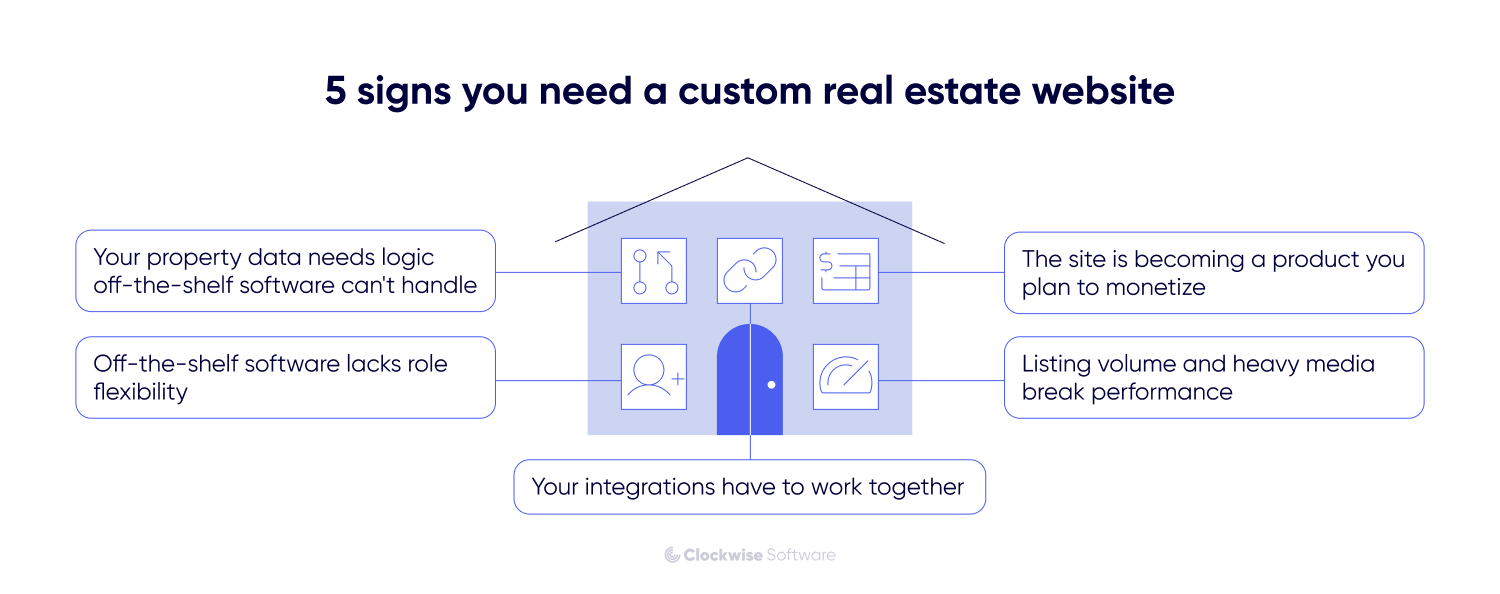
Here's what usually signals you need a custom build:
Your property data needs logic that off-the-shelf software doesn't support. Most platforms import an MLS feed or partner API, and only a few let you control how it's parsed. When two sources disagree on square footage, or a field arrives empty, you need your own normalization rules and update logic — not a mapping screen with fifteen fixed fields.
Off-the-shelf software lacks role flexibility. Agents, buyers, landlords, tenants, investors — each has a genuinely different job. Most off-the-shelf platforms provide a fixed set of user roles, with permissions designed around the product instead of your business processes.The moment an agent should see only their own leads while an investor sees portfolio-level data, you're editing role logic the platform was never built to expose.
Your integrations have to work together. IDX search, CRM sync, payments, valuation data — each has a plugin. The problem is the two-way part: a lead created on the website has to update in the CRM and come back with a status change. Plugins push one direction and stop.
Listing volume and heavy media break performance. Photos, floor plans, 3D tours. A real estate website builder caps what you can control here — no custom image pipeline, no query tuning, no control over how search is indexed. You optimize until you hit their ceiling.
The site is becoming a product you plan to monetize. Subscriptions, paid placements, tiered agent accounts. Now you need billing logic, entitlements, and your own data — 3 things you can't build on a platform that owns the database.
Before scoping features, decide which kind of platform you are building. The core functionality, the integrations you can’t skip, and the way the product makes money all shift depending on the platform type.
Here is how the 4 most common real estate portal development projects compare, plus the property management portal we see a lot in proptech.
| Platform type | Primary users | Core functionality (MVP) | Key integrations | Monetization |
| MLS | Agents, associations, brokerages | Listing aggregation, advanced property search, agent profiles, saved searches | MLS via IDX, RESO Web API, maps | Membership fees, tiered access, featured listings |
| Marketplace/portal | Buyers, sellers, agents | Listings, map-based search, lead capture, agent matching, messaging | Maps, payments, CRM, email or SMS | Listing fees, lead sales, subscriptions, ads |
| Agency/brokerage site | Agency staff, buyers, sellers | Branded listings, IDX search, lead management, CRM sync | IDX, CRM, mortgage calculator | Commission-driven, so the site is a lead engine |
| Property management portal | Landlords, tenants, managers | Tenant and landlord dashboards, payments, documents, maintenance requests | Payments, e-signatures, accounting tools | Only if your product is SaaS: subscriptions, per-unit pricing, transaction fees |
The trickiest of the 4 is usually the MLS platform, because the value lives in the data. Pulling listings cleanly means working with IDX and modern feeds through the RESO Web API, or the older RETS standard where a board still uses it. Each MLS has its own rules, refresh limits, and display requirements, so the data layer needs planning before any UI work starts. We cover this in depth in our custom MLS software development guide.
For StoneBay, a real estate management and analytics platform, we built automated pipelines that collect property data from public databases, directories, and other sources, then process it end to end. That automation cut the client's manual consolidation work by about 60% and improved data processing speed by 30 to 40%. The lesson that carries to any listing product: the aggregation layer absorbs most of the engineering effort — and produces most of the value.
Start with the features buyers and agents expect most, then add the rest once the product has real users. Overbuilding before launch is the fastest way to burn budget on things nobody asked for.
The core set for almost any custom real estate website includes:
There are a lot of real estate technology trends you have probably heard about. Let's consider them in detail to give you an understanding of what features you can implement in further cycles of website development for real estate:
Virtual tours
Virtual tours give a much more comprehensive experience than simple photos can provide.
Some real estate websites offer virtual tours of properties, allowing users to explore them remotely. Virtual tours help users get a better sense of the property's layout, design, and features. This feature is especially relevant in cases where clients can’t view the property physically due to distant location or lack of time. Moreover, today’s VR technologies allow for having very realistic virtual tours.
Advanced filters & smart search
Implementing smart AI-powered algorithms can improve the experience of your website visitors. You can use AI to predict users’ behavior and offer them relevant results.
Enable website visitors to search for property based not only on the desired location but also on their values, preferences, etc.
Chatbots
AI-powered chatbots are widely used on many websites today, and real estate websites are no exception. Chatbots can handle users’ queries in seconds, 24/7, answering the majority of their questions instead of humans.
Property valuation tool
Such a tool allows estimating the value of a property based on its location, size, condition, and recent sales data. This feature can be useful for both buyers and sellers to determine fair market value.
Big data
Big data refers to the collection of information from various sources (property listings, social media, reports, etc.) and its analysis. In the hands of experienced data visualization specialists, this information can turn into appealing interactive maps, charts, and dashboards that will attract more and more visitors to your website. Thanks to big data, both buyers and sellers can get truly insightful information about the property: personal opinions of the local citizens, crime rate, LGTB protection rate, etc. Real estate platforms like Zillow and Trulia already use big data to enhance user experience for their customers.
Following trends after launching a real estate website is crucial because it helps ensure that your website remains competitive, relevant, and aligned with current market demands and user expectations, ultimately driving more traffic and conversions.
You may suggest AI in real estate is something “innovative”, and you need it too. You need to ignore that push. The smartest way to use AI is to target the daily tasks that exhaust your agents.
That’s where AI feature can be 100% be useful for your website:
To free your agents from manual data entry and searching, connect your listing database to a language model. Your team loses hours digging for exact property matches and retyping property specs by hand. Both problems come down to the same thing — a machine that understands a plain-language request and pulls structured data out of unstructured input.
To capture leads around the clock, build a natural-language search assistant into your site. A buyer visits and types a plain request like “3 beds near good schools under $600k”. Your system skips the rigid dropdown filters and reads your database and returns exact matches. The assistant then asks a few questions to pre-qualify the lead before your agents call. You connect this chat directly to a system like HubSpot, and contact and conversation syncs automatically.
To cut listing creation time from an afternoon to a few minutes, give your agents AI document parsers that will let them upload a PDF brochure or a page of messy notes. An AI model will read their text, organize those details into your database fields and write a clean listing description. Your agent just reviews the draft and hits publish.
To speed up daily decisions, build AI tools for your other heavy text tasks: property summaries from listing data, specific clauses pulled from client contracts. Pricing suggestions are a separate case — the model reads your historical sales data rather than generating text, so the output is only as reliable as the records behind it.
When buyers zoom in on a neighborhood map, they expect hundreds of property pins to load instantly. When brokers upload gigabytes of raw property photos, your server must process them without crashing the page.
To handle these exact data pressures, we structure our frontend code using React or Next.js to keep the interface fast. On the backend, we rely on JavaScript’s runtime environment — Node.js. Its event-driven architecture enhances scalability and performance. Every component we select solves a distinct problem we see in the property search cycle.
Solid architecture makes growth a routine

If the foundation's solid, growth becomes routine. We balance performance, scalability, and cost constraints at the architecture design stage, choosing the option that holds up against your technical requirements and stays reasonable to maintain.
There's no single correct stack here. We pick the setup per project, based on data volume, integration load, and how the product makes money. What stays constant is that every piece has one defined job.
A typical split looks like this:
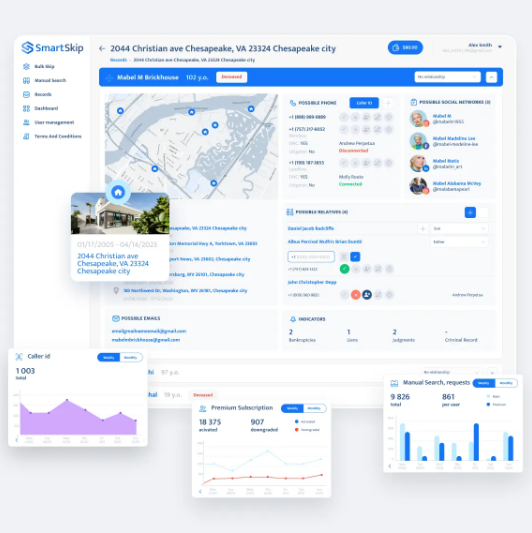
On SmartSkip, a skip-tracing platform for real estate professionals, the choices went differently. We ran NestJS on AWS with MongoDB, provisioned through Terraform, plus Stripe for a payment layer. Document storage fits the data better than a rigid relational schema, so that's what it got.
Integrations are where real estate website development gets genuinely hard, and where most of the hidden effort lives. Each connection is a dependency you don't fully control, and it will fail at some point. How your system behaves in that moment gets decided at the architecture stage, while the cost of changing your mind is still low.
The connections almost every real estate site needs:
MLS and listing data. Listings reach your site through IDX, using the RESO Web API on modern feeds or RETS on older ones. And yes, you can connect multiple MLS feeds on one real estate website. Each feed has its own schema, refresh limits, and display rules, so the data layer normalizes everything into one consistent model before it hits the UI.
Maps and geodata. The mapping providers power map-based search, pins, and neighborhood views. Map performance is a common weak point, so it needs load testing with real listing counts.
CRM in real estate. A two-way sync with Salesforce, HubSpot, or a real estate CRM like Follow Up Boss keeps leads and agent activity in one place instead of scattered across tools.
Payments. A payment provider handles booking fees, subscriptions, and deposit flows, and the choice comes down to regional coverage, pricing, and how much dispute-handling you want off your plate.
Integrations break in predictable places: rate limits, inconsistent data, and quiet API changes that surface weeks after launch. Most of it is avoidable if you plan for it early. Pinning MLS and provider connections to a fixed-IP setup and handling failures at the architecture level cuts error rates sharply and keeps the platform steady under heavy data load.
Integration experience prevents surprises

We've worked with 100+ different integrations, from popular real estate services and MLS systems to clients' custom internal tools. This experience helps us anticipate rate limits, data inconsistencies, and API quirks from the start.
We split real estate website development into 6 stages: discovery, design, development, testing, deployment, and post-launch support. It's the process we've refined across 10+ real estate and proptech projects.
Here's how each step works, and what we've learned makes it go well.
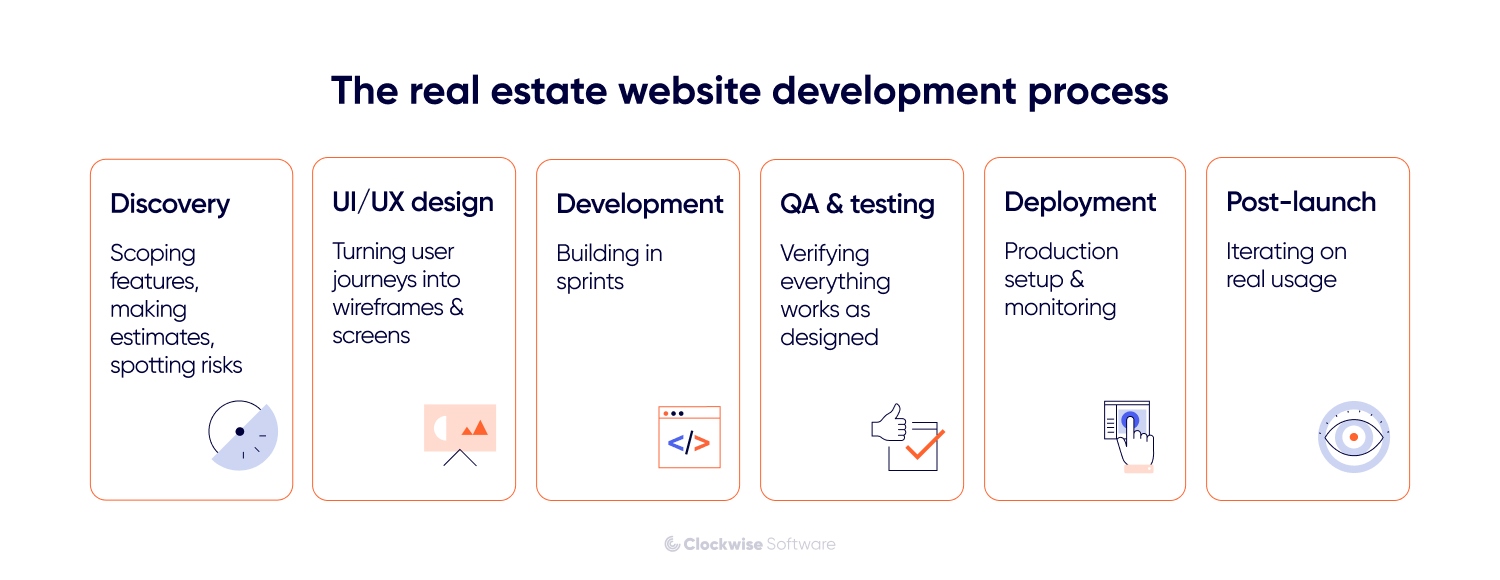
During discovery, we map functionality, architecture, integrations, and priorities, then confirm and document every decision with you. You walk out with a prioritized feature list, a defined MVP scope, a tech and integration plan, a development roadmap, and real cost estimates.
The reason we start here is scope. Discovery defines the full feature set, what gets built first, the risks worth flagging early, a real estimate, and a plan the team can execute against. On a real estate website, much of the complexity lies in data and integrations. Settle those early and the rest of the build moves fast. On average, our discovery work saves clients around $30K by cutting features that don't move their key metric.
On the Smartskip project, during discovery we cut the scope to the sharpest possible MVP so the team could ship fast and start earning early. That focus paid off: the product secured its first paying users within the first month.
Speed comes from clarity

Speed comes from removing uncertainty before we start. We spend the right amount of time in discovery so developers aren't stuck waiting for answers later. Once priorities are clear, progress stays steady, and clients start seeing results much earlier than they expect.
Next, we turn scope into a clickable prototype that shows exactly how the app will work, plus a reusable design system. Walking through the flows before coding catches confusing steps while they're still cheap to fix.
Here's an insight from experience about real estate website design: most property searches happen on a phone, so the small screen sets the constraints and the desktop layout follows.
Roles are the second constraint. A buyer scanning listings, an agent chasing leads, and a landlord handling a tenant request each need a different screen, so each role gets its own path through the product.
Two moves save the most pain later.
First, a smart move in real estate web design is to build a small component system (listing cards, filters, map pins, photo galleries) so the team reuses pieces instead of redrawing them on every page.
Second, put the clickable prototype in front of real agents and buyers before a line of production code exists. Watching someone fumble a filter in a prototype costs nothing to fix. Catching it after launch costs a sprint.
On our Propa project, a UK property management platform, the client already had a working iOS app and needed the same clean experience on web and Android without building each one from scratch. We used a PWA-based approach to carry the existing iOS functionality across both platforms, which kept the interface consistent and the timeline sane. It held up in the market too — the app holds a 4.7 App Store rating.
The development order matters more than raw speed. Early sprints go toward the parts most likely to cause trouble later, so the scary unknowns surface in week 2 instead of week 10.
The development runs in short sprints with a demo at the end of each one, so you see working software regularly and can adjust scope before it drifts. A project manager tracks CPI and SPI, which is how scope creep gets caught while it's still a conversation, before it turns into a budget problem. Owning the full cycle this way is what keeps our work acceptance rate at 99.89%.
CI/CD pipelines and testing go in from the first sprint, well before the launch crunch. On a real estate website that pays off most around payments and MLS syncing, where a quiet break can corrupt listings or drop a transaction before anyone notices.
These results depend on people reviewing the work. An engineer checks every change, and the key decisions, like architecture, critical logic, anything with real risk, are made by the team, without AI. The tools handle the repetitive volume; the engineers make the decisions that carry risk.
We test across the whole build, and lean on various types of testing:
Functional testing is where we confirm each feature does what the spec says.
Integration testing is where we check the seams — a lead created on the site has to land in the CRM, a listing update has to reach search.
Regression testing is our guard against collateral damage, catching what a new change quietly broke somewhere else.
Load testing gets the most attention, since that's what proves the system holds when listings and price updates arrive at real volume.
Keeping test coverage high across a large codebase is where our AI-assisted process helps most. We use tools like Claude Code, Codex CLI, and Cursor to draft test suites and cover edge cases — the broad and repetitive work that's slow to do manually. On our projects, we saw 9x more test coverage, around 30% faster delivery, and about 75% faster estimation, with no drop in quality.
What ties these together is timing. A QA engineer is in from the first sprint, reviewing requirements and writing test cases alongside the design, so problems surface while they're still cheap. By launch, the whole system has been tested end to end, and we already know how it behaves under the conditions that matter.
We set up the production environment, CI/CD pipelines, cloud hosting on AWS, and monitoring, then watch performance closely through the first release cycle. The CI/CD pipeline matters more than it sounds. A clean deploy path with a working rollback is what lets us ship updates safely and fix issues fast.
Integration stability gets special attention at this stage, because that's the most common failure point for real estate platforms. These sites rely on data they don't own, like MLS/IDX feeds, map providers, payment gateways, and CRM syncs, and any one of those can go down mid-launch. So we build for that: retry logic and fallback handling, so a dead feed doesn't take the whole listings page down with it.
After release, we refine features based on how people actually use the product, expand the roadmap, and keep the platform stable as traffic and data grow. This is where the advanced features from your v1.1 and v1.2 list get built, informed by real behavior instead of assumptions.
A custom real estate website costs between $15,000 for a discovery and prototype and $500,000 or more for a market-leading platform. Most first projects that reach a real launch land in the $50,000 to $150,000 MVP range. The table below shows the tiers we quote and what each one buys.
| Stage | Price range | What you get |
| Discovery and prototype | $15,000 to $50,000 | Requirements, clickable prototype, proof of concept, feature list, estimates |
| Minimum viable product | $50,000 to $150,000 | Core features, essential integrations, basic security |
| Sales-ready product | $150,000 to $500,000 | Custom design, broader functionality, cross-platform support, stronger security |
| Market-leading platform | $500,000+ | Brand-focused UX, multi-module architecture, high scalability |
Inside an MVP, the budget usually splits across a few areas: planning, UI/UX design, frontend and backend development (typically the largest share), and integrations for maps, MLS, and payments. Testing and deployment round it out. The exact split shifts from project to project. When integrations are core to the product, they pull more time and budget; on another build, a specific feature set carries most of the weight instead.
Here’s what moves the number up or down:
Watch the costs that don't show up in a development quote. MLS membership and data access fees, third-party API charges for maps or valuation, and content and data migration have to be connected and paid for before the platform goes live. Vendors don't always include them in the initial quote, so budget for them upfront, along with ongoing maintenance, so they don't surprise you later.
A few patterns show up across most of our projects, and each one is avoidable once you know where to look. Here's what goes wrong most often, and how to head it off.
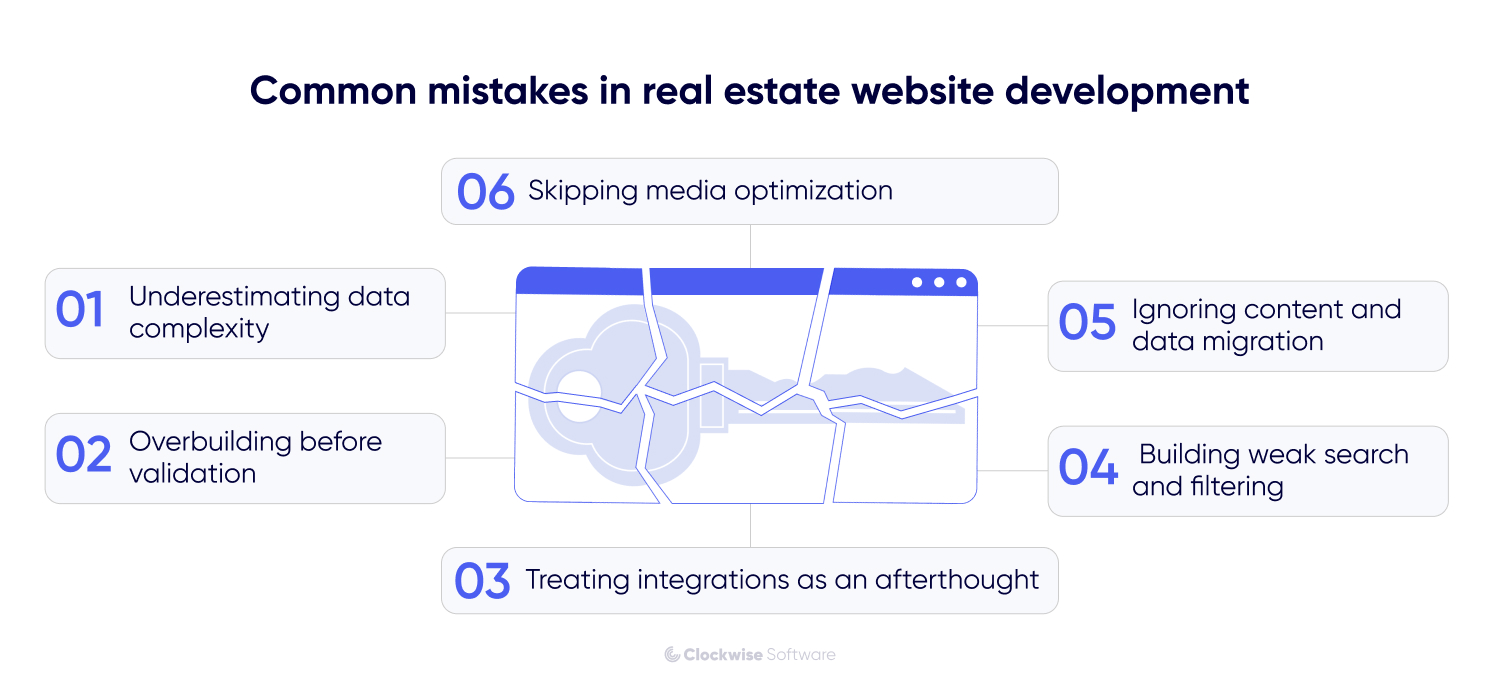
Real estate platforms pull from MLS feeds, public records, and internal systems, and those sources disagree with each other constantly. One feed calls it "sq ft," another "floor area",prices refresh on different schedules, and other issues can show up when you try to bring your data into one system. Teams that skip a clean data model early end up with listings that contradict each other and a search index full of duplicates.
The fix: define one canonical data model in discovery, before design starts. Map every source field to it, decide how conflicts resolve, and test the sync against real feed data early.
It's tempting to design for every persona and feature on day one: agent dashboards, investor tools, admin analytics, the works. That inflates the budget and pushes launch months out, all before a single user has confirmed they want any of it.
The fix: ship a focused MVP around the core flow (search, listing, lead capture), then expand based on real usage. Cut scope hard in discovery so you reach real users fast. Everything else gets roadmapped for the second version, once people show you which features they reach for.
MLS, CRM, maps, and payments each come with their own quirks: rate limits, inconsistent data, auth rules, quiet API changes. Teams that leave them for the final sprint hit the hard parts too late, then rework core features to fit an API they misread.
The fix: for any integration that's unfamiliar or complex, build a proof of concept first and prove it holds under real data before building on top of it. Treat each one as a dependency with its own failure modes.
Moving years of listings, images, and agent records off an old website takes a lot of time, and it almost always gets scheduled for launch week, when there's no room left. A rushed migration breaks URLs, drops images, and tanks the search rankings you spent years earning.
The fix: plan migration as its own workstream with its own timeline. Audit the old data, set up redirects for every changed URL, and run a test migration well before go-live so you catch broken records while they're still cheap to fix.
In real estate, search is the product. Buyers come to find a place, and if the filters feel clumsy or results load slowly, they bounce to Zillow. Plenty of teams treat search as a basic form field, then notice the problem only when the listing count climbs past a few thousand.
The fix: build search on an engine made for it, like Elasticsearch, with map-based results, fast filters, and saved searches from day one. Load test with realistic listing volumes so it stays quick as the catalog grows.
Listings live or die on photos, floor plans, and video, and all of that is heavy. Serve full-size images straight from the database and your pages crawl, especially on the phones where most people browse.
The fix: compress and resize images on upload, serve them through a CDN, and lazy-load galleries so the first screen paints fast. It's a small piece of engineering that decides whether your listing page feels quick or sluggish.
Real estate website development comes down to a handful of decisions made in the right order: what kind of platform you're building, which features and integrations you need for real, and how clean your data and process are before coding starts. Get discovery right, and everything after it moves faster and cheaper.