AI solutions
What we do
Services
Experts in
How we work


If you’re building a SaaS product, you’ve likely bumped into the term multi-tenancy. As SaaS becomes the go-to for profitable software, everyone is talking about it. But usually in a way that’s too complicated.
In plain English: should your users share one big house (multi-tenant) or should everyone get their own private one (single-tenant)?
As a SaaS development company, we have successfully delivered 25+ SaaS solutions. We’ve been in the trenches of these architectural decisions for 10+ years. Along with our senior software architect, we’ve put this guide together to help you make the right decision.
What exactly is multi-tenant architecture?
How does it differ from the single-tenant architecture?
How do you choose the right type of architecture for your platform?
And how do you avoid the most common mistakes when designing multi-tenant architecture?
You will find all this in our guide. Additionally, we will share our own experience working on projects with multi-tenant architecture.
Before we dive too deep, let’s start with the basics of SaaS platform architecture.
In SaaS, a user is the person who interacts with the app. Depending on the system, that user can be either a direct customer or part of a larger organization.
A tenant is usually a company, client, or organization that pays for access to the software and manages its own users within the system.
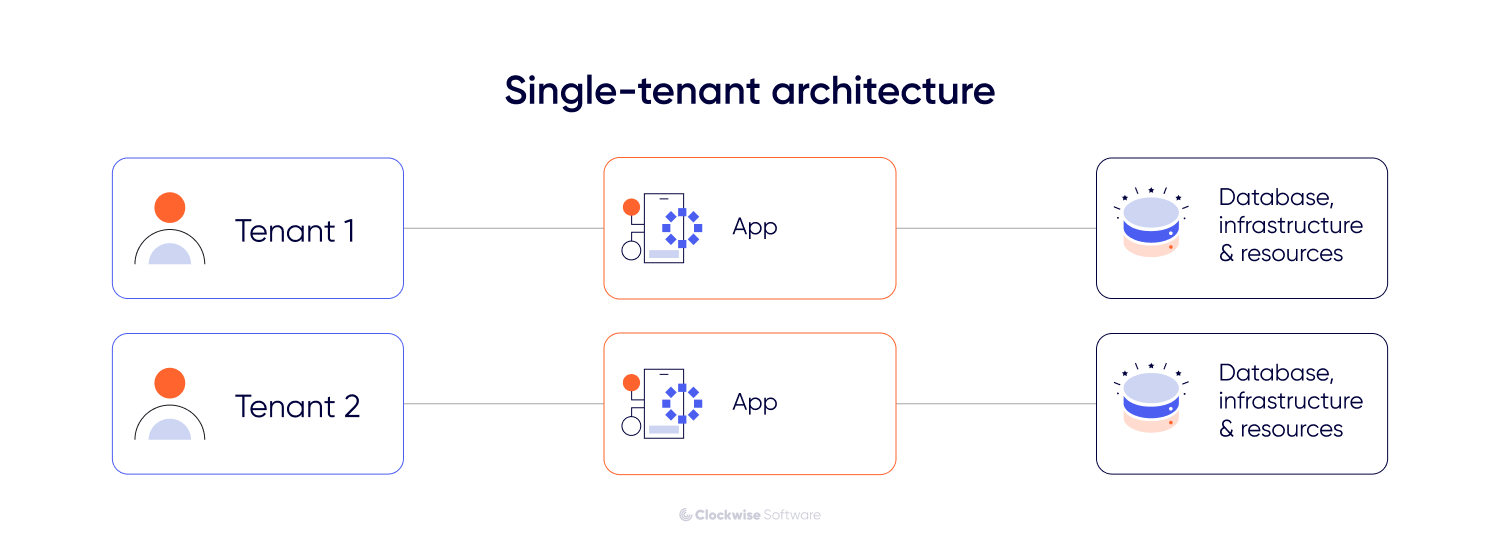
In a single-tenant architecture, each customer has a dedicated instance of the application and its supporting infrastructure. In this model, the people using the application are typically the same ones who pay for the service. Each customer operates in a separate environment, which can offer greater control but usually entails higher maintenance and infrastructure costs.
In a multi-tenant architecture, multiple tenants share the same infrastructure, database, and computing resources. Here, the tenant is usually an organization with its own internal users, roles, and workflows within the platform. In other words, the SaaS provider serves the tenant, and the tenant serves its own users through the app.
Even with shared resources, the system keeps each tenant’s data isolated and confidential. No tenant can see or access another tenant’s information. From the user’s perspective, the app looks and acts like a dedicated system built just for them.
This model also allows for flexibility in functionality. You can configure the system so that different tenants have access to different feature sets or custom settings while still running on the same core application. This makes it easier to manage updates and maintain the system, as changes to the central codebase are rolled out to everyone at once.
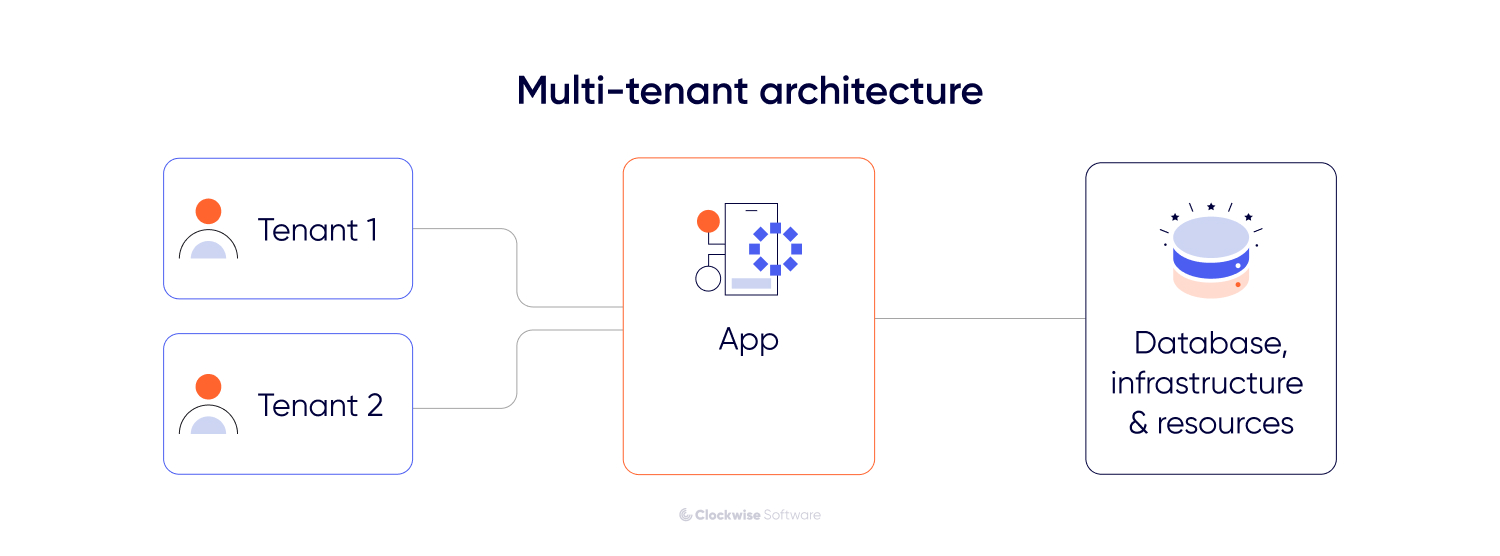
So, the key characteristics of multi-tenancy are as follows:
Resource sharing. All tenants run on the same servers and databases
Data isolation. Security protocols ensure that data remains private to each tenant
Functional customization. Functional customization. The ability to toggle specific features (such as AI-driven modules or other emerging trends in SaaS) for different tenants or user groups without changing the core code.
Most SaaS companies choose a multi-tenant environment because it perfectly aligns infrastructure costs with the recurring revenue goals of the SaaS business model. Instead of managing separate environments for each client, you maintain a single system that scales as new users sign up (if built right, of course).
Instead of going into unnecessary details, we will focus on the most significant reasons SaaS product owners opt for multi-tenant architecture. This will help you understand the real benefits of this model and its impact on business operations.
So, here are the primary reasons:
| Reason | Description |
| Cost efficiency | Shared servers and databases reduce costs by avoiding unused resources. |
| Simplified maintenance | A single codebase allows updates and fixes to be applied to all users at once. |
| Scalability | Allows adding new customers (tenants) without significant infrastructure changes. |
| Faster onboarding | New customers or tenants can access the system immediately because their environments are preconfigured. |
| Centralized security | Security measures and updates are applied consistently across all users. |
Understanding how multi-tenancy principles work in existing products (including many of today's fastest-growing SaaS startups) makes it easier to see how they apply to your own roadmap.
Here is how multi-tenancy functions across different categories of SaaS products:
Business management and CRMs
Systems like Salesforce use a shared database where every client has a unique organization ID. This allows the provider to maintain one massive, high-performance database while ensuring that a query from one company never pulls data from another.
Communication and workspace tools
Apps like Slack treat each workspace as a tenant. They run the same application logic for every user, enabling them to push new features such as huddles or AI summaries to millions of people simultaneously without managing individual server environments.
Creative and storage platforms
Services like Canva or Dropbox use multi-tenancy to manage billions of files. They use a shared global infrastructure to handle massive traffic, relying on strict permission layers to keep private assets invisible to others.
FinTech and payment processors
Stripe and PayPal use multi-tenant principles to process transactions. While the core processing engine is shared to ensure speed and reliability, the financial records and API keys for each merchant are kept in isolated data silos for security.
White-label solutions (our case study)
In a route planning platform we developed, the need for multi-tenancy was clear from the start. Since the product was intended for use by multiple transport companies as a white-label solution, the architecture had to allow each company to manage its own drivers and routes within a shared system. A multi-tenant model enabled the owner to onboard new partners instantly without duplicating infrastructure.
All of these examples rely on the same principle of shared resource management. They demonstrate how a single technical foundation can handle diverse data needs while keeping costs predictable as the user base grows. By centralizing the core logic, these systems provide each customer with a private environment without requiring the provider to manage separate software versions for each customer.
It may sound surprising, but not all SaaS products use multi-tenant architecture. Most of them - yes, but not all. To give you a fuller picture, let’s compare these two architectural models: how they differ in terms of tech specs, scalability, implementation costs, etc.
In a single-tenant architecture, every customer or organization uses a dedicated instance of the software. This means each tenant has their own separate infrastructure, database, and computing resources that are not shared with anyone else.
Since there is total isolation, one tenant’s data is physically and logically separated from others. This structure offers a high level of privacy and control, but it also changes how you handle growth and maintenance.
Key characteristics of single-tenancy:
Why is this model not popular for SaaS
While this model is often easier and cheaper to design for an early-stage MVP for SaaS, it introduces operational complexity when you need to onboard additional customers or organizations.
First, there is a maintenance burden. Instead of pushing a single update to everyone, development teams must manage, test, and deploy updates for each individual instance. This significantly increases operational effort and the risk of inconsistencies between environments.
Second, there is resource overhead. You provision a full server environment for every tenant, even if they are not using its full capacity. As the number of tenants grows, infrastructure costs scale almost linearly, making single-tenancy more expensive than multi-tenant systems, where resources are shared.
And last but equally important, single-tenancy comes with** complex onboarding**. Each new tenant requires a manual or automated infrastructure setup, which can slow down time-to-market and require additional operational support.
While multi-tenancy is the most popular choice for most SaaS products, there are times when a dedicated setup is the only way to close a deal or meet strict legal requirements. Single tenancy is, basically, the choice you make when “shared” simply isn't an option for your target audience.
Here is when a dedicated infrastructure actually makes sense:
Even in all of these cases, multi-tenancy is not off the table. With the right architecture, including strong logical isolation, encryption, access controls, and compliance certifications, multi-tenant systems can meet the needs of highly regulated and security-sensitive industries. In the end, the decision depends largely on the specific technical, regulatory, and risk requirements of each case.
To keep things grounded, let’s look at how this plays out in the real world. You’ll typically see this model used in specific high-stakes environments:
In enterprise tiers of services like AWS or Oracle Cloud, companies pay a premium for dedicated instances. This ensures their software runs on physical hardware that isn't shared with any other company, meeting the highest possible security standards.
Enterprise resource planning systems often require deep customization. A single-tenant setup allows the software to be tailored to a specific factory's unique workflows and legacy machine integrations without affecting how the software works for anyone else.
To pick the right path, you essentially need to decide between shared efficiency and dedicated control.
The key difference lies in how your software handles growth. Multi-tenancy focuses on a one-to-many relationship, where a single system serves multiple tenants, making it cheaper and easier to manage at scale. Single-tenancy is a one-to-one approach in which every new client gets their own environment, offering maximum privacy but requiring significantly more effort to maintain.
Here is how they stack up across the key parameters:
| Parameter | Multi-tenant architecture | Single-tenant architecture |
| Scalability | Easier. You can effortlessly add new customers to the existing framework. | More difficult. Scaling requires deploying new infrastructure for every client. |
| Cost | Economical. Shared resources mean lower hosting and maintenance bills. | Higher. You pay for dedicated hardware/cloud resources for each customer. |
| Data isolation | Logical. Data is separated by software permissions and unique IDs. | Physical. Data is stored on separate servers or databases. |
| Customization | Limited. Users get the same core features with some configuration options. | High. You can rewrite code or add unique integrations for each specific client. |
| Operational complexity | Low. You manage, update, and secure one single codebase. | High. Your team must monitor and update separate instances. |
| Onboarding speed | Instant. Customers sign up and start using the app immediately. | Slow. Requires a setup process to spin up new infrastructure. |
Choosing between these two models is a business decision that dictates how you’ll scale and how much you’ll spend along the way. To make the right choice, you need to weigh your long-term goals against your immediate technical requirements.
From the perspective of our experience, we recommend focusing on these 3 primary pillars:
If you're stuck between the two, ask yourself these three questions:
For a more in-depth guide to making this choice, we recommend reading our white paper, SaaS application architecture - a comprehensive guide for those who consider building or scaling a SaaS product, created in collaboration with our senior architect.
Now, let’s break down how securely data is isolated in multi-tenancy.
Not all multi-tenant architectures are built the same way. The way you isolate your tenants (whether they share everything or only a few components) directly affects your costs, performance, and SaaS security.
There are two primary ways: pool isolation and bridge isolation. Let’s now explore them in more detail.
In a pool model, every tenant shares the same resources: microservices, computing power, and a database. This is the purest form of multi-tenant architecture.
The benefits:
The drawbacks:
Complexity in tracking. Because everyone is in the same database, it can be harder to see exactly how much "server spend" an individual client is responsible for.
The noisy neighbor problem: This is the most significant risk of the pool model.
Since resources are shared, one tenant’s activity can degrade the experience for others. If Company A launches a massive marketing campaign and their traffic spikes, they might consume so much of the server's CPU or memory that Company B’s users experience lags and outages.
How to handle it: You can't always avoid a noisy neighbor, but you can manage them. We typically recommend setting resource quotas (throttling), continuously monitoring performance to catch spikes early, and providing reserved capacity for premium tiers.
The bridge model is a middle ground. It lets you share some layers of your architecture (such as the web interface) while keeping other layers (such as the database or specific business logic) isolated.
How it works: Imagine a shared front door and lobby, but once inside, each company has its own private, dedicated office suite. This gives you centralized management of a shared front end (what users see) while maintaining high-level security and performance by providing each customer with their own back end (where their private data is stored and processed).
The benefits:
The drawbacks:
Deciding between Pool and Bridge isolation comes down to your industry and your growth goals:
Are you in a highly regulated industry? If you are handling healthcare data, the Bridge model is often safer to ensure absolute data isolation.
Is collaboration key? If your app requires users from different companies to interact (like joining shared Slack channels), a Pool model makes this significantly easier to build.
How fast do you need to scale? If you expect to onboard thousands of users with a small team, the Pool model offers the best agility and lowest management overhead.
Designing a multi-tenant SaaS architecture is a critical technical decision. Mistakes made during this stage of the SaaS product development lifecycle are often difficult and expensive to fix later, potentially leading to data leaks, system instability, or inflated infrastructure costs.
Mike, our software architect with 15+ years of experience in SaaS, has identified the most common errors made during the design phase to help you navigate these risks.
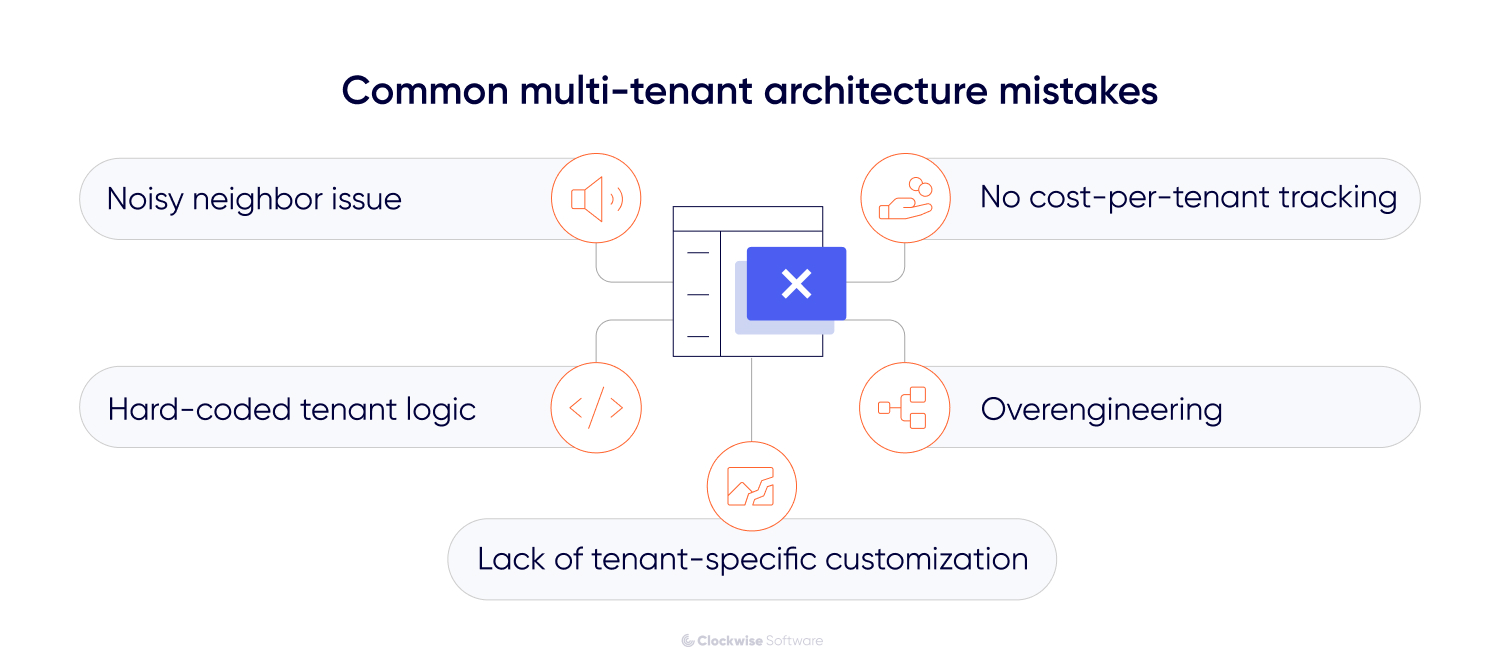
Many developers build a pooled system assuming everyone will play nice with the resources. You should never assume average usage. If you don't implement throttling or resource quotas from the start, one client running a massive data export can accidentally take down your entire service for everyone else.
A common mistake is leaking tenant IDs into every single function and then manually querying them. This makes the code messy and prone to human error - one missed where clause in a database query could expose Company A’s data to Company B. Instead, we recommend using a global filter or a dedicated service layer that automatically handles isolation so developers don't have to remember it every time they write a new feature.
Many founders think one-size-fits-all is the goal. However, as you scale, different clients will require different configurations, integrations, or feature sets. If your architecture is too rigid, you will be forced to create inefficient manual overrides or, in the worst-case scenario, maintain entirely separate versions of your code for different clients. We recommend using extensible metadata, which lets you toggle features or adjust workflows for specific tenants within a single central codebase.
On the flip side, we often see teams build a complex Bridge model when a simple Pool would have sufficed for their first 500 users. This leads to massive infrastructure costs and slow development before the product has even found its market fit. Start with the simplest model that meets your security requirements, but design it so you can migrate to a hybrid model later.
In a shared environment, your infrastructure bill usually arrives as a single total. Without tracking resource consumption per user, you can’t see which tenants are the most expensive to support. However, the importance of this depends on your pricing model. If you charge based on usage, it’s critical. If you use a fixed subscription, costs are typically averaged across users, making it less urgent but still useful for optimization.
Even then, basic usage monitoring helps prevent high-demand tenants from quietly eroding your margins as you scale.
Yes, you can migrate to a multi-tenant architecture later, but it’s a significant undertaking that requires careful planning. Many SaaS startups begin with a simpler single-tenant setup to get to market quickly and then transition as their user base grows.
You’ll know it’s time to move toward multi-tenant architecture when the manual work of running your business starts to hinder your growth. Here are the clear signs:
Migrating from a single-tenant setup to a multi-tenant one is a fundamental rewrite of how your application handles identity, security, and resources.
Based on our experience, here is a guide to navigating this transition.
1. Database restructuring
In a single-tenant setup, the data owner is implied because the database serves only one client. In a multi-tenant model, you must explicitly tag every single piece of data. This involves adding a tenant identifier to every table and creating a migration script that maps existing isolated data into a consolidated, partitioned structure.
2. Decoupling the front end
To support multiple brands or white-labeling, you need to separate your front-end assets from the core logic. This allows the system to load specific themes, logos, and custom CSS based on the user's tenant ID.
3. Implementing a tenant-aware service layer
You must rewrite your backend logic to make it tenant-aware. Instead of the code querying the entire database, every request must pass through a filter that automatically restricts the data scope to the specific user’s ID. This prevents data from leaking between customers.
4. Centralizing infrastructure management
The goal is to reduce manual environment administration by standardizing provisioning, deployment, monitoring, and maintenance across tenants. In a multi-tenant setup, updates are typically applied centrally, while processes such as tenant onboarding and billing integration should be automated where possible.
Wanna know how this guide works in practice?
Look at our Whitelance case.
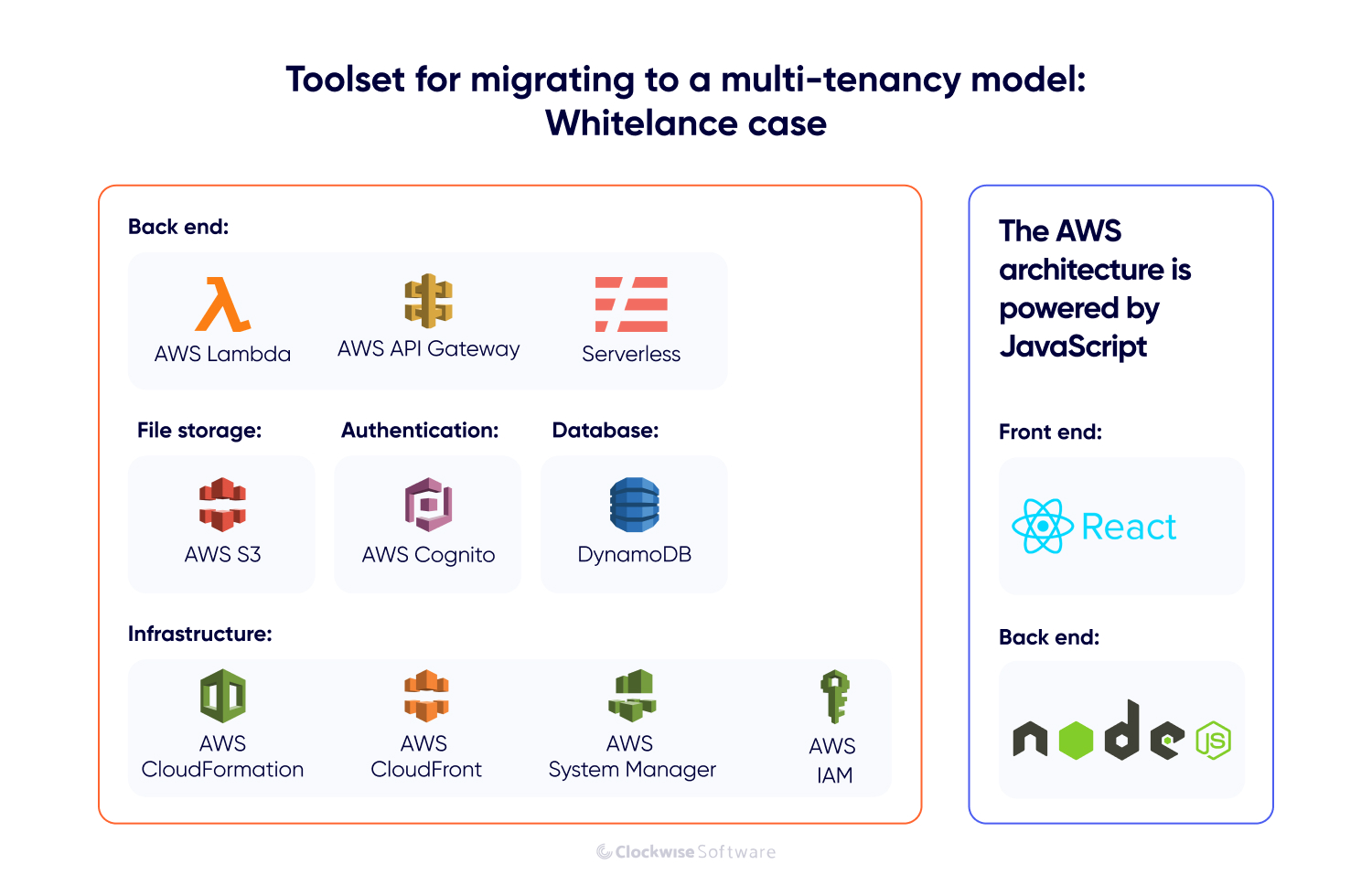
The founders of Whitelance, a successful marketplace platform, reached a turning point in their business. They wanted to transform their existing web platform into a white-label solution that other companies could buy and brand as their own. To do this profitably at scale, they needed to move from a single-tenant to a multi-tenant SaaS architecture.
Our architect and backend team analyzed their existing infrastructure. Here’s how we handled the transition:
While the Whitelance migration was a success, there are two realities to keep in mind:
Choosing the right architecture depends entirely on your business stage and long-term goals. Neither model is inherently superior; they simply solve different problems. If your foundation is solid, you can even transition between them as your project evolves.
Choose single-tenant if: You prioritize a fast SaaS product launch and idea validation.
Speed is your biggest advantage in the early stages. For bootstrapped startups or early MVPs, a single-tenant approach is often the most practical choice because it is faster and more affordable to deploy. It lets you prove your market fit without a massive upfront engineering investment.
Choose multi-tenant if: Scaling and operational efficiency are your priorities.
If you have the resources to build a complex solution from the start, multi-tenant architecture is the strategic move. It’s the industry standard for enterprise tools, AI-powered SaaS, and white-label platforms.