AI solutions
What we do
Services
Experts in
How we work


ERP software development cost is easy to underestimate because the visible part of the system is rarely the expensive part. An inventory screen or order dashboard may look simple. The real engineering sits behind it: business rules, role-based access, integrations, data migration, cross-department workflows, and the edge cases that appear once the system meets daily operations.
That is also why two ERPs with a similar module list can land in very different custom ERP development cost ranges.
In this article, we will break down realistic custom ERP development services cost ranges, show where the budget goes across discovery, architecture, development, integration, and implementation, and explain what usually pushes the estimate up.
ERP software development typically costs $100,000 to $150,000 for a focused MVP, $150,000 to $500,000 for a multi-module system, and $500,000 to $1 million or more for a complex enterprise platform. For planning purposes, the final price depends on workflow depth, integrations, data migration, security requirements, deployment model, and the number of users, roles, locations, and business units.
Before we get into the custom ERP development cost, let’s put them next to the alternatives you may be considering. The table below compares SaaS licensing, off-the-shelf solution customization, and custom ERP software development, so you can see what you’re actually paying for in each case.
| ERP scenario | Typical cost | What you are paying for |
| SaaS ERP license | $20,000–$150,000+ per year | User licenses, vendor hosting, standard modules, and limited configuration. Implementation is usually priced separately. |
| Off-the-shelf ERP customization | $50,000–$250,000+ | Platform configuration, custom workflows, integrations, data migration, and user onboarding. |
| Custom ERP MVP | $100,000–$150,000 | A unified data model, role-based access, one core operational workflow, basic reporting, and an integration backbone. |
| Multi-module custom ERP | $150,000–$500,000 | Several connected modules, cross-department workflows, multi-location logic, data migration, and 3–10 integrations. |
| Complex enterprise ERP | $500,000–$1 million+ | Advanced manufacturing or operational logic, multiple business units, strict security requirements, large datasets, and a heavy integration layer. |
| Tier-1 ERP rollout | $1 million–$5 million+ | SAP- or Oracle-scale licensing, customization, migration, consulting, training, and rollout across a large organization. |
Before any of these numbers tell anything, three things often get confused:
ERP software cost is the subscription, license, or ownership cost. ERP development cost is the engineering work to build or customize the system. When we talk about ERP development cost in this article, we mean the full delivery scope on our side: discovery, UX/UI design, architecture, development, integrations, QA, deployment setup, and project coordination. And ERP implementation cost covers migration, integrations, infrastructure, training, and rollout.
A vendor may quote only one. Your budget will pay for all three.
The seven-figure numbers you see online aren't wrong, but they describe global rollouts, Tier-1 platforms, large consulting teams, and years of legacy data. How much does an ERP system cost for a mid-market company? It can stay well under that, provided the scope is phased and the first release stays focused.
These are planning ranges, not ready-made price tags. To turn one into a useful estimate, you need to map actual workflows, user roles, approval rules, integrations, data sources, transaction volumes, and edge cases. That's where the real scope lives.
Off-the-shelf ERP and custom ERP can solve the same business problem, but their costs show up at different stages. With SaaS, you usually spend less upfront, then keep paying for licenses, modules, implementation, and custom work. With custom ERP, more of the cost comes at the beginning, while ongoing spending shifts to infrastructure, maintenance, and new functionality.
Here’s how licensing, development, and ERP implementation cost compare across the lifecycle.
| Cost factor | Off-the-shelf ERP | Custom ERP |
| Initial investment | Lower | Higher |
| Licensing | Recurring, usually per user or module | No vendor license after launch |
| Implementation | Lower, but migration and integrations cost extra | Higher due to discovery and development |
| Customization | Paid separately and platform-limited | Included in the development scope |
| Maintenance | Included partly in the subscription, custom work costs extra | Paid separately to your development or support team |
| Infrastructure | Usually included | Cloud, on-premise, or hybrid costs |
| Scaling cost | Grows with users, modules, and usage | Grows with infrastructure and new functionality |
| Switching cost | Can be high due to vendor lock-in | Depends on architecture and documentation |
The lower SaaS number gets misleading fast. A 30-user company may find it perfectly reasonable. At 300 users, once you add premium modules, storage, support tiers, and integration fees, the subscription keeps growing even when the product hasn't changed much for your team.
Custom software costs follow a different curve. Adding a new employee doesn't create another license fee. You decide what to build and when.
The tipping point is usually process fit. A cheaper platform becomes expensive when your team spends every day working around what it can't do.
From our experience

When we worked on Strapping, a retail business, we saw that an off-the-shelf system wouldn’t fit the way the company actually operated. The same order could affect stock, supplier pricing, and payment status differently depending on whether it was consignment, prepaid, or post-paid. Instead of forcing those workflows into a standard system, we mapped them separately and built the software around them. That made the custom system the more practical option, with FIFO and payment tracking included in the first MVP.
That's the general pattern. Choose SaaS when your processes are standard, speed matters, and you want a smaller upfront commitment. Choose custom when your operations are too specific for a vendor's logic, your integration needs are heavy, or recurring license and customization costs are starting to outgrow what you're actually getting.
Two ERPs with the same module list can land in very different places. In supply chain ERP, “inventory management" might mean a searchable stock table. It might also mean batch tracking, warehouse transfers, automated replenishment, barcode scanning, and live availability across multiple warehouses. Same label, completely different build.
Here's what actually moves the number:
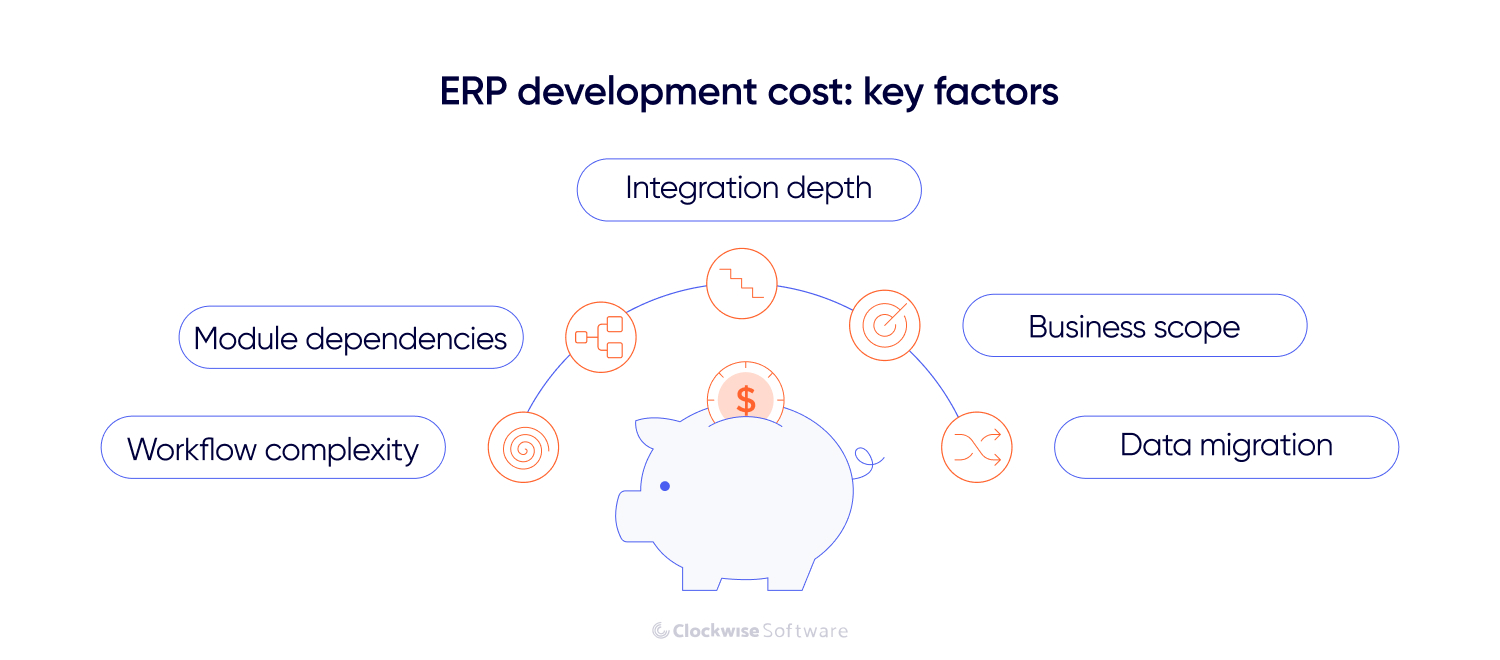
This is where most of the budget lives. A purchase order screen is simple enough. The system behind it (checking stock, validating department budgets, applying supplier rules, routing approval by order value, updating expected inventory, creating an accounting entry, notifying three teams) is not. A ten-field form can sit on top of a workflow that touches four modules and two external systems. Screen count is a weak basis for any ERP estimate.
ERP modules don't stay independent. Finance depends on invoices and orders. Procurement depends on stock levels. Reporting depends on all of them feeding consistent data into the same model. Adding "one more module" later is often bigger than it sounds. A warehouse module in retail ERP can introduce new inventory states, user roles, accounting rules, and approval logic that ripples through parts of the system that already exist.
The number of integrations matters less than the complexity of each connection. Importing customer records once a day is manageable. In an automotive ERP, keeping inventory, pricing, invoices, and order statuses synchronized in both directions, with retry logic, duplicate handling, and conflict resolution, is a different job entirely. Modern APIs with clear documentation keep this contained. Legacy systems with unstable endpoints or no API at all push the estimate up fast.
One department, one location — relatively contained. Add warehouses, legal entities, regions, or business units and the architecture starts carrying real weight: shared and restricted data, location-specific rules, multi-currency logic, different operating models inside the same platform. User variety usually matters more than headcount. 80 people with 20 permission models is harder to build for than 500 people with 3 roles.
Migration looks simple until the team sees the actual data. Old systems accumulate duplicate records, inconsistent codes, missing fields, and broken relationships, with spreadsheets especially. Before anything moves, it needs to be audited, cleaned, mapped, and validated. A clean product catalog migrates quickly. Ten years of financial and inventory history spread across four tools is a separate workstream.
The rest (infrastructure, security, reporting, UX) all affect the estimate, but usually as multipliers on the factors above rather than primary drivers. Compliance requirements like GDPR or HIPAA are much cheaper to design in early than to retrofit. A live analytics dashboard that combines four modules costs more than a monthly export. Poor UX creates workarounds and support costs that outlast the build. And the less defined the scope when ERP software development starts, the more expensive the questions that surface mid-build.
In most cases, custom ERP development cost follows a straightforward formula: project hours × team rate = development cost. That’s the model we use at Clockwise, because it ties the estimate to the actual work involved and makes it easier for you to see where the budget goes.
Estimating the hours is where it gets real. Each ERP feature usually requires both frontend and backend work: the interface your team uses, and the business logic, data flows, permissions, and integrations behind it. The estimate also has to cover business analysis, architecture, UX, testing, deployment, and the coordination keeping all those parts aligned. A quote that only counts visible screens or coding hours will look attractive. The missing work shows up later.
As a rough planning split:
The exact balance depends on the system and how the team is structured. Project management covers planning, communication, scope control, risk management, and coordination between analysts, designers, developers, QA engineers, and your team.
Development takes the largest share, but it is not one line item. It covers end-to-end frontend and backend work on each feature, integrations with external systems, and the technical setup needed to run the platform in production.
This is why a feature that looks small can take longer than expected. Adding a new order status in manufacturing ERP, for example, may also affect permissions, notifications, reports, accounting records, and external systems.
A focused ERP MVP usually costs $100,000 to $150,000. A meaningful share of that budget goes into setting up the architecture from scratch: the data model, environments, integration structure, and a foundation that can support more users, data, and modules as the system grows.
The rest goes into building one core operational workflow end to end. For a logistics company, that may be order management connected to inventory. For a finance-first ERP, it may be a general ledger connected to invoices and approvals. The estimate covers the frontend, backend logic, permissions, exceptions, and data exchanges that make the workflow work in practice.
This is why MVP estimates vary even when the module lists look similar. A basic order module may create and track orders. A more complex one may also reserve stock, apply pricing rules, generate documents, update accounting, and handle partial fulfillment. The name is the same. The number of development and QA hours is not.
Advanced analytics and additional modules usually move to the post-MVP phase, unless the first workflow cannot operate without them.
Once the first release is running, the budget shifts from building the initial system to expanding and maintaining it. Procurement may come after inventory, and route planning after order processing. Because the core workflows and infrastructure are already in place, we can use real operational data to scope the next phase more accurately.
New development is only one part of the post-launch budget. You also need to account for the ongoing work required to keep the ERP reliable, secure, and connected to the rest of your software stack. As a rough planning benchmark, annual maintenance and support often comes to 15–25% of the original ERP software development cost, depending on how actively the system evolves.
Here’s what that ongoing budget usually covers in practice:
Infrastructure and hosting. Cloud costs grow with users, transactions, and stored data. Production usage can also look very different from the load you saw during testing, so it is worth estimating these costs before launch.
Integration maintenance. The accounting platform, payment provider, or government database connected to your ERP may change its API or data format. Each integration needs monitoring and occasional updates to keep data moving correctly.
Post-launch changes. Real usage usually surfaces reports, approval steps, exceptions, and workflow details that were difficult to see during planning. Some will be fixes. Others will be new functionality that belongs in the next ERP software development phase.
Security and support. Dependency updates, access reviews, vulnerability checks, monitoring, and user support become recurring work once the ERP is live. AI development company can also fold automated monitoring and anomaly detection into that support layer as the system matures. These costs are predictable, but they need to be included in the budget from the start rather than treated as unexpected expenses later.
Ranges are useful for planning. Line items are useful for understanding where the money actually goes.
Below is an estimate based on one of our multi-module ERP projects. The client needed one system to connect customer and order management, vendor workflows, document handling, reporting, and external integrations, so the estimate reflects the work required to bring those processes into a single platform.
| Work area | Scope | Hours | Estimated cost |
| Core ERP functionality | Authorization, home page, user entities, search and filters, admin panel, reporting, notifications | 1,110 | $55,500 |
| Sales module | Client details, request management, order history | 610 | $30,500 |
| Order management module | Order database, service management, client support, attachment storage | 750 | $37,500 |
| Vendor management module | Vendor details and management workflows | 450 | $22,500 |
| Document management module | Proposals, invoices, and work orders | 650 | $32,500 |
| Integrations | Accounting system, email parser, map service, tax calculator | 450 | $22,500 |
| Project bootstrapping | Technical foundation, environments, repositories, and initial setup | 350 | $17,500 |
| Coordination | Delivery management and coordination across the project | 1,050 | $52,500 |
| Risk management | Risk identification, monitoring, and mitigation | 150 | $7,500 |
| Quality assurance | Functional, integration, regression, and workflow testing | 1,900 | $95,000 |
| Total | 7,470 | $373,500 |
A few things worth noting in those numbers. The operational modules (sales, orders, vendors, documents) account for less than half the total. The rest goes into the platform foundation, QA, coordination, integrations, and risk management. That's not overhead, it is what makes the modules work together instead of just existing next to each other.
An ERP budget doesn't move evenly from kickoff to launch. The early stages spend less money but make the decisions that determine almost everything that follows. The later stages spend most of the money executing those decisions, which means changing them gets expensive fast.
The first conversation (app requirements, modules needed, user groups, existing systems, core operational problems) is enough to put the project in a rough cost tier. It's not enough to commit to a number. Too many questions are still open: workflow rules, integration constraints, data sources, edge cases. The estimate at this stage carries a wider margin by design.
This is the most leveraged phase in the project. Business analysts and solution architects map workflows, roles, permissions, integrations, data migration, and dependencies. The team separates what's in the first release from what can wait.
This is also where a reliable vendor closes the gap between "rough range" and "realistic estimate." At Clockwise, discovery is what allows us to commit to a number with a less than 10% variance on both cost and timeline, across 200+ projects delivered. It's the result of resolving the right questions before ERP software development starts.
Example of our approach
On the Foresolutions route-planning project, the new module had to connect Azure Maps, government hazard data, and the client’s existing tracking platform, so we didn’t want to estimate that part based on assumptions. We built a proof of concept, basically a small working version of the riskiest flow, and used it to check that the systems could exchange the data our client needed. It surfaced a few integration and architecture questions before the main build started.
Once scope and architecture are stable, ERP implementation cost absorbs the largest share of spend. The data model, modules, business logic, integrations, permissions, reports, and infrastructure all get built here. QA runs alongside rather than waiting at the end.
Cost control at this stage means one thing: changes are decisions, not additions. New requirements get evaluated against the baseline — such as hours, timeline, dependencies, and current release — before they enter the sprint. Not because the plan is sacred, but because invisible scope changes are how budgets blow past estimates without anyone being able to explain why.
As your solution moves to production, the cost of implementing an ERP system shifts to final testing, migration, infrastructure, training, and stabilization. The build cost slows. Hosting, support, monitoring, and future modules become the ongoing budget line.
Real usage also produces the clearest product signal you'll get. Which reports actually matter, where users lose time, what should be automated next — that's visible once the system is live and generating operational data. Those decisions are easier and cheaper to make from a running platform than from a requirements document.
Reducing ERP software development cost comes from removing three things: unnecessary scope, unresolved uncertainty, and rework. Those are consistently the most expensive line items in any ERP project.
Phase the build around one complete workflow first. The data model, infrastructure, and user management built for that workflow become the foundation every subsequent module sits on, making the next phase cheaper and faster to estimate.
Be selective with integrations. Every connection adds authentication, data mapping, retry logic, duplicate handling, and monitoring. Connect what the core workflow can't operate without. Defer what only saves marginal manual work. And decide early which system owns each data type. If your real estate ERP and CRM can both edit the same customer record without clear rules, synchronization becomes an engineering problem instead of a configuration choice.
"Future-proof" architecture can quietly inflate a budget. A modular monolith handles early and mid-size ERP load without the operational overhead of microservices — distributed logging, network failure handling, independent deployment pipelines. Build around your current integration traffic and expected growth, leaving enough headroom to scale without adding unnecessary complexity too early.
Vague requirements are expensive. "Add approval management" sounds clear until ERP software development starts: who approves what, under which conditions, with which fallbacks when an approver is unavailable. Decisions made during implementation mean pausing development, rebuilding logic, and retesting completed work. The same decision made during discovery takes an hour to draw on a whiteboard.
Scope changes travel further in an ERP than in most systems. A new status can affect permissions, notifications, integrations, and analytics simultaneously. When requests enter development as informal additions rather than tracked decisions, the impact is invisible until it shows up in the timeline. Every change should come with a clear read on hours, dependencies, and what it touches in the current release.
Hourly rate is easy to compare. Rework isn't visible in a proposal.
A senior team costs more per hour and typically less per project, because they don't spend weeks correcting architecture decisions or rebuilding integrations that weren't scoped properly. Look at how a vendor estimates, how they handle risks of software development, how they structure QA, and how they manage scope changes mid-build.
A vendor using AI-assisted software development can move faster through well-defined, routine work such as test generation, refactoring, documentation, and regression coverage. Engineers still make and validate the technical decisions, review the output, and remain responsible for the final implementation. AI reduces time spent on repetitive tasks, but it doesn’t replace discovery, architecture, or engineering judgment.
Automated regression testing is one place where this can reduce the cost of developing an ERP over the course of the project. Once the core workflows are covered, the team can change one part of the ERP and quickly check whether it affected connected modules, instead of manually retesting every related flow.
But faster delivery only reduces the budget when the full scope is still accounted for. A cheap quote that leaves out migration, coordination, or integration testing is not more efficient. It is an incomplete budget.
ERP software development can cost $100,000 for a focused MVP or pass $500,000 for a complex multi-module platform. The difference is rarely the number of screens. It comes from the business rules, integrations, permissions, data, and dependencies behind them.
A useful estimate makes that work visible before development starts. It shows what belongs in the first release, what can wait, and which parts of the system are most likely to affect the budget.
The wrong ERP is expensive twice: once to build, and again in the manual work it fails to remove.
You can tell us which workflow is taking the most time in your business and we’ll map the scope, identify the main cost drivers, and prepare an estimate based on how the process actually works.