AI solutions
What we do
Services
Experts in
How we work


There are 3 practical ways to bring real estate operations into one system: adapt an existing ERP, connect the tools you already use, or build a custom platform around your workflows.
Which one fits comes down to how you handle leases, rent, multi-entity accounting, maintenance, and portfolio reporting. Standard platforms do the job when your processes look like everyone else's. Custom ERP software development services start to earn their cost the moment core workflows pile up workarounds, or your team burns its week re-keying lease, payment, and accounting data from one system into another.
Making that decision means looking closely at where the operational friction actually comes from and whether custom development would solve it. We’ve spent the last decade building operational software, including 10+ ERP systems, 10+ real estate products, and 100+ integrations. That experience shapes the recommendations in this guide, from deciding what belongs in the MVP to planning migrations and managing delivery risks.
We’ll also look at when custom development makes sense compared with off-the-shelf software or an integration layer. By the end, you’ll have a clearer idea of what a realistic custom ERP project involves before you commit a development budget.
Custom development starts to make sense when core workflows depend on a growing list of special rules, manual workarounds, and spreadsheet fixes. The usual suspects: multi-entity accounting, property-specific approvals, odd lease structures, and reports that stitch data from four systems by hand.
But "we've outgrown our tools" doesn't automatically mean "build." The right route depends on what already works and where the friction actually sits.
Here’s how we usually frame the decision:
| Option | Choose it when | What to plan for |
| Off-the-shelf ERP | Your workflows are standard and you want a faster rollout | Some processes may need to follow the product’s structure |
| Custom integration layer | Your current tools work well but remain disconnected | Their individual limitations will still remain |
| Custom real estate ERP | Your workflows are unique, and you want the software to fit the way you work | A larger upfront investment, longer delivery, and ongoing maintenance |
Here's the part teams miss: going custom doesn't mean ripping everything out. A custom build can sit on top of the systems that already handle accounting, CRM, or property operations well, tying them together through one operational layer where your team works and pulls the data it needs.
That's exactly what we did for UDK, a construction materials manufacturer stuck in the same legacy-system bind. Accounting and warehouse systems already ran critical parts of the operation, so we kept them and connected them through a custom WebOffice platform — one place for the workflows and data people actually needed. Processing an order dropped from 5 calls between departments to zero, and UDK saved over $100,000 on delivery in the first year after launch.
An MVP for real estate ERP software should cover the smallest set of connected workflows your team needs to run end to end. For one company, that may be a focused lease or maintenance module. For another, it may require 5 or 6 connected modules plus integrations with accounting, payment, and property data systems.
How do we pick? We follow the pain instead of the wishlist. Where does the business lose hours, key the same data twice, or leak revenue? A workflow that eats 3 people and 2 spreadsheets beats a dashboard someone opens once a quarter, every time.
The exact ERP software development scope depends on the company. The modules below cover the workflows we most often see in property and portfolio management projects. For a brokerage or real estate developer, CRM, sales, or construction ERP software modules may take the place of one of them.
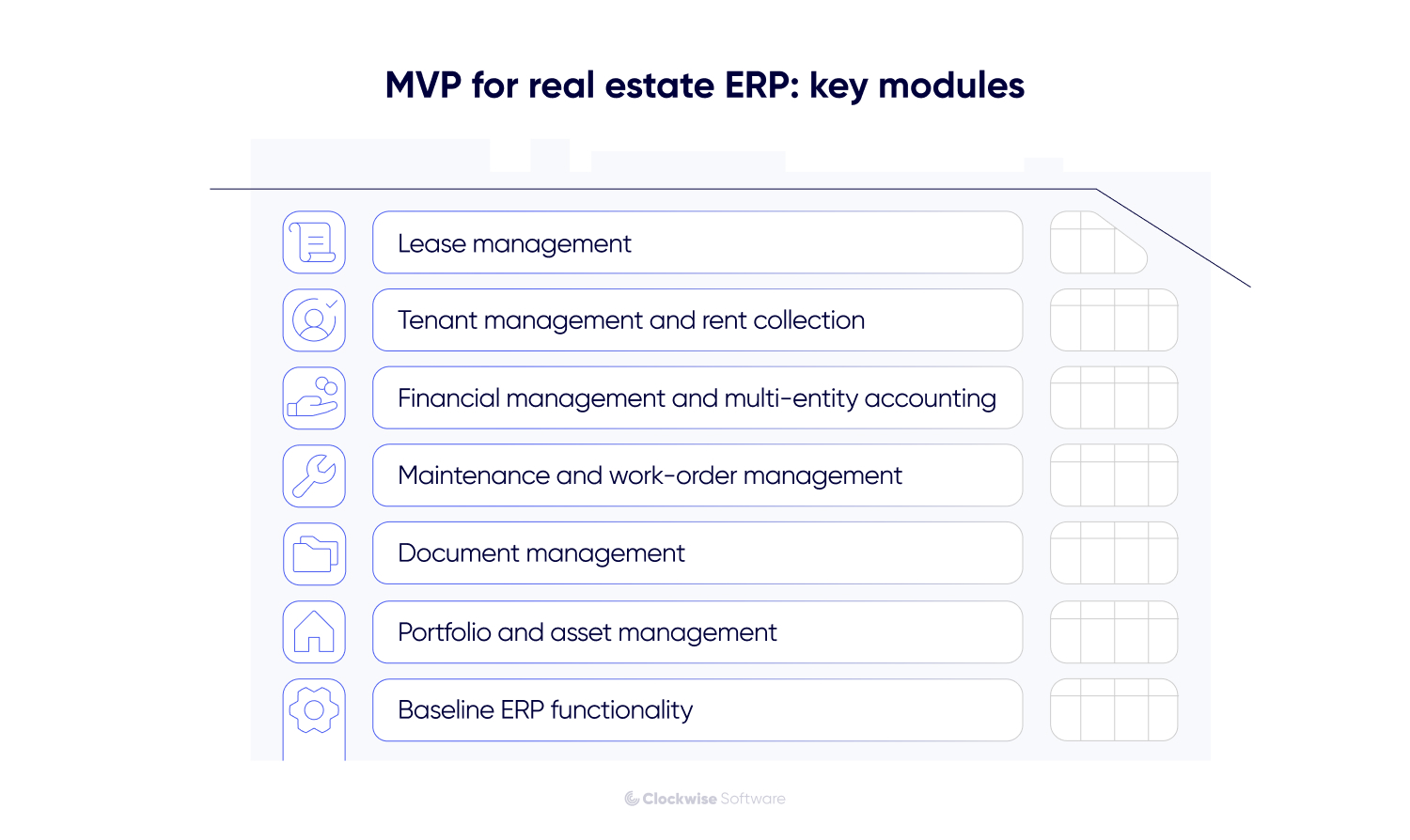
This is usually the first module we build, and for a blunt reason: it's where the copy-paste hurts most. The same lease details keep getting re-typed by hand into invoices, reports, and accounting records, and every hand-off is a chance to get a number wrong.
The module holds lease terms, renewals, escalations, indexation, and notice dates in one record. From there, the ERP pushes the right values and dates straight into accounting and reporting. Enter it once, use it everywhere, stop reconciling.
Reporting under US GAAP? We can build lease management software to support ASC 842 workflows, so approved lease data flows into the accounting process without being entered again.
This property management ERP module ties the tenant lifecycle to the money moving through it. Depending on your setup, it covers onboarding, invoicing, payment tracking, arrears reminders, and separate views for tenants, property managers, and owners.
The payoff is one linked record. When a payment slips or an invoice changes, every team sees the same status, no cross-checking three tools to find out who owes what.
Here's where real estate breaks generic accounting software. Companies run through separate legal entities for individual properties, funds, or asset groups, and finance has to keep every entity clean and roll it all up into one portfolio view.
A custom ERP in real estate wires entity-level accounting to the operational data underneath: leases, payments, approvals, property expenses. Depending on where finance lives, it either runs part of the accounting workflow itself or hands validated data to your existing ledger. Bigger portfolios pull in intercompany transactions, multiple currencies, and reporting under US GAAP or IFRS.
And this is the strongest case for custom. A standard platform handles each entity fine, then leaves consolidation, property-specific approvals, and operational reporting stuck in spreadsheets. The ERP can run the workflow around your ledger without ripping it out.
This module turns tenant requests, inspections, and preventive maintenance tasks into tracked work orders. Teams can assign vendors, set priorities, monitor progress, and connect each job with its final cost.
It pays off fastest where repairs still run on phone calls, emails, and a side spreadsheet. Put requests, vendors, deadlines, and spend in one place, and you can finally see what's stuck, what keeps breaking, and where the maintenance budget actually goes.
Add vendor management to the MVP, and you get one more thing: contractor performance, service history, and spend compared across every property.
Leases, onboarding, and handovers throw off a mountain of paper. Every file has to hang off the right tenant, property, lease, or transaction, with a clear status and a record of who opened it.
A document module links contracts, screening records, invoices, and handover papers to the workflows that produce them. Your team prepares and signs files inside the ERP, controls access, and always knows the current version.
We built this into the property management platform Propa: tenancy records tied to open-banking rent collection, payment tracking, digital agreements, and document access for both landlords and tenants. One workflow, from onboarding and contract signing through to ongoing payments.
It's the part of the ERP that does the job of standalone real estate portfolio management software, with the lease and financial data already underneath it. It gives owners and investment teams one shared view across the portfolio, following each asset from acquisition through operation and tying it to the lease and financial data behind it.
What it tracks depends on how you run the portfolio. Some teams want property-level performance and partner reporting. Others also watch acquisition pipelines, valuations, ownership structures, and capital activity.
On StoneBay, a real estate management analytics platform we worked on, the moment a property was bought or rented, it moved into the Projects module with its description, photos, and history attached. The team kept working on the same record and used it to pull together materials for prospective investors.
Beyond the modules above, a few things every ERP for real estate needs regardless of niche — the layer the modules sit on:
Treat these modules as a starting point. Your MVP should cover the workflows that matter most today and leave a clear path for deeper analytics, additional real estate automation software, mobile tools, and new user roles as the system grows.
How we prioritize the first release

When we define the MVP, we look at which workflows people go through every day and where the same data is entered more than once. Those are usually the first things worth fixing. Reporting, automation, and extra user views can come later if they don’t block the core process.
ERP for real estate rarely works alone. It needs to exchange data with external systems such as property listing websites, payment providers, CRM tools, and real estate accounting software. The important part is deciding what each system owns and how updates move between them.
Based on real estate and ERP integrations we built, these are the connections that come up most often. For each one, we define which system owns the record, how updates move, and what the ERP should do when the external service is slow or unavailable.
For example, on SmartSkip, a skip-tracing platform for real estate professionals, external services support several core workflows. A data provider powers manual and bulk searches, while Stripe handles subscriptions, bulk-search payments, and wallet top-ups. We separated those payment flows and kept provider-specific logic contained, so one integration didn’t dictate how the rest of the product worked.
That boundary work is the whole point. Swap in a new payment provider or property-data source later, and yes, some workflow changes, but you're not tearing open every connected module to do it. We draw those lines early and document how data, errors, and retries travel through each one, which is exactly what keeps an integration-heavy ERP stable while the systems around it keep changing.
The features below often sit on the post-MVP roadmap, but they don’t automatically have to wait until after launch. If one is critical to a core workflow, it can be part of the MVP. In practice, though, we more often see them added after release, once the core system is in place. Once you're live, the guessing stops. Usage data, support tickets, and team feedback drive the next calls.
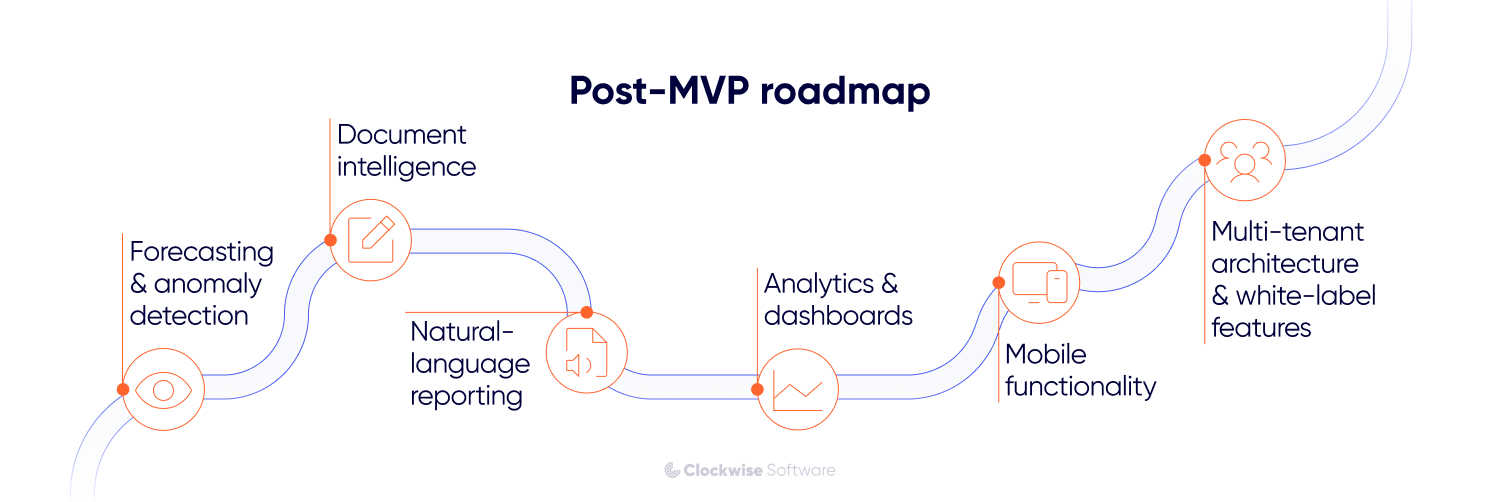
AI pulls its weight on occupancy, cash flow, and maintenance forecasting once you've got consistent history behind it, and on catching odd patterns in expenses, utilities, or entity-level transactions that no fixed rule would flag.
Some alerts don't need a model, though. A missed escalation or an overdue balance, and the ERP flags it straight from the records. We reach for AI when the answer rides on several variables, shifts property by property, or has to be learned from past behavior, and only after checking you've got the history to feed it. Otherwise, cleanup comes first.
Lease and contract processing is one of the clearest AI use cases in a real estate ERP. The system can extract payment terms, renewal options, notice periods, indexation rules, and other key clauses into structured fields.
We usually show each extracted value next to the source clause and let the reviewer confirm or correct it. Only approved data moves into the lease, accounting, or reporting workflow, and the ERP keeps a record of the change.
A finance or operations lead asks a question in plain English — which leases expire within six months, which entities have overdue balances — and gets the answer without building a report or asking an analyst.
The assistant works on your ERP data, using the same permissions the person already has. If someone can't open a property's financials in the system, the assistant won't show those numbers either. Every answer comes with the records behind it, plus the period and filters used, so the person can open the underlying leases or payments and check the number before acting on it.
One rule with AI in ERP: start narrow. Pick a workflow with clean inputs, a checkable output, and a number attached. Lease-data extraction beats a general assistant because you can measure review time, corrections, and cost per document. A chat box on messy data just hides the mess.
Dashboards aren't automatically a post-launch job. When your team needs real estate data visualization to close the month, track occupancy, or report to partners, they belong in the first release. Same with a data warehouse: if reporting pulls from several systems or needs historical snapshots to compare periods, that gets planned into the MVP rather than bolted on later.
What we do hold back is the deeper analytics. Forecasting models and portfolio-wide BI work best once the connected data is consistent and your team has confirmed which metrics they actually check every week. We've built 120+ dashboards for operations, finance, and leadership teams, and the pattern is steady: the ones people keep using are the ones designed after a few months of real data, not before.
Mobile functionality often comes after launch, once the core workflows are stable and it’s clearer what people actually need to do away from a desk.
For an office-based finance team, a responsive web ERP may be enough. But property managers, inspectors, or maintenance crews often need mobile access for things like work-order updates, photo uploads, or approvals. If those tasks are part of a core workflow from the start, mobile can still belong in the MVP.
When we plan mobile functionality, we look at where people use it, what information they need there, and which actions should stay quick. That usually leads to a much more focused mobile experience than copying the full ERP feature by feature.
Planning to offer the ERP as a proptech product to other companies later? That's an architecture conversation, because multi-tenancy is brutal to retrofit once every module assumes a single company.
To make this transition easier, we define the tenant boundary early and make sure the data model and permissions can support multiple companies. Customer-facing features like branding, self-service onboarding, billing, and admin can come later, when you’re ready to sell. On StoneBay, for example, this meant building an organization-management module that lets the client bring other companies onto the platform without spending MVP budget on the full white-label setup.
We usually group a real estate ERP project into three phases: planning, development, and release. Within them, the work moves through 10 steps. Some overlap, especially development, integrations, testing, and migration, but separating them makes it clear what you can review and approve at each point.
We start by walking through the way your team works today. Who creates lease records? Where do payment updates come from? Which reports still need manual reconciliation? What happens when two systems show different numbers?
Then we map the tools already in place and decide what stays. Your accounting platform may handle finance perfectly well, leaving the ERP to run approvals, property operations, and reporting around it. We walk those calls through with the people who own each workflow: finance, operations, IT, and the end users who'll actually live in the system.
This is where the original feature list usually changes shape. A dashboard slides down the backlog once we find three teams re-typing the same lease data. A planned module turns into an ERP integration because your current software already does that job.
What we look for during discovery
Clients often expect discovery to be mostly about listing features. In practice, we spend more time tracing who changes the data, where it gets copied, and what happens when two systems disagree. That usually changes the MVP more than the original feature list does.
Design work starts while we’re still defining the requirements. We first turn the main workflows into UX wireframes and review them with the people who will use the system. This helps us catch problems with navigation and day-to-day flows before development starts.
As the requirements become clearer, we turn the wireframes into early prototypes. We then create the design system and apply the UI to the approved screens, building a more complete prototype that shows how the ERP will actually look and work.
Next, we decide how the ERP will fit into your current software stack.
We define where each type of data lives, how modules exchange it, and what the ERP should do when a connected service is unavailable. We also plan permissions, audit history, entity boundaries, expected data volumes, and the integration points between systems. Based on those requirements, we choose the architecture and technologies that fit the project.
These decisions matter even more when the ERP supports several legal entities, business units, or customer organizations. Each user should see the right entities, properties, and financial records, while shared portfolio reporting still works across the structure.
Together, these first three steps make up the discovery phase. By the end of it, you have a prioritized MVP scope and backlog, mapped workflows and user roles, an architecture and integration plan, a migration approach, and a delivery roadmap with a timeline and estimate.
That package is yours whether or not you build with us. It's also the point where a project either gets a realistic budget or an optimistic one, and optimistic budgets are how ERP projects earn their reputation.
Before we start building business features, we prepare the foundation the team will use throughout development.
We set up repositories, databases, development and testing environments, CI/CD pipelines, logging, and monitoring. We also prepare the initial backend and frontend structure, dependencies, shared components, and baseline security controls.
For an ERP, this stage often includes authentication, roles, permissions, navigation, and the common UI patterns that later modules will reuse. Doing this early keeps the team from solving the same setup problems again in every feature.
We work in short iterations and start with the workflows that bring the most value to your team.
In each iteration, we build a working part of the system and review it with you. If the review surfaces new information or your priorities have changed, we update the backlog accordingly. The schedule and review process adapt to the project and to how often your team can provide feedback.
On the frontend, we build the tables, forms, dashboards, and role-based views your team uses every day. We connect them with the backend and make sure complex screens remain clear across desktop and mobile layouts.
On the backend, we implement the rules behind leases, payments, approvals, accounting flows, permissions, and connected systems. This is also where we enforce data validation and make sure the same business rule works consistently across modules.
You start seeing real workflows early. Your finance, property, and operations teams can test them while changes are still relatively easy to make.
We build ERP integrations alongside the modules that depend on them.
When we review a rent-collection workflow, we test it with the payment provider connected. We take the same end-to-end approach with accounting tools, CRMs, property data sources, and reporting platforms.
Before coding, we confirm API access, map the fields, and agree which system owns each record. Then we test both the successful flow and the less convenient cases, including timeouts, duplicate requests, expired credentials, and incomplete data. Your team should be able to see which records synced, which failed, and what needs attention.
We start planning the migration during discovery, when we review the source systems, data volumes, and record quality. Trial imports begin later, once the target data model and the relevant workflows are stable enough to test.
We map fields, define which records should move, and agree on what can stay in the archive. Legacy data often needs deduplication, normalization, or missing values resolved before import.
We then run trial migrations and compare record counts, relationships, balances, and calculations. Your finance and operations teams review representative records as well, so technical validation and business validation happen before the final transfer.
Testing runs throughout development. QA checks new functionality during each iteration, while developers cover critical business logic and integrations with automated tests based on the project’s risks.
Depending on the project, our test plan can look different, but here are the most common testing types we run:
Once the planned MVP functionality is ready, we prepare a release candidate. The QA team runs another regression cycle, developers fix the remaining issues, and we check the full system again before handing it over for acceptance testing.
During UAT, you and selected end users run the release candidate through real business scenarios.
Your team creates leases, approves payments, assigns work orders, uploads documents, and generates the reports users expect to rely on after launch. We compare those results with the agreed acceptance criteria and log any defects or workflow gaps that still need attention.
We fix the launch-blocking issues and verify the updated release again. New feature requests can move into the post-launch backlog, while the agreed acceptance criteria determine when the system is ready for production.
Before launch, we prepare the production environment, run the final migration, verify user access and integrations, configure monitoring, and agree on the rollout and rollback plans with your team.
The exact launch format depends on the project. You may roll out one module at a time, start with a smaller user group, or keep the previous system running in parallel for a while.
Once users start working in production, we run the final smoke checks and monitor errors, performance, integration failures, and support requests. This helps us catch issues that appear only with production data and everyday usage.
During stabilization, we also prepare the next roadmap using product usage, support requests, and your team’s feedback. We can continue supporting and expanding the ERP, or hand it over to your internal team with the codebase and project documentation.
Based on our current ERP software development cost estimates, a focused real estate MVP usually costs $150,000 to $200,000. A multi-module business system typically falls between $350,000 and $500,000, while a platform with advanced AI, complex integrations, or broader multi-entity functionality can move beyond $500,000.
A separate ERP discovery usually costs $12,000 to $25,000. The final cost depends on the number of workflows we need to cover and the complexity of the existing systems and data.
The range is wide because two companies say "real estate ERP" and mean completely different products. One wants a few sharp workflows for one internal team. The other wants portfolio-wide reporting, migration off four legacy systems, banking integrations, and separate permissions across a dozen entities. Same phrase, 3x the budget.
Here are the factors we look at when preparing the estimate:
| Cost driver | Lower end of the range | Higher end of the range |
| MVP scope | One or a few focused workflows for a limited user group | Several connected modules, roles, and departments in the first release |
| Integrations | A few documented APIs with test access and simple data flows | Multiple systems, two-way synchronization, limited documentation, and complex failure handling |
| Data migration | Structured records from one or two maintained systems | Duplicates, missing fields, conflicting records, and several legacy sources |
| Entities and permissions | One company with a simple role structure | Multiple entities, regions, departments, and property-specific access rules |
| Financial logic | Billing, payments, and standard operational reporting | Consolidation, intercompany workflows, multi-currency, and lease accounting (ASC 842 / IFRS 16) |
| Analytics and AI | Operational dashboards based on structured ERP data | A data warehouse, multi-source BI, forecasting, document intelligence, or AI assistants |
The visible feature list gives us a starting point, but integrations and migration usually carry more uncertainty. Their real scope depends on API behavior, data quality, and the number of exceptions the system needs to handle.
A well-documented payment API with reliable test access is usually easier to estimate. The work grows when one workflow depends on several external systems with different authentication rules, data formats, limits, and failure cases. We review the required actions, dependencies, and documentation before estimating the connection. For a critical or uncertain API, we may also build a small proof of concept so you know about its limitations before the main development starts.
Clean lease and tenant records from one maintained system can move fairly quickly. Duplicated properties, missing fields, conflicting balances, and data spread across several legacy systems require more mapping, cleanup, trial imports, and business validation.
You can also stage the development and budget. We often begin with discovery, build the workflows with the clearest operational value, and plan later modules once the first release is in use. Your team gets a useful version sooner, while the next budget decision can rely on real usage, support requests, and measurable results.
The implementation problems we see most often come from scope, data migration, integrations, and user adoption. We look for them during discovery and keep tracking them through development and launch, because they become harder to correct once several workflows depend on the same decision.
Where we see these start

By the time a project is in trouble, the original call usually looked reasonable. Adding one more module to the first release, keeping a legacy system connected longer than planned, moving UAT a month later. Each one made sense at the time, which is why we track them as they happen rather than reviewing them afterward.
Three ways to run an ERP software development project, depending on how much of the delivery you want to own.
Full-cycle development. One team takes the ERP from discovery through design, development, testing, rollout, and post-launch work. We build and manage the delivery team, coordinate technical decisions, and keep scope, timeline, and risks visible. Your team stays on workflow priorities, regular reviews, and business approvals.
Dedicated development team. For companies that already have product leadership or an in-house engineering team but need more capacity or specific real estate software development experience. We assemble a team around those gaps and plug it into your existing process. You keep control of product direction and priorities; we agree on day-to-day delivery responsibility together.
Standalone discovery. For when you need a validated plan before committing a development budget. We map current and future workflows, define the MVP backlog, clarify data ownership, assess integration and migration risks, and deliver the architecture direction, roadmap, timeline, and estimate. From there, you can continue with us, or hand the documentation to your internal team or another vendor.
The model can change as the project does. Plenty of clients start with standalone discovery, use full-cycle delivery for the first release, then move to a dedicated team once they have stronger engineering ownership in-house.
Either way, the work stays yours. Discovery gives you the documentation, roadmap, and estimate. Development gives you the code, architecture, and delivery materials, with the repository transferred at handoff.
Custom ERP software for real estate starts to make sense when the problem stops being one missing feature. By then it's the manual work between systems, reporting across a dozen entities, and the workflows that keep falling back into spreadsheets because nothing quite fits.
That doesn't mean rebuilding everything at once. A focused MVP can take the workflows that cost the most time or produce the most errors, while the tools that still do their job stay where they are. AI, deeper BI, mobile, and white-label capabilities come later, once the core system has clean data behind it. And if the platform eventually becomes a product you license to other property companies, the architecture decisions you make now are what allow it.
Start with the bigger question, though. Before choosing modules, work out whether you need a custom platform, an integration layer over your current systems, or an off-the-shelf product configured properly. That's what discovery is for, and it's a much cheaper place to find the answer than development.