
Any questions unanswered?
Let's discuss them


You’ve got a solid SaaS product and want to level it up with AI? Or you’re starting fresh and wondering how to add AI capabilities right from the start? Either way, the idea is exciting, but the path forward is not always so clear.
Should you use GPT out of the box?
Fine-tune a model?
Build your own AI stack?
How much is this going to cost, and will it even pay off?
We’ve spent years refining how to build SaaS products the right way. Since 2014, our team has launched 200+ products, including 30+ SaaS development services projects. And in the last few years, AI has become a regular part of the development process. We’ve helped clients roll out features like automated onboarding that slashes setup time, lead-gen chatbots that capture leads and sync them to HubSpot instantly, and analytics engines smart enough to impress Fortune 500 audiences. We’ve also built AI functionality for a PR platform used by brands like Aston Martin, WHO, and Dyson.
In this guide, prepared with input from our CTO and senior architecture engineer, we show a practical path to build or upgrade a SaaS with AI. You will find practical choices, a clear build process, and budget ranges to help you plan your AI SaaS product.
In 2026, users expect their tools to do more than store data or automate simple workflows. They expect intelligent features that save time and adapt to their needs. This shift has turned AI from a nice add-on into a competitive requirement.
AI can turn a good SaaS product into something even more powerful and valuable. Notion now auto-generates meeting notes. Grammarly rewrites tone and structure using AI. Even Canva helps generate design ideas and text content with a click. These features save users time, reduce manual work, and often feel like magic when done right. Here’s where AI usually makes the biggest impact inside SaaS products:
Personalization. AI tailors experiences to each user, like content feeds or smart recommendations.
Automation. It handles repetitive tasks: summarizing reports, generating emails, or sorting data.
Decision support. AI can help users make smarter choices by analyzing data in real time.
Content creation. From product descriptions to social posts, generative AI speeds things up.
Customer support. AI chatbots and assistants reduce pressure on support teams.
Any of these AI use cases can become a revenue driver. A well-placed feature, like advanced analytics or automation of repetitive, time-consuming tasks, can be the exact thing that nudges users to upgrade to a higher-tier plan. That means more value for them, and more recurring revenue for you.
AI is no longer a differentiator. It is part of what users expect even from micro SaaS apps. Once you understand where AI creates the most value, the next step is figuring out how to implement it in a way that fits your product.
Most teams can add valuable AI to a SaaS model without long model training or custom infrastructure. It is usually better to start with the lightest path that fits your data, accuracy needs, and timeline. Below are 3 practical options we use in AI-powered SaaS production, with tips on when each one makes sense.
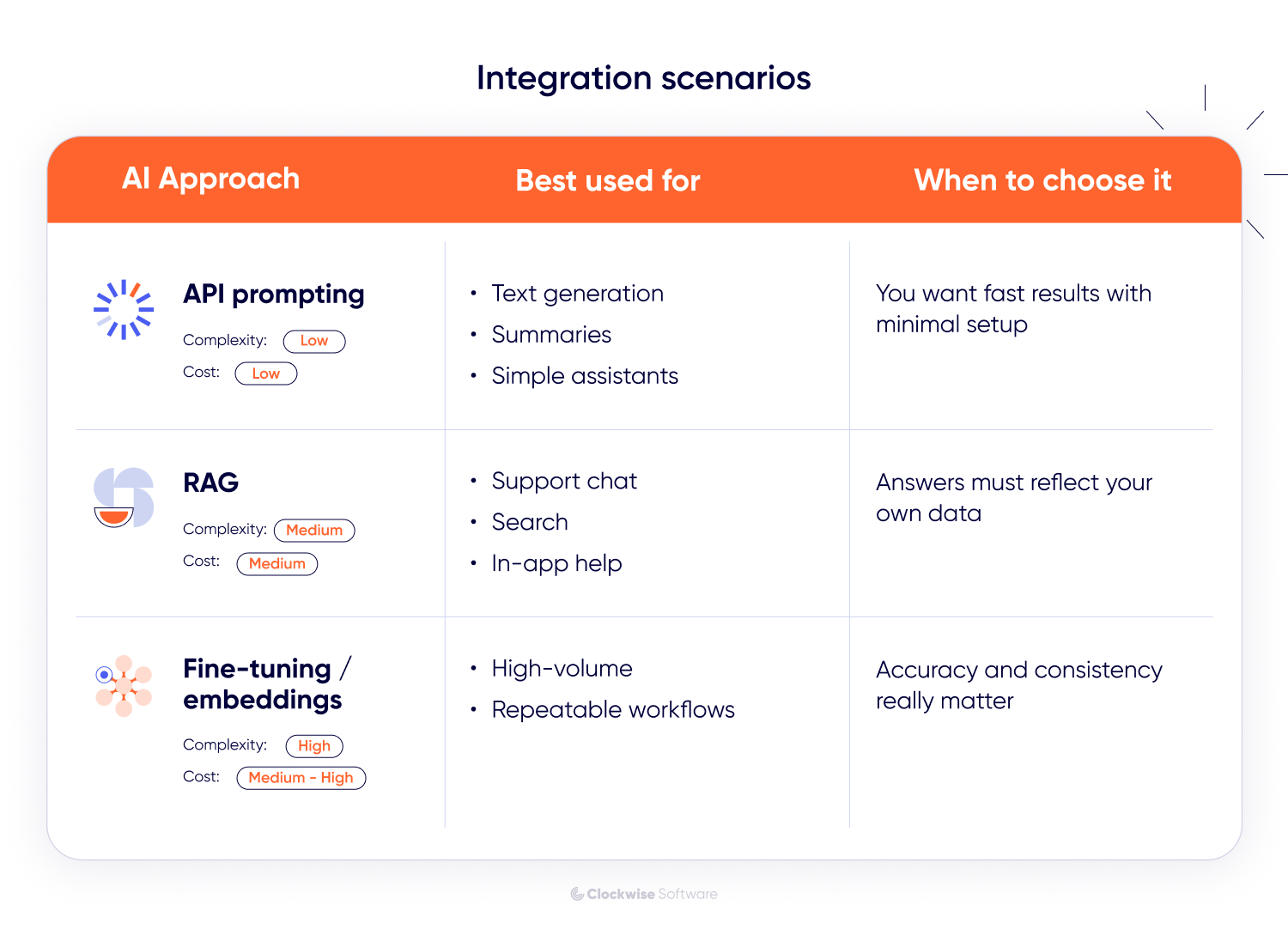
A simple way to add AI is to call a hosted model such as GPT or Claude over an API. You handle prompts and light post-processing (formatting or cleaning up the model’s output) in your backend, then surface results in the UI.
This approach works well for profile autofill, text generation or rewrites, summaries, simple classifiers, and quick assistants.
To support it, you’ll add basic safety checks on the backend, connect the UI to the model, log requests and responses, and prepare a small evaluation set to measure quality.
It’s a good fit when base models can deliver the value of generative AI you need without additional training. The setup stays lightweight, the complexity low, and the cost modest.
When answers should reflect your own docs or records, you can add retrieval to an AI SaaS product. Content is stored in a vector database, the most relevant pieces are fetched at request time, and that context is passed to the model. This works well for support chat, searchable assistants, in-app help, and personalized dashboards.
To support this approach, you’ll need an ingestion job to keep data fresh, a retrieval layer with permission checks, and light caching to keep latency predictable.
It’s a good fit when your data needs to shape the answer, but training a custom model would be unnecessary. Watch for issues like data from one customer appearing in another customer’s results (cross-tenant leakage), outdated search indexes that reduce answer quality, and prompts becoming too long for the model’s context window.
Effort is moderate, complexity is higher than simple API prompting, and the cost is mid-range.
If the baseline model isn’t enough and you have good example data, you can teach the model your way of doing things. It’s similar to onboarding a new teammate with clear samples. You can adjust an LLM for tighter behavior or use embeddings so it ranks and recommends the way you would. This works well for matching users to the right content, automating repeatable steps, and high-volume tasks where small mistakes add up.
To support this, you’ll prepare clean data and gather a small set of trusted examples to check quality. You will also set up a simple train-and-deploy routine and add basic monitoring.
It’s a good fit when you need more consistent or domain-specific behavior than prompting alone can provide. This is especially helpful when the task repeats often and accuracy has a noticeable impact on user experience or AI SaaS product cost.
This approach takes more effort and costs more than a quick API integration, but it delivers steadier, more predictable results when accuracy matters.
Now that the main integration approaches are clear, the next step is understanding how they fit into a real AI-driven SaaS product development workflow.
Many guides focus on explaining SaaS migration for AI-based apps or how to bolt AI onto an existing product. Useful, but what if you are starting fresh? What if AI should shape the core experience from the start of the project?
In this section, we will walk you through our path to develop an AI-powered SaaS product. You will see how we move from idea to working features, what to decide at each stage, and how to keep the plan realistic on time and scope.
Before you write code or pick models, get clear on the problem you solve. What job does your AI SaaS product do for the user, and why does it make sense to deliver it as a subscription rather than a one-off tool?
Then focus on the role of AI. What value will it add that plain rules or workflows cannot? Will it automate a complex step, personalize the experience, or surface insights users would not see otherwise? Aim for AI that unlocks something meaningful, not a feature added for its own sake. Getting this right early saves time and budget, and it prevents the mid-project “why are we doing this” moment.
Discovery aligns our team and client on what success looks like and how to reach it. This is where a raw idea becomes an executable plan with scope, technical choices, and an AI SaaS product roadmap that fits your timeline and budget. What we do during this stage of the SaaS product development lifecycle:
Clarify goals, target users, and the core problems to solve
Prioritize features and note which ones will use AI
Assess data readiness, privacy, and compliance constraints
Choose the AI approach (prompting, RAG, or fine-tuning), and outline how it fits in the system architecture
As part of discovery, we also outline the initial system architecture in SaaS and recommend the technical stack that will support both standard logic and your AI features. This includes thinking through multi-tenancy, performance, security, and how the platform will interact with hosted models or AI infrastructure. We look at data orchestration, retrieval, or processing pipelines, and what’s needed to keep inputs, outputs, and model behavior reliable over time. By defining these foundations early, we ensure the AI SaaS product can scale and evolve.
Here’s a typical setup we use when building AI-powered SaaS platforms
| Layer | Tech example | Purpose |
| Hosting | AWS, Google Cloud, Azure, Docker | Cloud infrastructure, serverless options |
| Backend | Node.js, Laravel, Ruby on Rails | Core logic, API layer, AI integration |
| Frontend | React, Vue, Angular | Web app interface |
| Core data storage | PostgreSQL, MySQL, MongoDB | Core app data |
| AI data & retrieval | Vector databases (Pinecone, pgvector, ChromaDB), object storage (AWS S3) | Embeddings, document retrieval, contextual data for AI |
| AI layer | LLMs (OpenAI, Claude, Gemini, open-source models), task-specific ML models | Generation, analysis, classification, prediction, and inference |
| Authentication & authorization | Auth0, AWS Cognito, custom auth, SSO providers | User identity management, access control, and permissions |
| Billing & payments | Stripe, Paypal, Braintree, custom billing logic | Subscriptions, payments, invoicing, plan management |
| Monitoring | Cloud-native monitoring (AWS CloudWatch), New Relic, Sentry, product analytics tools | System health, performance monitoring, and user behavior insights |
This stack lets us move fast, stay flexible, and scale AI features alongside the rest of the product. It also makes it easier to plug in new models or infrastructure if things evolve, because they often do.
Also, when needed, we run a lightweight proof of concept to validate quality, latency, and feasibility before moving into AI SaaS product development.
What you get after discovery:
A feature map and clear scope for an MVP
Technical recommendations and an initial system architecture
A delivery plan with risks, assumptions, and timelines
A realistic budget so you can move into development with confidence
Getting discovery right saves time and money, and it reduces the risk of mid-project pivots.
A well-scoped MVP helps you launch faster, validate your idea with real users, and avoid sinking months into features no one ends up using.
To do that, you need to clearly define the core of your AI SaaS product, the essential features that solve your users’ main problem, and prove your value. That includes deciding which AI features belong in version one, and which can wait until later.
To decide which AI features belong in your MVP and which can come later, it helps to map them against a simple feature matrix. importance to the user vs willingness to pay. Below is an example of a workflow SaaS tool aimed at small teams.
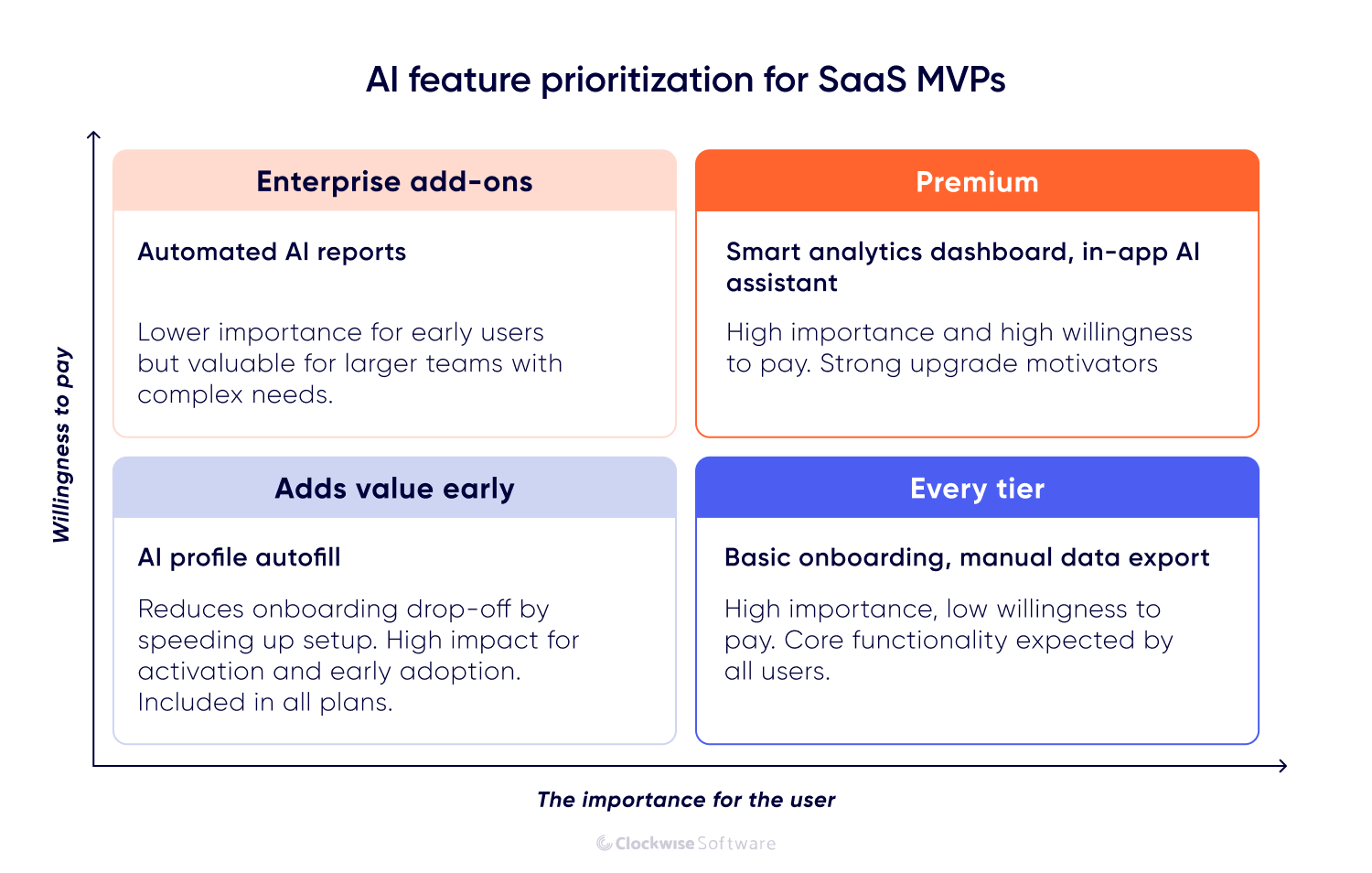
MVP development for SaaS helps you focus your resources and ship something useful sooner. It also lays the foundation for your tiered pricing strategy, letting you offer core functionality to new users, while unlocking more advanced AI-powered SaaS features in paid plans.
With the fundamentals ready, we bring in AI features that are practical to run and easy to evolve. Here’s how we usually implement AI inside a SaaS product.
For API-based features, we connect backend logic, prompts, and UI components so requests flow reliably from the user to the model and back. For RAG, we set up ingestion jobs to keep your data fresh, build the vector store, and implement retrieval with permission checks and light caching. For fine-tuning or embeddings, we prepare clean training data, run a simple train-and-deploy routine, and add monitoring and safe fallbacks.
As the feature takes shape, add tracking and monitoring so you can see how it performs and improve quality and cost over time. AI-powered SaaS is data-centric. Track log inputs and outputs, capture user feedback, and store the context you pass to models. Keep an evaluation set you can run on each change, version prompts and models, and record lineage so you always know which data, config, or code produced a given result. This gives you a reliable loop for prompt updates, fine-tuning, and future feature expansion.
Once integration and instrumentation are in place, the AI SaaS product is ready for structured testing and QA.
Before launch, make sure the AI SaaS product works the way users expect. Standard checks confirm the app is stable and secure, and meet the requirements outlined at the start. AI checks confirm the model’s behavior is reliable and predictable. We approach testing in two layers. Standard SaaS checks:
Functional testing. Features work as designed
Performance testing. Steady response times and safe load limits
Security reviews. Authentication, data at rest and in transit, and audits
Cross-device and browser testing. Consistent UX across environments
AI-specific checks:
Output quality. Accurate, relevant, and consistent responses
Grounding and context. The right data is retrieved and passed to the model
Prompts and guardrails. Robust to edge cases, safe when inputs are messy
Latency and cost. Meets targets for response time and token spend
Fallback behavior. Clear errors, retries, and handoff to a human when needed
User acceptance. Real users find the AI helpful and not confusing
A clear test plan for both the app and the AI sets up a clean launch and makes future updates easier.
When the build and tests are complete, we prepare the system for production and turn features on in a controlled way. The goal is a stable release, clear visibility, and an easy path to roll back if needed. We typically handle:
Environment setup. Configuring staging and production environments
CI/CD pipelines. Making sure your automated delivery pipeline is ready for staging and production releases
AI service readiness. Making sure API keys, model endpoints, and data sources are secured and connected
Monitoring and logging. Setting up tools to track usage, model performance, and system health
Final smoke testing. Running through critical user flows post-deploy
Rollback plan. Versioned releases and a tested rollback procedure
Depending on the launch strategy, some teams introduce new AI features gradually to gather early feedback and ensure stability before reaching full scale. The approach is flexible and tailored to what makes sense for your AI SaaS product and audience.
When users begin exploring your AI SaaS platform, you’ll quickly see what they love, what confuses them, and what could work better. That feedback is gold. It helps you polish the experience, adjust features, and make smarter decisions about what to build next.
Keep an eye on how your AI performs in the wild. Are its answers accurate and helpful? Are users engaging with AI features or skipping them? Small tweaks, like refining prompts or retraining on fresh examples, can make a big difference in reliability and trust.
As things stabilize, you can focus on growth. Add new capabilities, expand automation, or integrate with other tools your users already rely on. Post-launch is really about learning and improving. When you listen and iterate, you build an AI SaaS product people rely on, not just experiment with.
Now, it’s a good moment to talk numbers. Below is what you can expect budget-wise when building anAI SaaS product.
Building an AI-powered SaaS is well within reach. Here’s a breakdown based on our past projects and typical industry ranges:
Discovery phase: from $12,000: covers research, AI SaaS product strategy, feature mapping, and technical planning.
MVP development: from $100,000. Includes backend, frontend, UI/UX, infrastructure, billing, and deployment.
Feature-rich products: can exceed $200,000, depending on scope and feature complexity.
These are ballpark figures, of course, but they reflect what we’ve seen across 30+ SaaS projects we’ve built.
The budget depends on factors like data readiness, security needs, level of customization, and how many parts of the platform depend on AI to function.
Costs tell you what it takes to start. Challenges tell you what it takes to finish strong. Let’s talk about the ones worth paying attention to.
AI is one of the top SaaS trends and can add huge value to your product, but it also comes with its share of challenges. These aren’t just “what if” scenarios, they show up in real projects all the time. But with the right plan, you can handle them and build an AI SaaS platform without breaking your budget or missing deadlines.
When your AI SaaS product handles sensitive data, like in finance, healthcare, or HR, you have to think beyond the tech. Compliance and privacy become just as critical. Sending personal or confidential data to third-party AI models without the right protections can break rules like GDPR or HIPAA.
We start working on your SaaS security by mapping how user data moves through your system and where AI interacts with it. From there, we build privacy and compliance measures directly into the architecture. This can include anonymizing data, adding user consent flows, or deploying fine-tuned models within private cloud environments instead of public APIs. This way, your team keeps full control of the data while still getting the benefits of AI-driven functionality.
AI features often perform well at launch, but their accuracy can slip as your product, data, or user behavior changes. What delivers great results in the first few weeks might not hold up months later without regular upkeep.
We build in feedback loops from the start to keep performance steady. That means tracking how the model responds, logging results responsibly, and spotting weak outputs early. Based on this data, we adjust prompts, fine-tune ranking, or retrain lightweight models when needed. This proactive approach keeps your AI reliable and aligned with how users actually work, without the cost or disruption of full-scale retraining.
AI requests, especially to large language models, can sometimes take longer than users expect. A short delay might be fine for background tasks, but even a second or two can feel slow if it happens in the middle of an active flow, like typing or submitting a form.
We address latency early in both design and architecture. This can include running AI requests in parallel, prefetching likely results, or creating subtle loading states that make waiting feel natural. When possible, we also shift processing to happen right after an action, not during it, so users don’t experience interruptions. The result is a more seamless interaction that hides complexity and keeps the AI SaaS product feeling fast and responsive.
Just as user behavior and the data you rely on can change, so can the model and its settings. Even small shifts can affect how users perceive its output.
We treat AI logic like code and version it the same way. Each prompt or model change is tracked so you always know which version produced a given result, and you can roll back if needed. This also makes it easier to test new logic in a controlled way before it reaches users. Built-in versioning keeps updates safe, traceable, and fully under your team’s control.
Users can be cautious about AI systems that feel like black boxes, especially in areas where decisions matter, like hiring, finance, or healthcare. When the AI SaaS platform gives an answer or recommendation, people want to understand how it got there. Without that context, trust can fade quickly.
We design AI features to be transparent by default. That can mean showing which data sources were used, clarifying what inputs shaped the output, or adding a short explanation in plain language. Even a simple note like “How this answer was generated” helps users feel informed and in control. Clear context builds confidence and reduces the need for manual support later on.
With solid architecture, thoughtful planning, and steady iteration, these challenges are entirely manageable. Instead of getting in the way, they simply become part of building AI that performs reliably and delivers real-world value.
Besides challenges, there’s one more question to consider: how do you find the right team to develop an AI-powered SaaS product if you don’t have the expertise in-house?
If you’re looking to build or scale an AI SaaS product but don’t have the right team in-house, there are several ways to bring in external expertise. The best approach depends on how far along your product is, the level of technical leadership you already have, and how quickly you need to move. Here are 3 models we offer our clients:
You hand over the project from idea to launch, and we handle the rest: discovery, architecture, UI/UX, backend and frontend development, AI integration, testing, and post-launch support. This model works best if you’re starting from scratch and need an AI software development partner who can take full ownership of delivery. It offers the fastest path to market, with clear accountability and minimal demand on your internal team.
A dedicated team focuses fully on your AI SaaS product, working as an extension of your in-house resources. We provide backend, frontend, and AI/ML engineers, along with QA, DevOps, and project management support. You can manage the team directly or let us take care of delivery, entirely up to you. It is best to hire dedicated developers when you already have a running SaaS platform or internal developers and want to expand quickly with proven AI expertise. It integrates seamlessly with your workflows, offers flexibility as your needs evolve, and delivers lasting cost efficiency.
If you’re not ready for full AI SaaS platform development but want to shape your product vision into a clear plan with defined requirements, a tech approach, and a roadmap, you can start with a discovery phase. Over 4–8 weeks, we define your AI use case, prioritize SaaS features, assess data readiness, and design the technical architecture. This model fits when the scope, priorities, or budget still need refinement and you want to minimize risk. It’s a low-commitment way to get a detailed, practical roadmap for your next SaaS outsourcing steps.
Building an AI SaaS product can feel like a big challenge, and it’s true, there are a lot of decisions to make along the way. But with a solid team, a reliable architecture, and a clear focus on user value, it’s entirely achievable.
Whether you're starting from a blank page or looking to integrate AI into a product you've already built, we hope this guide helped you see the path more clearly. We've been building SaaS products since 2014, and today, AI is part of nearly every project we touch, from lightweight LLM integrations to full-scale machine learning systems.
If your goal is to create an AI SaaS platform that’s smart, scalable, and built to last, we’re here to help.