
Any questions unanswered?
Let's discuss them


Custom software development pricing is one of those topics everyone loves to discuss, but few explain clearly. You see estimates anywhere from $50K to $500K+, but what do those numbers actually mean?
We can tell you, because we’ve built the products behind these estimates.
Our team has delivered digital product development services for 200+ clients across martech, logistics, healthcare, and manufacturing. We’ve learned how different scopes and levels of complexity translate into budgets, and we consistently deliver within a CPI/SPI variance under 10%.
In this guide, you’ll see how much does custom software development cost, what you can build for $50K, $100K, or $250K+, and how to keep your software development budget predictable, transparent, and under control.
Let’s start with what you came for, the actual numbers. Based on 10+ years of experience, here’s how custom software development budgets typically translate into real product outcomes.
| Budget range (USD) | What you can build | Product characteristics | Best for |
| $50,000 – $100,000 | Minimal Viable Product (MVP) with core features. | - Core functionality only
- Template-based or lightweight custom design - 2–3 key integrations (e.g. payments, auth, analytics) - Cloud hosting setup |
Startups and SMBs launching the first market version |
| $100,000 – $300,000 | Market-ready product or scalable internal system. | - Custom UX/UI design
- Modular architecture - 5–10 integrations - Solid security baseline - Production-grade infrastructure |
Growing startups or SMBs scaling active products |
| 500,000+ | Full-scale enterprise platform or ecosystem of modules. | - Complex domain logic
- Multiple user roles and workflows - Microservice or domain-driven architecture - High performance, data security, enterprise grade insights |
Enterprises, or SMBs digitizing entire operations |
These ranges reflect total cost of software development, including backend, frontend, QA, design, and project management.
Numbers are helpful, but context matters. To really understand these budgets, let’s break down where the money goes, and what each part covers.
There’s no mystery to custom software pricing, just people, time, and how much ground you’re trying to cover. Every dollar in your budget pays for a specific skill or stage that makes the product work, scale, and last. Here’s how a typical full-cycle development budget breaks down (based on our delivery data):
Product design (10–20%). At this stage, ideas turn into real user flows and screens. Clear design helps developers move fast and stay aligned. The effort depends on the number of screens and feature complexity. In smaller projects, this means quick wireframes and basic UI kits; in larger ones, full UX research, more wireframes, and interactive prototypes to visualize flows.
Development (60–70%). The core engineering work: writing code, connecting systems, and building product logic. Covers backend, frontend, integrations, and infrastructure. In projects with complex architecture, heavy workflows, or multiple integrations, development often takes a larger share of the total budget (closer to 70%), since more engineering effort goes into building and connecting core systems while other stages grow at a steadier rate.
Quality assurance (QA) (10–15%). Makes sure everything built matches requirements and performs as intended. For MVPs, manual QA may be enough; for production systems, automated tests (unit, integration, regression) keep things stable as you scale.
Project management (5–10%). Keeps schedules, risks, and costs predictable. The PM manages the entire process, ensuring developers stay unblocked, communication is clear, and goals are met on time.
Maintenance & support (5–10%). Covers post-launch updates, bug fixes, monitoring, and performance tuning to keep users happy and downtime low.
That’s where your main budget goes once development starts. But there’s one step that can make or break how predictable those costs stay, the discovery phase.
Discovery is often what separates effortless projects from stressful ones. We usually start with this phase because discovery helps to build a solid plan and keeps estimates grounded in facts. During this stage, we help you:
Shape a clear product vision and goals
Map user flows and core logic
Design first UX/UI concepts
Choose the right tech stack and architecture
Build a realistic timeline and cost estimate
But not every product needs a discovery phase service. Teams with solid specs and finalised designs can go straight into development. For everything else, especially when the idea needs structure or the estimate needs accuracy, discovery provides the direction that keeps development on track.
It’s basically a “build the plan before you build the product” step. And yes, it costs extra, usually $12,000–$25,000. But skipping it can easily cost 3 times more later in rework due to missed requirements or wrong tech decisions.
If your total budget is small, it can be smarter to invest in discovery first, get solid documentation and estimates, and use that plan to attract investors instead of rushing into development. We’ve seen many of our clients begin with discovery and then use the documentation and estimates to attract investment before development started.
With discovery done, you’re ready to build. Here’s what determines how much that build will actually cost.
Around 60–70% of your total budget goes directly into development. But the final number isn’t just about how many hours the team works. It depends on what you’re building, who’s building it, and how you build it. Here are the main factors that push the cost of software development up or down.
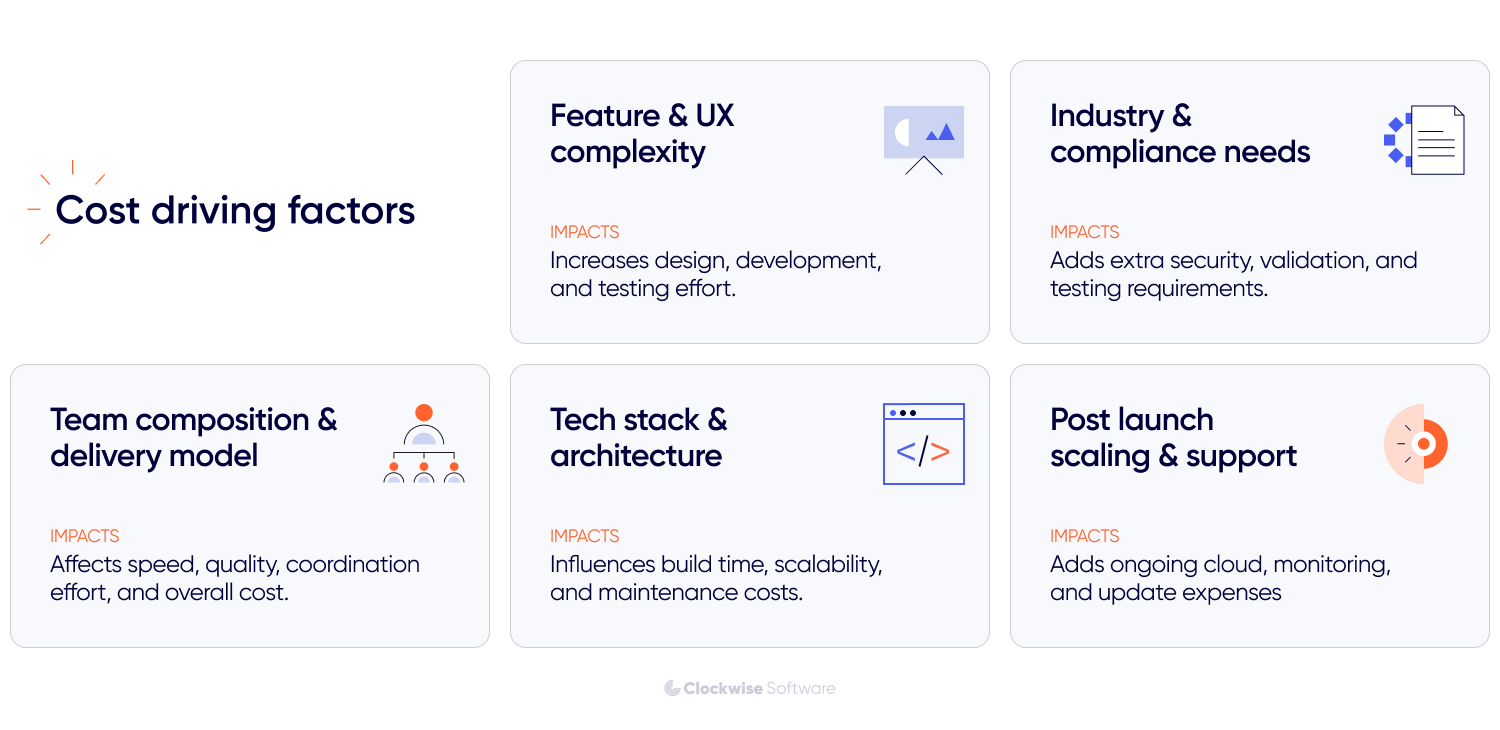
Every feature you add means more logic, more testing, more edge cases to handle. A simple booking flow? Pretty lean. Add multi-role dashboards, integrations, approval chains, and analytics — your scope (and budget) grows fast.
The same goes for design. Template-based UIs move quickly. Adding unique flows, dashboards, or components can increase design effort, but the real driver is how much functionality they support and how it all fits together.
That kind of depth usually adds around 10–20% to the overall budget. The best approach? Nail the essentials first. Once your core functionality works and users start giving feedback, it’s much easier (and cheaper) to grow from there.
The more regulated or high-risk your space, the more time (and testing) it takes to meet security and legal standards. All that extra security and validation work adds time, sometimes 15 to 40% more, compared to the typical testing scope.
If you’re in a highly-regulated industry, it pays to think about compliance and risk management in software development early instead of patching it in later when the product’s almost done.
You can hire freelancers, build an in-house team, or work with a software outsourcing company. Each model has trade-offs in control, speed, software development rates, and risk.
In-house team. Full control and deep product knowledge, but also the highest overhead. You cover salaries, equipment, office space, and benefits, even if the workload drops and part of the team sits on the bench.
Freelancers. Flexible and cost-effective for small scopes, but require hands-on coordination and quality control on your side. Best when you already have internal management capacity.
Outsourcing agency. A structured setup where you usually pay for development hours (time & materials). You get a managed, cross-functional team with established delivery processes, without long-term staffing costs. Best fit when you need reliable execution without building a team from scratch.
Seniority also matters. Senior software developers cost more per hour, but they’ll likely save you weeks of rework. We usually build balanced teams that include senior, middle, and junior specialists. Seniors handle complex architecture and critical decisions. Middles cover most of the core delivery, while juniors take on well-defined tasks under their guidance. This mix keeps delivery efficient without compromising quality or velocity.
The right setup depends on your priorities: speed, cost, and reliability don’t always balance perfectly. Rather than focusing on the software developer hourly rate, look at the outcome you’re getting for every dollar spent.
The tools and infrastructure you build with shape both your upfront custom software development cost and long-term maintenance. Choosing the right stack matters, but how you structure, scale, and maintain your app also has an impact on cost and performance. Common stacks like React, Node.js, Python, or .NET are easier to hire for and quicker to start with, while niche tech such as Rust, Elixir, or AI/ML frameworks often mean higher rates and longer ramp-up.
Your setup also defines operating costs. A small app with a few hundred users needs far lighter cloud resources than a high-traffic or data-heavy system. Third-party APIs (payments, analytics, or AI features) can also add ongoing expenses as usage grows.
Architectural choices matter too. A simple monolith is faster and cheaper to build, but harder to extend later. A modular or microservices setup is more scalable, though heavier up front. The best stack is the one aligned with your product’s goals, not what’s trending.
When you are building an app, your goal should be to launch something that stays stable, secure, and fast. That means cloud costs, uptime monitoring, regular updates, bug fixes, and user support.
Many teams forget to budget for this part, but it usually takes around 15 to 20% of the initial cost every year. Treat ongoing support like part of the product, keeping it stable, secure, and improving over time is what turns an MVP into a lasting business.
When new features or upgrades are on the roadmap, we form a dedicated team for that phase. Its size and structure depend on the task list and delivery goals. This setup keeps updates organized, budgets clear, and progress steady. Here’s what support setups can look like:
| Team composition | Monthly budget |
|
$12,000 |
|
$48,000 |
| * On-demand involvement | |
Not all custom software development cost factors are obvious at first glance. But the more clearly you define your features, priorities, and long-term goals, the easier it is to build something reliable without blowing the budget halfway through.
Next, let’s make it tangible with project examples: how much does custom software development cost in reality and what companies actually got for $50K, $150K, or $300K+.
Numbers mean little without context. So in this section, we’re sharing examples from our own projects: what we built at different budget levels, what each one included, and where we made trade-offs to keep things on track.
These are pulled from 200+ projects we’ve delivered since 2014 across industries like martech, logistics, healthcare, and real estate.
StoneBay is a property management and real estate analytics platform that helps real estate professionals track leads, manage projects, and handle contracts, all in one place. The founders came to us with an early concept and a set of initial designs. Our goal was to turn that into a lean, functional MVP that could be used to test the idea in the real market. We built:
Lead tracking and property management modules
Contract management with document status and history
Simple role and onboarding system for teams
UX improvements to make navigation faster and clearer
Backend, frontend, and REST API setup for scalable growth
Because the client already had a basic design and focused on only the essential features, the project stayed efficient and fit comfortably within the $50K web application development cost range.
The platform launched as a stable internal solution that improved day-to-day operations and served as a base for future development. The client also had plans to evolve it into a white-label product, so we structured the system to remain flexible for future customization and expansion.
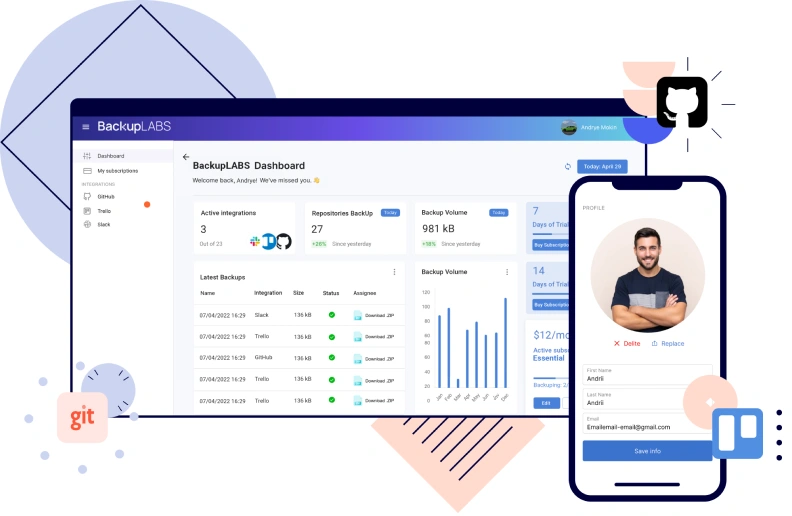
BackupLabs is a SaaS platform that automatically backs up data from services like GitHub, GitLab, Trello, and many others. The founders wanted to move away from a third-party backup provider and build their own product, one that was secure, scalable, and flexible enough to grow with their business. They also wanted it to support backups from a wider range of tools, since there were no existing solutions on the market that covered all their needs. For the first version, we built:
Integrations with GitHub, GitLab, and Trello for automated data backup
Encryption and a scheduled backup system using AWS S3 and KMS
User dashboard for monitoring, restoring data, and managing accounts
Stripe integration for subscriptions and billing
Admin panel for managing users and jobs
Microservice-based architecture ready for scale
This project aimed to deliver a production-ready MVP, not just a prototype. It included real infrastructure, live integrations, and the foundations of a SaaS business model. With this scope, the build landed in the $80K–$150K range — a realistic investment for a secure, market-ready SaaS MVP launch.
BackupLabs launched quickly, started onboarding users, and gathered valuable feedback to shape their roadmap. The platform’s modular design and strong security foundation also positioned it for long-term scalability and future integrations. In later iterations, the team expanded the product with additional services, and today it backs up over 4.5 million assets across multiple tools.
Attention Nest (built for Attention Experts, a leading Australian marketing agency) is a social media management platform that unifies campaign planning, approvals, publishing, and analytics in one workspace. The agency had outgrown third-party SaaS tools and wanted a custom solution built around their exact workflows, one they could later offer to other agencies as a product. What our team built was:
Unified content scheduling and posting across Facebook, Instagram, LinkedIn, and X (Twitter)
Built-in approval workflows for managers and clients
Analytics dashboard with engagement and reach metrics
Canva-style creative editor for visual assets
Secure role-based access and data protection
AWS-based infrastructure for scalability and reliability
The goal was to create a full-featured internal tool that could evolve into a SaaS platform. The project’s scope (multiple social APIs, advanced workflows, and enterprise-grade security) placed it in the $200K–$400K range, typical for complex, integration-heavy systems.
Attention Experts now runs all its campaign operations inside one platform, cutting down manual work and tool switching. Managers get real-time visibility, approvals are faster, and reporting is centralized. The architecture also gave the team a strong base to commercialize the platform as Attention Nest, turning an internal efficiency project into a new business opportunity.
At the high end of the range ($500K–$1M), budgets usually go toward large-scale, mission-critical platforms with deep integrations, complex logic, and strict performance or security standards. These products often serve as the digital backbone of a company or evolve into revenue-generating ecosystems.
Two of our projects illustrate what this level of investment delivers in practice.
Workerbee is a multi-vendor marketplace connecting businesses with software consultants and agencies. The client, Agilea Solutions, had strong in-house expertise but needed a partner to design and develop the platform while their team focused on other products. We built:
The platform required complex logic, multiple integrations, and financial workflows. With that level of depth and scalability, it fits the $500K–$1M range typical for large-scale marketplace products.
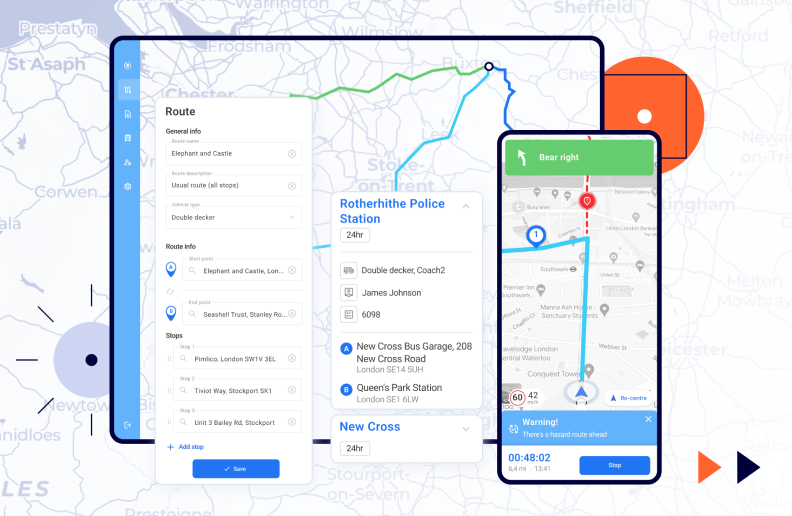
UDK WebOffice is a custom ERP system built for UDK Gazbeton, a major construction materials manufacturer in Eastern Europe. The company needed to digitize and connect order management, invoicing, and logistics that were previously handled through calls and spreadsheets. The ERP included:
Online order management and automated invoicing
Delivery contractor bidding and selection workflows
Route planning engine integrated with Google Maps
Real-time warehouse synchronization for accurate stock levels
Unified dashboards and role-based access for operations, finance, and logistics
The system connected multiple departments and automated critical workflows. With deep integrations and performance tuning involved, the project fell in the $500K–$700K range, typical for building an ERP solution. UDK cut manual work and coordination costs while doubling daily truck capacity from 45 to 92 and saving over 2 million UAH annually on logistics.
Both Workerbee and UDK WebOffice show how projects in this tier transform business operations through automation, scalability, and tightly integrated systems built to last.
Software projects aren’t set in stone: priorities shift, new ideas pop up, and sometimes the tech needs to change mid-way. That’s why even the most accurate estimates can change slightly once development starts.
That said, with the right structure in place, it’s absolutely possible to stay close to plan and avoid budget creep. Here’s how we keep our cost and timeline variance under 10%, even on complex builds:
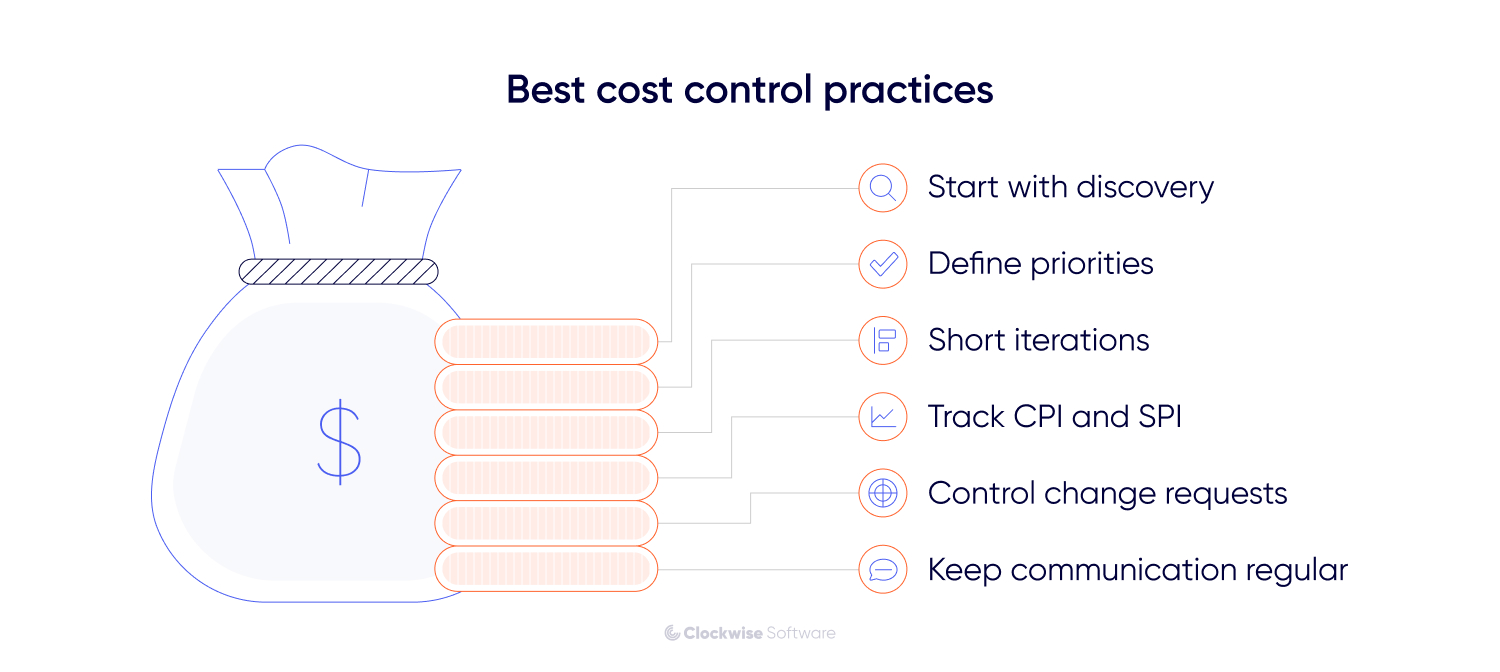
Start with discovery. A well-run discovery phase clarifies goals, features, and constraints, giving you an estimate based on facts, not assumptions.
Define priorities early. Separate “must-haves” from “nice-to-haves” before development begins. This ensures the team focuses on core business value first.
Work in short, measurable iterations. Regular sprint reviews and demos keep progress transparent and allow early corrections before issues grow expensive.
Track metrics, not just deadlines. We monitor CPI (Cost Performance Index) and SPI (Schedule Performance Index) to detect variance early and take corrective action.
Control change requests. Every new feature or integration affects the timeline and budget. Log and approve changes deliberately, not ad hoc.
Keep communication with your team regular. Weekly syncs, progress reports, and risk updates ensure alignment between the client and an offshore development center (ODC) or delivery team.
Even with these safeguards, estimates will always remain estimates. The goal isn’t to freeze scope forever, it’s to ensure every adjustment is visible, justified, and aligned with your business priorities.
After building 200+ products, one thing’s clear: software costs less when everyone understands what they’re building and why. Scope drives the price, but clear requirements and early planning always reduce it by keeping effort focused in the right direction.
It’s not about cutting corners or chasing the cheapest quote. It’s about clarity, control, and decisions that age well.
If that’s how you want to approach your next project, we’ll help you plan it the same way we build: deliberately, transparently, and without wasted effort.