
Any questions unanswered?
Let's discuss them


Building a successful navigation app takes far more than implementing GPS, accurate maps, and turn-by-turn directions. It demands a strong business plan, right tech stack, scalable infrastructure, and a deep understanding of how people will use your app in real-world scenarios.
How can we talk about that so confidently?
We have been providing location-based app development services for more than 10 years.
We have successfully delivered 10+ location-based apps, including fully-fledged navigation apps.
We built solutions for the world-known Geocaching platform, and the #1 London bus provider.
Wanna know how we managed to do that successfully? We are ready to explain. Read on to find out what steps, processes, and decisions it takes to build a profitable navigation app.
Let’s start with the basics. In 2026, navigation apps use real-time data, GPS, sensors, and predictive algorithms to guide users efficiently and safely by adapting routes to traffic, weather, personal preferences, and contextual conditions.
In simple terms, if 10 years ago navigation apps were just digital maps that showed directions, now they think ahead by using live data and AI to adapt routes, predict delays, and provide guidance in real time.
As you can see, the functionality of navigation apps has changed drastically in the last years. Let’s take a look at it in more detail.
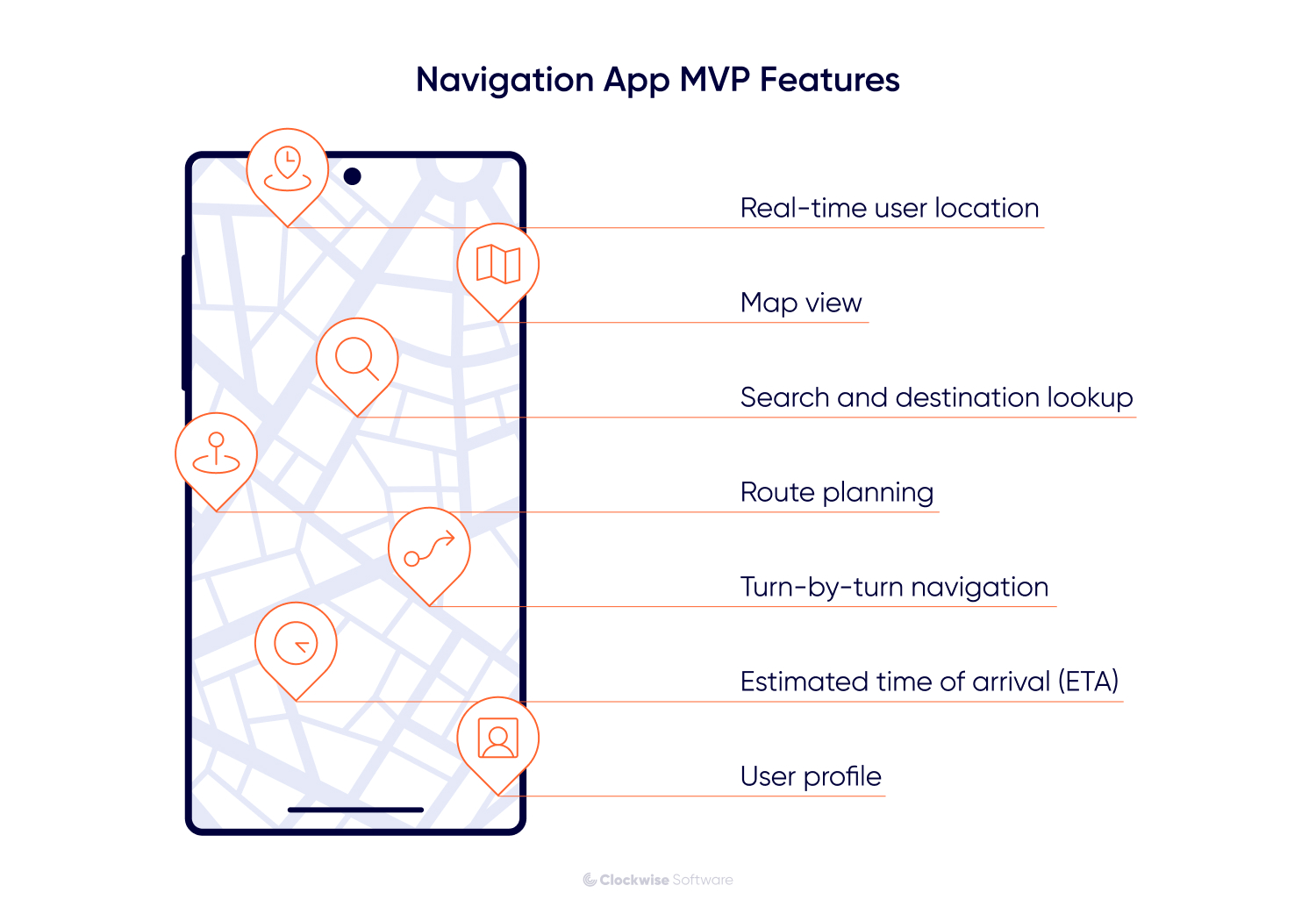
The MVP (Minimum Viable Product) of your product is its first version that contains the essential features only. Let’s see what they are:
Of course, if you want to conquer the market with your app, it’s not enough to build a navigation app with just some basic features - you need to show your app’s unique selling point (USP). Here are the examples of features that can become the UPS of your app:
Intent-aware routing instead of fastest routing. Most navigation apps still optimize for time or distance. You can go further by letting users choose intent. For example, lowest stress, safest after dark, least cognitive load, or most predictable traffic.
Why this works for an MVP: You can launch with one strong intent, such as stress free routes for daily commuters, and own that niche before expanding.
Micro hazard detection powered by local signals. Help users avoid things that maps usually miss: temporary road narrowing, broken traffic lights, school dismissal chaos, or recurring delivery truck blockages. You can achieve this by combining anonymized user behavior, lightweight reports, and historical patterns instead of expensive real time sensors.
Why this works for an MVP: It feels nearly magical to users and immediately builds trust. Even partial coverage in one city will be enough to prove value.
Navigation that adapts to user behavior. Your app learns how the user actually moves, how often they stop, and how they handle complex intersections, and personalizes routing and instructions accordingly.
Why this works for an MVP: Personalization is a strong USP even if it’s basic at first. Users notice when the app “gets them”.
Transparent AI explanations. Make an app that explains its recommendation in plain language. For example, “This route is slower on average, but today it avoids an accident prone intersection during rain.”
Why this works for an MVP: Trust is a major barrier in navigation apps. Transparency lowers it fast.
When you have decided on features, it’s time to start the pre-development stage.
At Clockwise, we run all the pre-development processes as a part of the discovery phase which helps our clients save up to $30K on development. How? Discovery is a more wholesome process than a simple pre-development phase that primarily focuses on planning. During discovery, we focus on everything that will help you minimize risks and save costs on unnecessary features/processes. If you want to find out more about discovery, its benefits, processes, and deliverables, get acquainted with our discovery phase process page.
Now, we will focus on the most critical tech points that we handle during the discovery phase of a navigation app development.
Native development gives you maximum performance, and the best possible user experience tailored to each platform. On the other hand, cross-platform development allows you to launch faster with a single codebase, reduce development costs, and validate your idea across both platforms at once. Your tech stack directly depends on what you will choose for your MVP: native or cross-platform development.
At Clockwise, we build cross-platform solutions using React Native.
For an MVP, cross-platform development is usually the better choice because it lets you test core navigation features, gather user feedback, and iterate quickly without doubling time and budget.
Case study example: Route planning platform with React Native
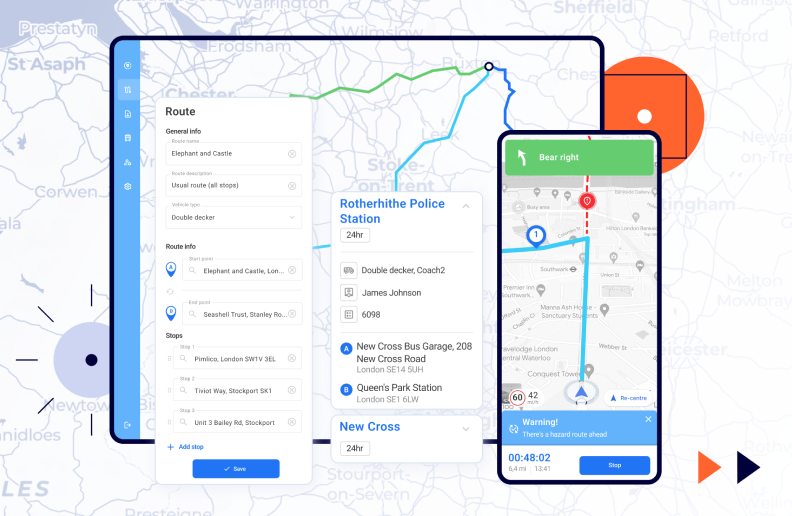
When we was working on a route planning solution for #1 London bus provider, one of our tasks was to develop a mobile application for drivers. For this, we chose React Native. It allowed us to implement features rapidly and iterate without long release cycles. Thanks to its hot reload capabilities and a rich ecosystem of ready-to-use libraries, our development team was able to prototype, test, and refine functionality much faster compared to native development.
Also, its single codebase approach allowed us to deliver the app simultaneously for iOS and Android, reducing development time and maintenance effort while ensuring a consistent experience across platforms.
The right mapping service integration is a critical technical decision that shapes accuracy, scalability, user experience, and long term maintenance of your navigation app.
Here are the top 5 best mapping services integrations to consider:
| Mapping service | Description | Best suits for |
| Google Maps | Offers global map coverage, real time traffic, routing, geocoding, and extensive place data backed by Google’s infrastructure. | Consumer-oriented apps that require high accuracy, fast implementation, and familiar user experiences. |
| Mapbox | Focuses on flexibility, allowing teams to deeply customize map styles, interactions, and performance characteristics. | Products where branding, advanced visuals, or offline and outdoor navigation matter. |
| Azure Maps | Provides geospatial APIs and SDKs built into Microsoft’s Azure cloud ecosystem, offering maps, routing, traffic, and spatial analytics backed by Azure infrastructure. | Those who already use Azure services and want tight integration with their cloud backend, IoT, and analytics workflows. |
| HERE Technologies | Delivers enterprise-grade navigation, traffic intelligence, and location services with strong global reliability. | Logistics, fleet management, and transportation apps that operate at scale. |
| OpenStreetMap | Community-driven, open source mapping database that gives full control over data usage and customization. | Those aiming to minimize licensing costs or build highly-specialized navigation solutions without vendor lock in. |
Case study example. Handling map clutter at scale
Our team worked on Lilypad Chat, a location-based chat app for Geocaching where thousands of users appear on the map in real time. Using Mapbox, we encountered a practical limitation. Rendering too many markers at once led to visual clutter and performance issues. But, instead of switching providers, we built a custom clustering algorithm that grouped nearby users into single icons and expanded them only when zooming in.
As you can see, Mapbox is a strong choice when you need deep control over map behavior and are ready to extend it for high density, real time data.
Case study example. Choosing Azure Maps to reduce operational friction
In our other project, the aforementioned route planning app for #1 London bus provider, our client's entire infrastructure was already built on Microsoft Azure. Introducing a separate mapping vendor like Google Maps or Mapbox would have increased complexity around billing, security, and data compliance. By selecting Azure Maps, we kept the solution within a single ecosystem and aligned with the client’s existing processes. This experience highlights why Azure Maps is often the right choice for enterprise and B2B products where cloud consistency and governance are critical.
Real-time data delivery is a critical technical decision for a navigation app: routes, ETAs, traffic congestion, road closures, and incidents must update instantly. Here are main points you should take into account:
A navigation app must continuously receive and process updates and recalculate routes on the fly so users could choose the fastest path to their destination instead of following outdated directions. Integrate your app with the right mapping platform (we mentioned them earlier) that aggregates data from millions of devices, sensors, and vehicles to deliver reliable real-time traffic insights.
When a user misses a turn or traffic conditions change, the app must instantly recalculate the route. Real-time data pipelines enable the backend to update routes within seconds and push changes directly to the client.
This typically requires:
Case study example. Real-time location updates in Lilypad Chat
When building Lilypad Chat, the core requirement was allowing users to see their friends move on the map in real-time. Traditional REST-based APIs introduced too much latency and unnecessary data transfer for continuous location updates. So, we implemented a WebSocket-based architecture to stream location changes in the background with low latency and minimal overhead. In result, users saw smooth, near-instant movement on the map without noticeable delays or excessive battery drain.
Here are our 3 discovery packages and what they can offer you for navigation app development:
| Small package
From $12,000 Discovery, focused on essentials |
|
| Medium package
From $16,000 Extended discovery for a full-feature navigation app |
Everything in Small, plus:
|
| Large package
From $25,000 Comprehensive discovery for complex navigation platform |
Everything in Medium, plus:
|
At Clockwise, the navigation app development process consists of 6 steps:
Firstly, we set up the groundwork for development. This includes:
Since navigation apps depend heavily on external signals like GPS and traffic data, we design the system to handle latency, partial failures, and inconsistent inputs to create a setup that supports fast iteration without compromising accuracy or stability later on.
We build reusable UI components for maps, route previews, turn by turn guidance, and alerts. Each component is connected to backend services through clearly defined APIs and predictable state management.
In parallel, our backend team builds the systems that power routing, location processing, and data synchronization. This includes structuring databases for map tiles, traffic data, and user preferences, along with APIs that support route calculation and live updates. We design backend logic to handle frequent recalculations without overloading the system. That means efficient algorithms, careful rate limiting, and clear separation between real time services and less time sensitive data.
At this stage, we integrate the system with the necessary third-party services:
Maps. Providers such as Google Maps, Mapbox, Azure Maps and others supply base maps, road geometry, and points of interest.
Traffic and routing data. Services like TomTom Traffic or HERE Traffic provide live congestion, incidents, and road closures.
Location and GPS services. Platform-level services from Android and iOS, sometimes extended with third party SDKs, are used to improve positioning while controlling battery usage.
Based on the project requirements, we can also add integrations with other, case-specific services.
Testing is continuous throughout navigation app development. Given the number of variables involved, we combine automated coverage with hands-on validation:
Unit tests. Verifying routing logic, calculations, and data transformations.
Integration tests. Ensuring frontend, backend, and external services communicate correctly.
End-to-end tests. Simulating full navigation sessions from route selection to arrival.
Regression tests. Protecting core navigation behavior as the system evolves.
Manual and exploratory testing. Driving real routes, testing edge cases, and validating behavior under poor signal or heavy traffic.
This testing process helps us ensure that the product works flawlessly before it goes to the users’ hands.
We run final checks and release to production with tracking in place for performance, crashes, routing accuracy, and data freshness. Once the system meets our quality bar, we release it to production and put monitoring in place to observe performance, surface issues early, and react quickly when something needs attention. For mobile platforms, we manage store preparation and compliance, and stay available for quick fixes if issues surface post release.
How much does it cost to build a navigation app? It’s hard to answer this question as this depends on numerous factors. Here is our cost breakdown structure that will help you navigate the price range:
| Discovery and prototype
$15,000 to $50,000 Validate your navigation app idea with a prototype |
|
| Minimum viable product
$50,000 to $200,000 Build a navigation app with basic set of features |
|
| Solid navigation app
$200,000 to $500,000 Deliver a robust, scalable navigation solution suitable for commercial use. |
|
| Market-leading navigation app
$500,000+ Create a next-level navigation platform with advanced capabilities |
|
Choosing the right team for your navigation app development depends on your product maturity, internal resources, and level of involvement you want to maintain. Here are 3 cooperation models we can provide to help you build a navigation app efficiently and with the right level of control:
End-to-end product development
Dedicated development team
Product discovery service
From our experience, we can say that building a successful navigation app in 2026 takes right strategic and technical decisions early on. That is why it’s worth investing in discovery, the first route is calculated.
When built on a solid foundation and supported after launch, your app can grow from a simple routing tool into an adaptive product that users rely on daily. That is the outcome we aim for in every navigation app we build.