Any questions unanswered?
Let's discuss them


As a company that has built 10+ real estate apps and developed dedicated facility management modules as part of our ERP software development services, we know how to create solutions that eliminate manual processes, deliver intelligent analytics, and solve real business problems.
What does it take? We're going to share everything in this article: practical choices, our development process, costs, and more. By the end, you will:
Facility management software is a tool for coordinating buildings, assets, and services within a single digital system. It serves as a shared platform for efficiently managing spaces, equipment, maintenance, and daily operations. As a result, it reduces manual work, improves visibility across operations, and helps make faster, data-driven decisions.
First, let’s break down the features any facility management software must have, and which can improve, expand, and optimize the system's core functionality.
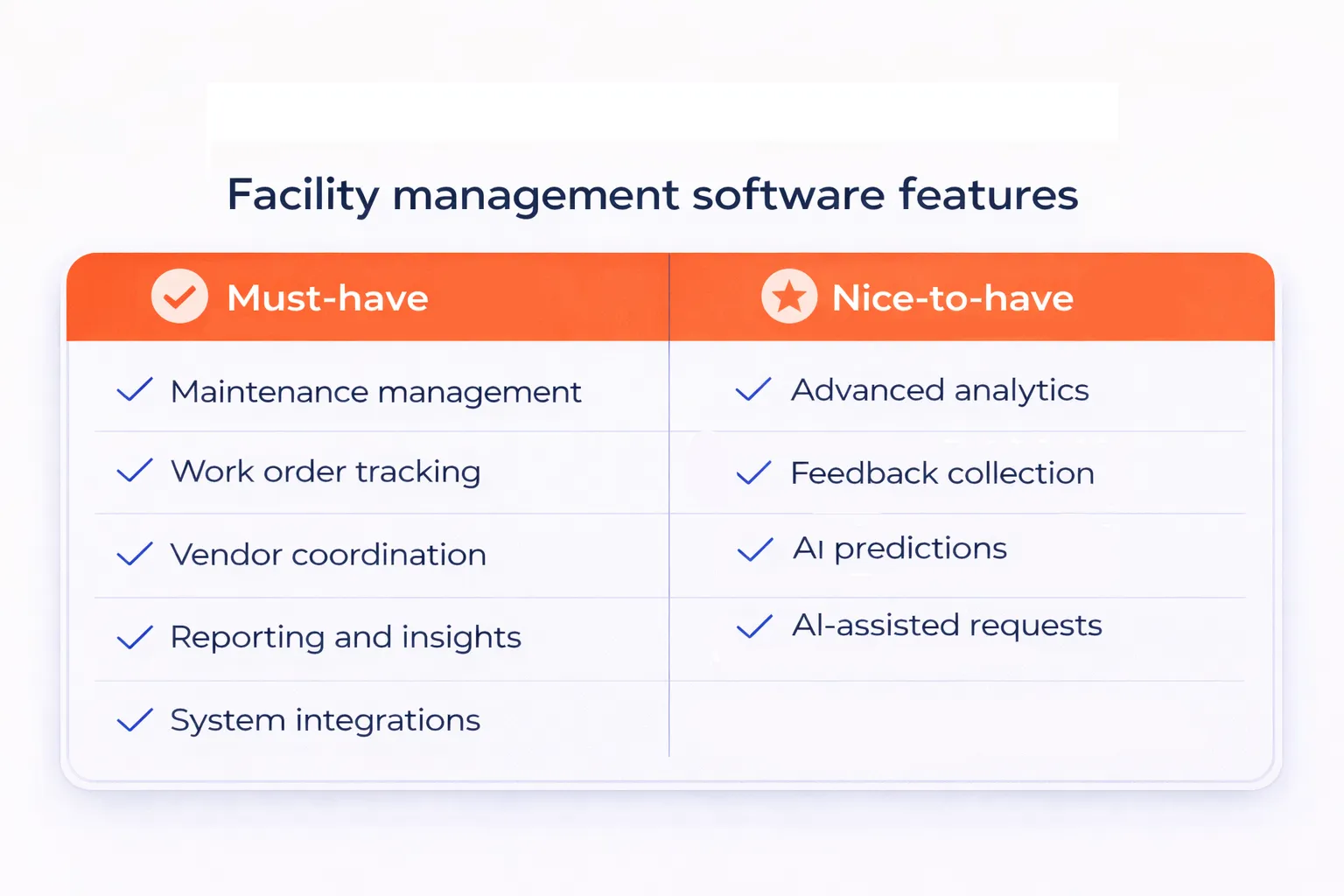
Must-have features form the operational foundation of the facility management system MVP. Here are the features your future platform will need to fully support the main processes of facility managers:
| Feature | Explanation |
| Maintenance management | Manages maintenance requests, task assignment, scheduling, and lifecycle control from request creation to closure. |
| Work order tracking and status visibility | Provides real-time visibility into work status to improve coordination and communication. |
| Vendor and contractor coordination | Enables vendor assignment, communication, and performance tracking in a single system. |
| Reporting and operational oversight | Offers basic reports on volume, response times, and completion rates to support decision-making. |
| Third-party integrations | Connects with external systems to automate workflows and reduce manual effort. |
When we worked on Vialoop, a tool for facility maintenance order and vendor management, we built functionality that allows managers to dispatch vendors to maintenance requests, schedule maintenance work, and track its progress from creation to completion. This set of functionality ensured clear ownership of tasks, faster response times, and consistent visibility across all active maintenance activities. We integrated the tool with NetSuite to enable automated invoicing and added a tax calculator integration to reduce manual effort and improve financial accuracy.
Nice-to-have features extend core functionality, helping you optimize workflows as operations grow. While not essential for day-to-day execution, they improve the platform’s performance and efficiency.
| Feature | Explanation |
| Advanced analytics | Provides insights for long-term planning and performance optimization as the platform grows. |
| Customer and staff feedback loop | Collects ratings and comments on completed work to measure service quality and identify issues. |
| AI-based predictive insights | Uses historical data to detect early failure patterns and recommend preventive actions. |
| AI-assisted work request creation | Transforms natural-language descriptions into structured work requests for faster, more consistent intake. |
We divide the process of facility management software development into 3 key stages: discovery, development, and post-release support. Let’s take a closer look at them:
At Clockwise, we start our projects with a discovery phase because it helps us replace assumptions with real insight, lay a strong foundation for development, and align everyone around shared goals and expectations.
This approach has already helped our clients avoid $30K+ in additional costs that often appear in the middle of projects when key details were missed at the start.
Below, we will briefly explain what you should do during this stage of the facility management software development process. However, if you want more details, check our discovery process page.
Discovery helps you plan in detail the scope and requirements for your system before development starts. During this phase, you should focus on these activities:
Define scope and goals. Start by clarifying your business goals and the software's role. This will help you define the must-have features and the overall scope to avoid scope creep and control budget and timeline.
Identify users and their needs. List all user roles, including facility managers, technicians, and administrators. Define their responsibilities, pain points, and daily tasks.
Set the foundation for UI/UX design. Outline key user journeys and usability principles. Focus on fast access to critical data, straightforward navigation, and mobile-friendly experiences for on-site staff.
Make technical decisions. Define the optimal tech stack, necessary integrations with existing systems like ERP or IoT sensors, security requirements, and compliance constraints.
Set a realistic plan. Summarize decisions into a clear scope, estimated budget, and timeline. This plan serves as the team's working foundation, guiding execution and helping you track progress and deadlines.
Create an app requirements document. It usually brings together everything related to the product, including functional and non-functional requirements, technical approach, design references, security standards, performance expectations, and scalability considerations.
Discovery brings clarity before commitments. If done right, it not only helps avoid additional costs but also rings a bunch of other benefits:
In the end, discovery protects your budget, your timeline, and the quality of the final product.
Typically, the facility management software development process includes 6 core stages:
1. Application bootstrapping
Application bootstrapping is the base of your platform. At this stage, you:
All this will help you move smoothly to the development process.
2. Backend development
Backend development focuses on building the logic that powers the software. This is when your development team implements databases, APIs, authentication, and permission systems to support secure and structured operations.
3. Frontend development
Frontend development is what turns functionality into a usable experience: dashboards, task views, calendars, and forms that help facility managers and technicians complete their work efficiently.
4. Integrations
Integrations connect your facility management software with external systems. You may integrate accounting tools, ERP systems, IoT sensors, building management systems, or analytics platforms. These connections reduce manual data entry and improve operational visibility. You can speed up development by using existing APIs or ready-made integration modules instead of building everything from scratch.
5. Testing and quality assurance
Testing ensures the system works as well as it was initially planned. The QA engineers test individual features as development progresses and run full-system checks once all components are connected. This stage verifies that maintenance workflows trigger correctly, that data remains consistent, that notifications arrive on time, and that the system handles daily operational loads. Thorough testing helps prevent costly issues after launch.
6. Deployment and rollout
Deployment marks the transition from development to real-world use. You release the software to a production environment and make it available to facility teams.
After launch, you should monitor performance and collect user feedback. Then, continue improving the platform by adding new features, refining workflows, and optimizing usability based on how facilities use the system day to day.
Once your facility management software is released, the focus shifts to ongoing support and gradual improvement. This stage ensures the product continues to perform well in real operating conditions and adapts to changing requirements. At Clockwise, during the post-release phase, we typically focus on:
By treating post-release as a continuous process, you ensure your software remains reliable, relevant, and valuable over time.
The cost of building a facility management software can vary significantly depending on many factors. These include the number of buildings and assets managed, required modules, level of customization, third-party integrations, security and compliance needs, scalability requirements, mobile access, and ongoing support expectations.
That said, below is a table with a rough cost estimate for 3 common development scenarios to help set expectations.
| $50,000 to $100,000
Basic facility management solution with essential functionality and minimal upfront investment. |
|
| $100,000 to $500,000
Robust, monetization-ready facility management platform suitable for commercial deployment. |
|
| $500,000+
High-performance, enterprise-grade facility management system designed to outperform competitors. |
|
There are several ways we can help you build and scale facility management software, depending on your goals, timeline, and desired level of involvement. Below are 3 cooperation models we offer:
You share your vision, and we turn it into a working product, from research to release. You stay involved in key decisions while we handle planning, engineering, and quality assurance. Regular check-ins, demos, and updates keep progress and next steps clear.
We provide dedicated teams that fit seamlessly into your workflow. You can manage the team directly or rely on our project manager. This model is ideal if you already have a facility management system and need dependable engineers to maintain, expand, and scale it without straining your in-house team.
Our product discovery service helps define direction before development starts. Together, we clarify user roles, workflows, technical needs, and priorities. You receive a realistic scope, timeline, and budget, creating a strong foundation that reduces risk and addresses real facility management needs.
Building facility management software is most effective when priorities are clear, features are carefully chosen, and development is grounded in real operational needs.
Based on our experience working on similar systems, a structured discovery process and thoughtful execution can significantly reduce manual effort, improve visibility, and support long-term scalability. With the right team and ongoing support, such solutions provide consistent value over time.