
Any questions unanswered?
Let's discuss them


AI is showing up in more ERP systems every year. But if you’re actually responsible for one, the real questions are pretty practical. What will AI change in your system? How hard is it to implement? And will it genuinely improve operations, or just make things more complicated?
This article is not about AI in theory or future visions. We won’t repeat generic benefits, ignore technical ERP software development services constraints, or suggest AI without considering cost and effort. Instead, we focus on one practical question:
How can AI be used to strengthen an ERP system in a way that improves real operational workflows today? We’ll cover:
Where AI in ERP delivers measurable value, and where it doesn’t
Which AI development approaches work best in real ERP environments
How to estimate scope, budget, and risk before you start
Everything here is based on hands-on experience building and evolving 10+ ERP systems and integrating AI into business-critical platforms. Our goal is to help you decide if AI belongs in your ERP, and if it does, how to approach it in a controlled and practical way.
In 2026, AI adoption in enterprise systems is driven by operational pressure, not hype. Organizations have always grown along with their data, processes, and decision complexity. The difference now is that AI makes it significantly easier and faster to adapt ERP workflows to that increasing scale.
According to recent research, roughly 88 % of organizations now use AI in at least one business function, up from around 78 % the year before. This reflects broad adoption across operations, customer service, and knowledge workflows.
The pressure behind AI in ERP systems comes from how enterprise systems actually operate today.
Data keeps growing. ERP systems collect more data every year. Transactions, inventory changes, production logs, supplier updates. At some point, reviewing everything manually stops being realistic. Static rules can only handle predefined scenarios. AI helps spot patterns and outliers that don’t fit those rules.
Processes need to move faster. Forecasting, planning, and exception handling can’t wait for weekly reports anymore. When inputs change daily, the system needs to react just as quickly. AI helps adjust forecasts, surface risks, and highlight priorities as data changes.
Manual steps become bottlenecks. Many ERP workflows still depend on someone reviewing a dashboard and deciding what to do next. That works at a small scale. It breaks down as complexity grows. AI doesn’t remove human oversight, but it reduces repetitive analysis and speeds up decision cycles.
This is why AI in ERP is becoming practical rather than experimental. System complexity has reached a point where rule-based logic and manual review alone are no longer enough, and the accuracy of modern AI outputs makes their use safe for optimizing business processes.
The pressure we’re talking about shows up in specific parts of the ERP system. Let’s take a look at areas that benefit from AI-powered software modernization more than others.
AI in ERP creates value when it strengthens existing workflows rather than trying to replace them. It becomes useful when data volume, variability, or decision speed exceed what static rules can handle. Here are the areas where benefits of AI in ERP typically show up.
Traditional ERP logic records transactions, reconciles accounts, and produces reports based on predefined rules. Reviews are often retrospective and depend on manual checks.
Artificial intelligence in ERP adds continuous monitoring. It flags unusual transaction patterns, highlights inconsistencies early, and surfaces potential risks before they reach month-end reporting. The result is earlier issue detection and less manual review effort.
Planning usually relies on historical data and fixed parameters, with planners adjusting forecasts manually, like in ERP for manufacturing industry, for example. As variability increases, these models become harder to maintain.
AI helps forecasts adapt dynamically. It recalculates projections as demand signals change and surfaces emerging trends sooner. This applies across resource planning, from production to assets, facilities, and workforce allocation. The result is fewer shortages, less over-allocation, and better responsiveness to change.
Reorder points and stock thresholds are often static. Exceptions are handled after they occur.
AI can predict potential stockouts, identify excess inventory, and recommend replenishment based on real demand patterns and supplier behavior. This improves turnover and reduces capital tied up in inventory.
Vendor performance is typically reviewed periodically, and approval flows follow fixed paths.
AI enables continuous evaluation of supplier reliability, pricing trends, and delivery risk. Instead of reacting to disruptions, teams can anticipate them and adjust earlier.
Many ERP alerts rely on predefined thresholds. Root-cause analysis is manual and reactive.
AI monitors operational data streams for deviations that don’t fit historical patterns. It helps surface emerging issues earlier, reducing reactive firefighting.
A similar pattern appears outside ERP as well. In one project, we worked on an enterprise SaaS platform that tracked asset movements inside digital geofenced work zones. The system generated large volumes of location data, but interpreting that data manually wasn’t realistic at scale.
AI was introduced to detect movement patterns, forecast asset and labor utilization, and turn raw data into usable operational signals. It didn’t replace the system’s core logic. It made the data actionable.
ERP environments face the same challenge. When operational scale outgrows manual review, AI becomes a practical layer that helps interpret and prioritize information without disrupting the foundation of the system.
Now you know how AI is used in ERP. The next question is how to implement AI realistically.
There is no single way to implement AI in ERP. The right approach depends on how deeply AI needs to be embedded into workflows, how much customization is required, and how much effort the organization is ready to invest.
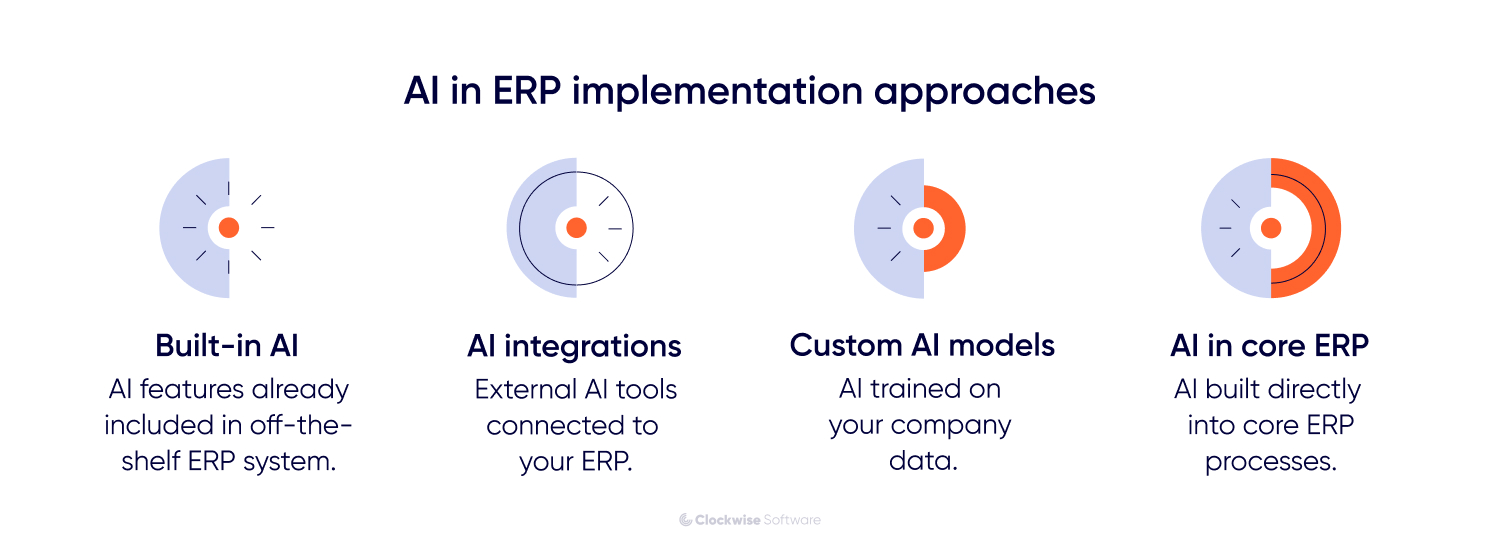
Below are the most common implementation approaches we see in ERP projects, ordered from lowest to highest complexity.
Many major ERP vendors now include built-in AI features. These usually cover standard use cases such as demand forecasting, recommendations, or basic workflow automation.
In this case, AI is configured rather than built. The functionality is already embedded in the platform, so integration effort is minimal and time to value is short. For many teams, this means weeks instead of months.
This approach works well when your requirements align closely with what the vendor already supports. If the use case is standard and doesn’t require deep customization, built-in AI and machine learning in ERP can be a practical starting point.
The limitation is flexibility. Off-the-shelf AI features are designed for broad applicability, not for highly specific workflows or complex data nuances. As ERP processes become more specific, these capabilities often reach a ceiling. Deeper adaptation usually requires custom integration.
For many ERP projects, this is the most practical starting point for AI software development.
In this model, pretrained AI services, such as language models or predictive APIs (integration with an ML model pretrained for forecasting), are connected to the ERP through backend integrations. Custom logic controls when AI is triggered, how ERP data is prepared, and how results are returned to users inside the existing interface.
AI integration in ERP systems works well for clearly defined use cases such as anomaly detection, document or transaction analysis, natural-language access to ERP data, and lightweight forecasting or recommendation features.
It’s fast to implement and doesn’t require heavy data preparation. The trade-off is depth. Since the models aren’t deeply tailored to your specific ERP data, accuracy and control may be limited for more complex or decision-critical workflows.
When out-of-the-box generative AI in ERP doesn't deliver enough accuracy, the next step is to adapt them to your environment.
In this setup, pretrained models are adjusted using ERP-specific data. That can involve fine-tuning, embedding-based search, or retrieval layers that connect the model directly to structured ERP records. The goal is to make AI behavior reflect your terminology, business rules, and historical patterns instead of relying on generic training.
It makes sense when accuracy directly affects business outcomes, when ERP data is large and well-structured, or when AI is used in high-frequency or decision-critical workflows.
The trade-off is clear. You invest more upfront in data preparation and integration, but you gain better reliability and more predictable behavior over time.
In some ERP environments, AI moves beyond supporting workflows and becomes part of the system’s core logic.
At this level, custom predictive or classification models are trained on large, domain-specific datasets. These models are integrated directly into planning, optimization, or decision engines inside the ERP. Instead of assisting with isolated tasks, they influence how the system calculates forecasts, allocates resources, or prioritizes actions.
It only makes sense when AI is expected to become a core capability of the ERP rather than a supporting feature. Examples include advanced demand forecasting engines, production optimization models, or large-scale predictive analytics that directly affect operational performance.
The upside is depth and control. The trade-off is complexity, cost, and long-term ownership.
In practice, most ERP with AI projects start with API-based integration and evolve toward more tailored models only when value is proven. Heavier approaches make sense only when AI accuracy and automation deliver measurable operational gains.
Let’s talk about investment and resources each approach requires.
The cost and timeline of implementation for AI in ERP depend on the level of customization, data readiness, and integration complexity. Below is a simplified overview based on typical project scopes.
Off-the-shelf AI features are usually included in platform licensing or available as add-ons, which keeps initial investment predictable and time to value short. In most cases, implementation takes a few weeks.
API-based AI integrations typically range from $5,000 to $30,000, with implementation timelines of 1 to 3 months depending on scope. These projects require moderate integration effort but do not involve building models from scratch.
Fine-tuned or data-grounded models usually require $20,000 to $80,000 and take 3 to 6 months to implement. The effort is driven by data preparation, model adaptation, and tighter integration with ERP workflows.
More advanced AI capabilities, where models become part of core ERP logic, typically start at $100,000 and often require more than 6 months to develop. These projects involve significant infrastructure, model development, and long-term maintenance considerations.
But where to start without committing to unnecessary complexity? We have an answer.
Not every AI initiative in ERP needs a six-figure budget or a six-month roadmap. In fact, some of the most useful improvements come from fixing small but painful workflow gaps.
Think about the tasks your team repeats every day. Matching documents. Reviewing reports. Digging through data to answer simple questions. These are narrow problems. But they add up.
AI works well in these moments. It reduces manual back-and-forth, speeds up routine analysis, and surfaces issues earlier. You don’t need a massive transformation to see real operational impact.
Below are examples of AI in ERP systems use cases we often see implemented within realistic budgets and timelines.
Matching purchase orders, invoices, and delivery documents sounds simple until you’re doing it at scale. Small differences in naming, quantities, or formatting quickly turn into hours of manual review for finance teams.
Instead of relying on exact string matches, an AI model compares line items semantically. It can recognize that “15x Chairs” and “Office Chair – Pack of 15” refer to the same product. Only the truly ambiguous cases are flagged for review.
What changes in the ERP
Automatic matching of most PO and invoice line items
Clear confidence scores for each match
Exceptions routed to accountants for review
Most transactions are reconciled automatically, while accountants focus only on edge cases that require judgment.
Budget and timeline
Budget: $15,000–$30,000
Timeline: 1–2 months
Most enterprise systems are packed with useful data, both legacy and cloud-based ERP software. The problem is accessing it. Finding answers often means navigating multiple menus, exporting reports, or waiting on someone from BI. That slows down everyday decisions.
With AI, a language model sits on top of the ERP through a controlled query layer. Instead of building a report, users can ask direct questions in plain language. For example, “Which suppliers caused delivery delays last quarter?” or “Show overdue invoices above $50K.” The system translates the request into structured queries and returns the relevant data.
What changes in the ERP
Faster access to insights without building custom reports
Reduced reliance on BI specialists for routine questions
More consistent use of ERP data across teams
This doesn’t replace reporting tools. It simply lowers the barrier to accessing information that already exists.
Budget and timeline
Budget: $20,000–$40,000
Timeline: 1–3 months
In many ERP environments, problems are discovered after they’ve already caused damage. A delay shows up in a report. A cost overrun appears at month-end. A compliance issue surfaces during review.
AI shifts that timeline forward. Instead of waiting for reports, models continuously monitor ERP data streams and look for deviations from normal patterns. That might mean unusual spending, unexpected production slowdowns, or inventory behavior that doesn’t match historical trends.
What changes in the ERP
Early warnings instead of post-factum reports
Fewer manual control checks
Faster root-cause analysis
The value isn’t just detection. It’s timing. Teams see potential issues earlier, when there’s still room to act.
Budget and timeline
Budget: $25,000–$50,000
Timeline: 2–3 months
All of these examples focus on well-defined workflows and use existing ERP data. They don’t require heavy model training or complex infrastructure.
Most importantly, they can be implemented incrementally and validated quickly. That makes them a practical starting point for adding AI into ERP systems without committing to a large-scale transformation.
Regardless of scope, introducing AI into ERP systems follows a similar pattern.
ERP platforms run core business processes and handle sensitive data across multiple integrations. AI needs to be introduced carefully. The goal is improvement without disrupting workflows or increasing operational risk.
Here’s the approach we typically follow when building ERP with AI.
The first step is not choosing a model. It is identifying where AI can realistically improve outcomes. This stage is basically software product discovery phase during which we:
Analyze current ERP workflows and bottlenecks \
Identify processes with high manual effort, data volume, or error rates \
Assess where faster decisions or predictions would create measurable value
In ERP contexts, good AI use cases are usually narrow and well-defined. Broad, vague goals tend to increase cost without clear returns.
ERP systems contain large datasets, but not all of them are suitable for AI out of the box. Here we evaluate:
Which data sources are available and reliable
Data quality, volume, structure, and historical depth
Dependencies on other systems, such as CRM, WMS, or external data feeds
Security, access control, and compliance constraints
This step often determines which AI approach is realistic. In many cases, data readiness, not model choice, is the limiting factor.
Once the use case and data are clear, the next question is how complex the AI actually needs to be.
In some cases, a simple API integration is enough. In others, the model needs to be grounded in ERP data or fine-tuned for higher accuracy. And if the workflow is decision-critical, a custom model may be justified.
The key is not choosing the most advanced option. It’s choosing the one that fits your ERP architecture, performance limits, and risk tolerance.
The outcome of this step should be simple: a clear technical direction with defined scope, timeline, and budget.
Before integrating AI into the live ERP environment, we validate the approach through a focused proof of concept.
In ERP with AI projects, that usually means working with real data, or realistic samples, and testing the solution in an isolated or limited environment. The goal is to confirm that accuracy, performance, and integration logic hold up under real conditions.
This step protects the system and the budget. It helps avoid committing to an approach that looks promising in theory but doesn’t deliver enough value in practice.
By the end, either the approach is validated and ready for production development, or we refine and iterate before moving forward.
Once validated, the AI functionality is integrated into the ERP system. This includes:
Backend integration and orchestration
UI adjustments so AI outputs fit existing workflows and the feature feels like a natural part of your ERP
Access control, logging, and monitoring
Fallback logic to ensure system stability
At this stage, the priority is reliability. AI should enhance the ERP, not disrupt it.
After release, the work doesn’t stop. AI behavior needs to be monitored in real usage.
We look at how accurate the outputs are, how the system performs under load, and whether it’s actually improving operational KPIs. Edge cases and failure patterns are especially important. They show where the model needs adjustment.
Based on real usage, the solution can be refined, expanded to nearby workflows, or scaled more broadly across the ERP.
The goal is building a stable foundation for incremental AI adoption over time.
Our process is designed to respect the realities of ERP platforms:
Large data volumes
Strict security and compliance requirements
Complex integrations
Low tolerance for operational disruption
By validating value early and scaling gradually, AI can be introduced into ERP systems at different SDLC stages as a controlled, predictable capability rather than a risky transformation.
Even with a structured rollout, AI introduces new considerations that shouldn’t be ignored.
AI can significantly improve ERP systems, but it also introduces new constraints. Most challenges do not come from the models themselves, but from how AI interacts with data, processes, and operational risk inside enterprise platforms.
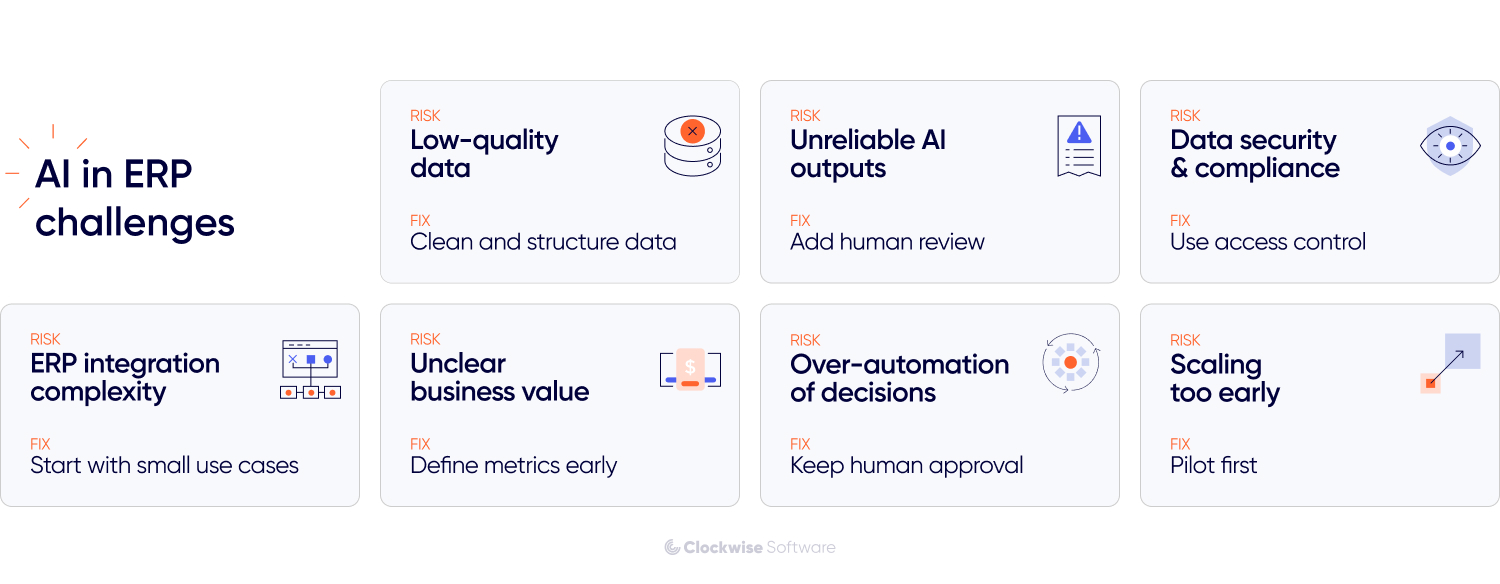
ERP platforms often contain years of historical data across multiple modules and integrations. That data is rarely perfectly structured or aligned. AI doesn’t fix inconsistencies. It exposes them. If data quality is weak, outputs become unreliable and trust erodes quickly. The safest approach is to start with narrow use cases and well-defined datasets, then expand as data pipelines are validated.
ERP systems handle sensitive financial and operational information. Adding AI introduces additional processing layers and, in some cases, external services. Access control and data boundaries must remain consistent with existing security policies. AI components should follow the same permission model as the rest of the system.
ERP rarely operates in isolation. It connects to CRM, WMS, HR systems, and third-party services. AI features that ignore these dependencies can disrupt workflows or create mismatches between systems. Integration needs to be designed as part of the overall architecture, not as an isolated enhancement.
Users depend on predictable ERP system behavior. If AI outputs feel inconsistent or opaque, adoption drops and teams revert to manual processes. Where possible, surface confidence indicators and keep human review in decision-critical workflows.
Not every process benefits from automation. Over-automating unstable workflows can increase errors instead of reducing them. AI also introduces ongoing infrastructure and monitoring costs. Clear usage tracking and phased rollout help prevent small initiatives from turning into uncontrolled expenses.
In practice, this also means carefully evaluating where AI adds value and where it doesn’t. We help teams assess risks, identify suitable use cases, and avoid introducing AI into workflows where it would add unnecessary complexity.
The ERP systems that benefit most from AI treat it as an incremental capability. Start with contained use cases. Validate impact. Expand where value is measurable.
AI works best in ERP when it strengthens the system without disrupting the foundation it depends on.
AI is becoming a practical extension of modern ERP systems. Not because it’s new, but because operational scale and data complexity have outgrown static rules and manual review.
In ERP environments, value comes from focused use cases, realistic implementation choices, and careful integration into existing workflows. The teams that succeed start small, validate impact, and scale only where results are measurable.
If you’re evaluating AI for ERP, the next step is clarity. We help teams assess feasibility, design practical solutions, and integrate AI into ERP systems without disrupting the foundation they depend on.


![AI in ERP: Implementation Guide [Scope, Budget & Risks]](/img/blog/ai-in-erp/header-background-mid.webp)