
Any questions unanswered?
Let's discuss them


Over the past 10 years, our SaaS development firm has delivered 25+ SaaS solutions across multiple industries. Moreover, we back up each client's data, and over time, we have developed a recovery strategy that consistently proves itself in real-world conditions.
Want to know what it really takes to keep your SaaS data safe and recoverable when it matters most?
Here, we will share practical insights for SaaS data recovery that have proven effective in our projects, and provide a real-world example.
SaaS data recovery and backup is the process of saving your cloud app data in trusted locations so you can restore it quickly if something goes wrong. It gives you constant copies of your files, settings, and user data so you always know where everything lives and how to get it back.
This matters for SaaS because you store your data on a third-party cloud platform, so you need a solid safety net of your own. It also keeps your team moving without downtime, lost work, or chaos.
When you’ve been building SaaS products for a decade, you see one truth clearly: data protection is mission-critical. If you skip strong recovery and backup practices, you’re gambling with your roadmap, your budget, and your users’ trust.
Below are the strategies that we’ve seen work again and again, tuned for both tech teams and business decision-makers.
Before you even write your first backup script, you need the SaaS app architecture to support recovery and resilience. Your team should design storage layers, services, and data flows with recovery in mind.
Separation of concerns: Use distinct layers for web, API, business logic, and persistence. That way, you can isolate failures and recover faster.
Redundancy built in: Have redundant zones or regions so that a data center outage doesn’t take your service down. Choose infrastructure that scales horizontally so you can absorb failures without a full shutdown.
Define failure domains: Know exactly what could fail, how much business damage it causes, and what you’ll do when it happens. Include these scenarios in your planning. At Clockwise, we avoid hidden single points of failure by reviewing architecture diagrams every quarter and validating them against real incidents.
From a business standpoint, this means fewer surprises, fewer emergency developers’ hours, and more predictable budgeting. If the architecture supports quick recovery, your team spends less time firefighting and more time improving a product.
Before choosing any backup strategy, you need to define two numbers:
RPO (Recovery Point Objective) - How much data can you lose if something goes wrong?
RTO (Recovery Time Objective) - How long can your system be unavailable during recovery?
Once you know these limits, it becomes clear which backup methods fit your needs. For example, if your RPO is 5 minutes but you back up only once an hour, that setup will not protect you.
From here, we’ll walk you through the layered approach we use to keep data safe.
High availability, or HA, isn't technically a backup strategy, but your first line of defense against data loss. This layer uses synchronous replication to maintain an identical copy of your database in a separate physical location, typically within the same region but in a different availability zone. When your primary database fails, the standby automatically takes over, often so quickly that your application doesn't even notice.
RPO: Near zero. Transactions happen on standby instantly.
RTO: Seconds to minutes. Failover is automatic.
This layer prevents the need for backup restoration in the first place. Most database failures are hardware-related or occur within a single data center. High availability handles these gracefully without requiring you to restore from backup, which means your users experience minimal disruption.
With HA in place, you rarely need to restore from backups after a server crash or single-zone outage. With built-in support from major clouds (AWS Multi-AZ, Aurora, Google Cloud SQL/Spanner, Azure SQL/PostgreSQL), HA is often your first and cheapest line of defense.
HA won’t save you from logical problems: broken migrations, destructive queries, accidental data corruption. Point-in-time recovery involves continuous streaming of transaction logs to durable storage as changes occur. When you need to recover, you can roll back your database to any moment in time, even seconds before the error.
RPO: Typically 1–5 minutes: you lose only a few minutes of data at worst.
RTO: 15–60 minutes, depending on log size and database size.
You get full consistency and the ability to restore exactly where you need. Most cloud providers support PITR (AWS RDS, Google Cloud SQL, Azure) and make it easy to set up with minimal overhead.
Snapshots capture your whole database at a moment in time. Modern cloud snapshots are incremental at the storage block level. They’re fast, efficient, and cheaper than traditional full backups.
RPO: Up to 24 hours (if you take them daily, you can take them more often if needed).
RTO: Typically 10–30 minutes.
Use snapshots when you need a quick full-state copy, for example, to restore a database from “yesterday,” spin up a testing environment, or debug a problem without touching production. Cloud snapshot tools are incremental and often storage-block based, which keeps storage costs and time low.
This is your compliance and “what if we need data in five years” layer. Here, you export data from the database to portable formats (such as SQL dumps or Parquet files) and store them in cold storage optimized for low cost and long-term retention.
RPO: usually up to 7 days (assuming weekly exports).
RTO: hours to days, depending on archive size and retrieval speed.
This layer protects you if issues go undetected for weeks or months, if backups get corrupted, or if you migrate away from your original database engine. Cold-storage archives with immutable options also help meet compliance and legal requirements.
By building this into your process, you reduce downtime, avoid unexpected budget overruns during disasters, and earn customer trust by showing you’re prepared.
Having backups and versioning is great, but you also need to detect problems early so you can act before users are impacted.
Track data metrics: Watch for lagging replication, sudden growth in storage, or abnormal change-rates.
Alert when thresholds break: If something weird happens, e.g., multiple failed writes, long backup times, or missing logs, your team should be notified immediately.
Predictive visibility: Monitoring gives you data to justify spending. If you notice backups taking longer or storage costs steepening, you can raise the budget or redesign before something breaks.
Good monitoring means you avoid reactive spending, you stay ahead in operations, and you maintain business continuity.
You might have the best backup system, but if your team doesn’t know how to use it under pressure, you’re exposed.
Conduct regular maintenance drills: simulate failures and walk through the recovery process end to end. Time it, assign roles, identify bottlenecks.
After each drill, update your recovery documentation. What took too long? What manual step needs automation? What permission slowed things down?
Train your team: Everyone in the chain, from DevOps to leads, should understand the recovery plan, their role in it, and the business impact of recovery time objectives. Based on our experience, pairing new engineers with senior staff during drills drastically reduces confusion during a real incident.
When the team is practice-driven, and the process is smooth, you reduce downtime, limit budget shocks, and maintain credibility with customers.
One of the most overlooked areas is how you test your backup and recovery process without risking live data.
Separate development, staging, and production environments: Use copies of production data in lower environments so you can test migrations, backups, and restores without impact.
Use the same backup tooling: Practice on the staging environment using the same workflows you’ll use in production. If your staging restore takes hours and manual steps, the production one will too.
Fail-forward mindset: Treat every test as a learning opportunity rather than a pass/fail. Each attempt refines the strategy, clarifies the budget, and improves your timeline estimates.
By running your backups and restores in safe mode, you lower risk, gather metrics for decision-making, and avoid surprises when the real incident hits.
By following these practices, you’ll be ready for whatever comes your way, and your technical choices will support your business ambitions rather than hinder them.
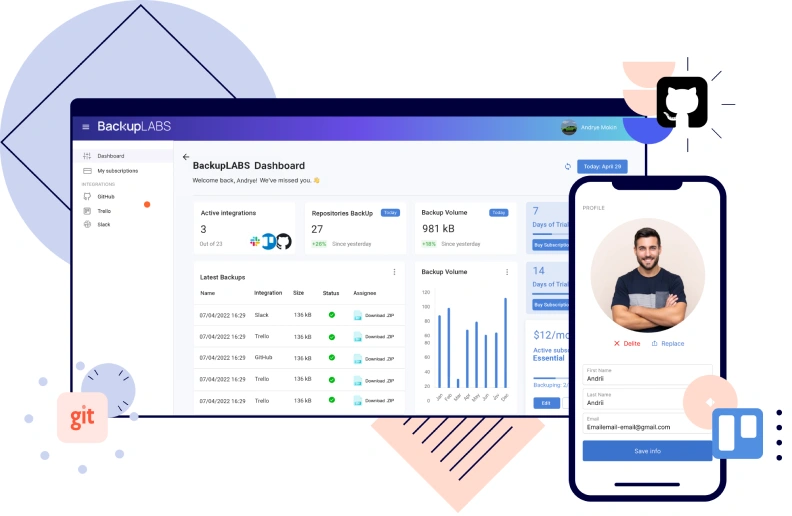
Here is an example of how we designed and built a backup app capable of handling millions of assets. Working with BackupLABS, we created a platform that can reliably process and protect data at scale.
Our client had an operational business helping clients back up their data using a third-party solution that limited what he could offer. We helped him replace it with a platform designed for reliability, scalability, and future growth. Today, it processes and protects more than 4.5 million assets across multiple services.
The client’s previous tool fell short on several fronts:
These are the exact pain points you see in SaaS backup workflows when design and architecture don’t keep pace with data scale and service diversity. We proposed a new platform that would deliver both backup and recovery as first-class citizens.
Our architectural foundation began with validating extraction, structuring, and full-restore workflows. On the backend, we selected a serverless design based on AWS Lambda, Step Functions, SQS, and DocumentDB. Storage uses AWS S3 with encryption managed by AWS KMS, so that user data is securely isolated and recoverable at any time, ensuring its integrity. This approach scales smoothly whether a user has tens, thousands, or millions of items without compromising performance.
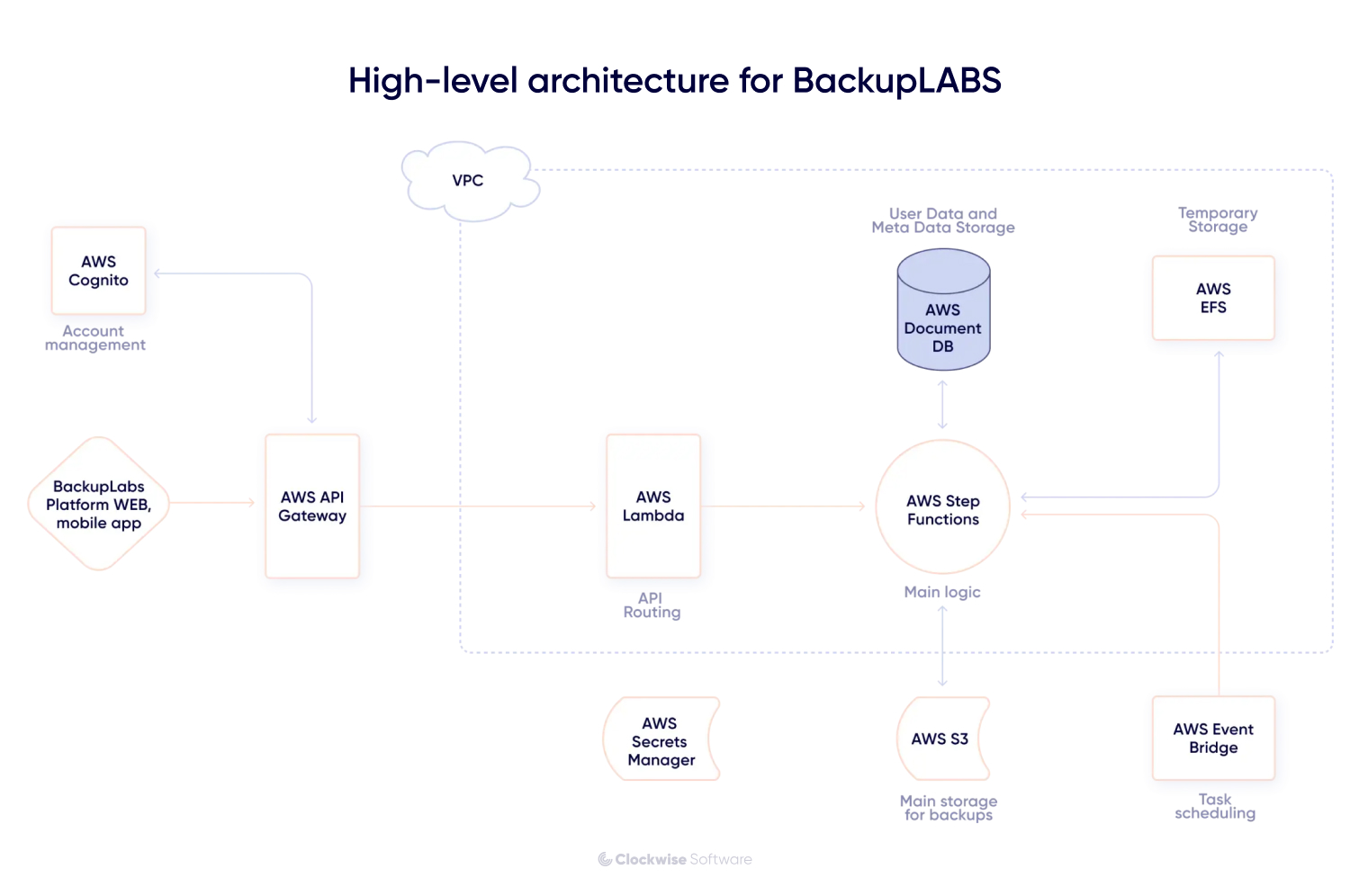
In this project, reliable restoration was a core requirement. We built workflows that map how items connect to each other, keep track of referenced materials such as issues, attachments, and comments, and support complete return-to-service restoration.
Our data collection relied on 2 complementary techniques. We gathered items one by one to preserve accuracy, and we created full-package snapshots for sections where a combined capture was more reliable. Using both techniques allowed us to handle different data types while keeping every component fully recoverable. For parts of the system that produced structured exports, we transformed the data into organized JSON, stored it in encrypted folders, and reconstructed the full environment from those files during recovery.
The platform includes user interfaces that allow end users to monitor their backup stories, initiate restores, and view statuses. On the business side, the client has full visibility into user volumes, storage usage, and system health.
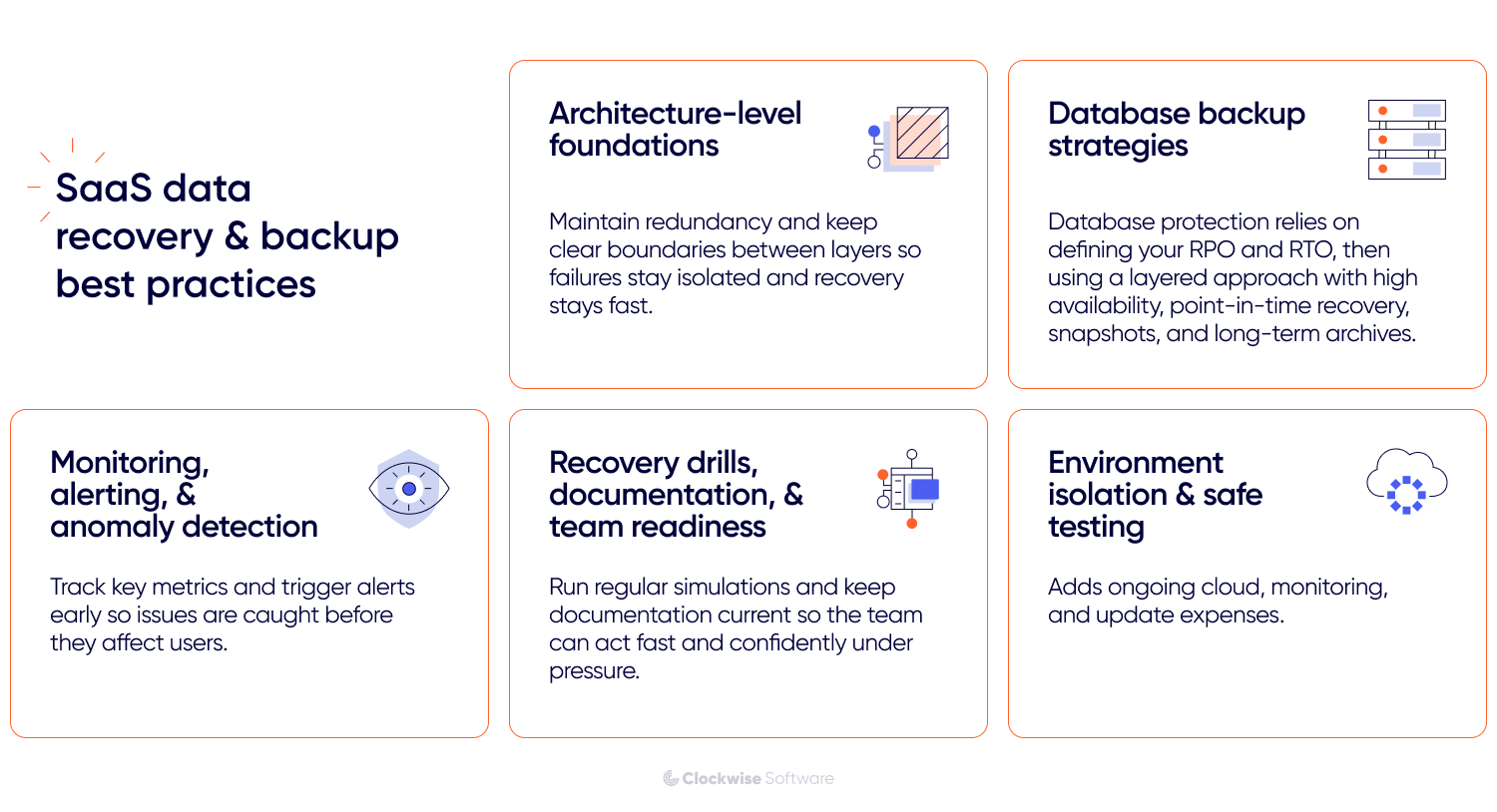
Strong SaaS data recovery depends on a few proven pillars:
These pillars work together to keep your product stable and recoverable. We have applied these strategies across dozens of real projects. We have tested them, refined them, and seen them hold up under pressure. If you want a SaaS product that stays reliable when it matters most, our team knows how to build it.